keyd
keyd: A focused, free Linux remapper for layers, overloaded keys, and per-app layouts. Ranked #55 of 105 in Keyboard and Mouse Customization Software by our editors (5.3/10); pricing: Free plan; best for linux users needing system-wide keyboard layers.
At a glance
- Editor score5.3 / 10
- PricingFree plan
- Best forLinux users needing system-wide keyboard layers
- Free planYes
- Paid fromFree
- Supported operating systemsLinux
- Facts checked20 Sep 2026
Where it wins
- Supports system-wide layers and tap-versus-hold key behavior
- Offers keyboard-specific and application-specific remapping
- Works with X11, Sway, and GNOME Wayland
Where it doesn't
- Supports Linux only
- Focuses on keyboards rather than mouse customization
- Requires configuration beyond a typical graphical remapping tool
Our verdict on keyd
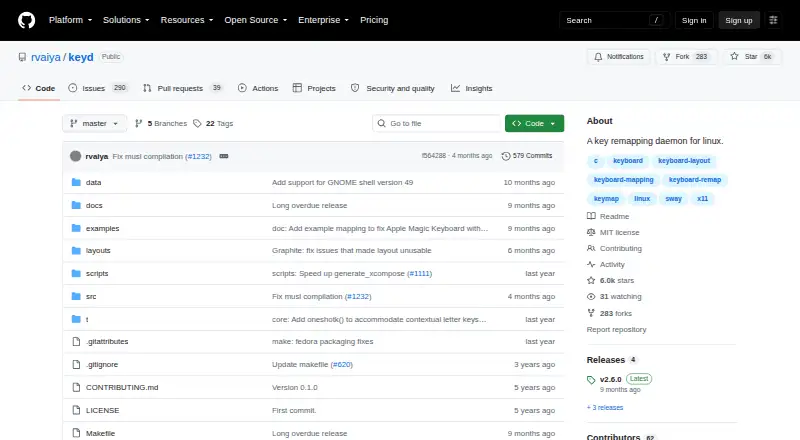
keyd is an open-source Linux daemon for system-wide keyboard remapping. It is designed for Linux users who want custom layouts, different modifier behavior, or separate mappings across multiple keyboards. The feature set covers configurable keyboard layers, tap-versus-hold key overloading, keyboard-specific configuration, application-specific remapping, Unicode input, and instantaneous changes without firmware flashing. Its client-server model with IPC also supports a system-level approach rather than tying remapping exclusively to a graphical display server.
The main strength is depth in keyboard behavior. Layers can support alternate layouts, while tap-versus-hold overloading lets one key perform different actions based on how it is used. Application-specific remapping is useful when a layout needs to change between programs, and keyboard-specific configuration helps distinguish multiple connected keyboards. Integrations with X11, Sway, and GNOME Wayland extend its fit across Linux desktop and compositor environments. Users who need keyboard-focused control without firmware flashing have a broad set of behaviors to configure.
keyd is available as open-source software with a free plan, so its appeal is strongest for Linux users who are comfortable managing configuration and want system-wide keyboard control without a paid tier. It is not a general-purpose keyboard-and-mouse suite: the documented focus is keyboard remapping, and the supported platform is Linux. Choose keyd for layers, per-application mappings, Unicode input, and tap-versus-hold behavior at the system level. Choose another category tool if mouse controls or broader cross-platform customization are central requirements.
Your product? Our editors can test keyd in depth and publish a review, labelled as paid · from $149/mo →
keyd pricing
keyd fact sheet
| Free plan | Yes |
|---|---|
| Paid from | Free |
| Supported operating systems | Linux |
| Macro support | Yes |
| Per-app profiles | Yes |
| Onboard device memory | Not verified |
| Polling rate control | Not verified |
| Sensitivity controls | Not verified |
| Profile slots | Not verified |
| Deployment | Desktop |
| Platforms | Linux |
| Integrations | 3 integrations: X11, Sway, GNOME Wayland |
| Pricing | Free plan |
| Website | github.com |
| Facts checked | 20 Sep 2026 |
keyd integrations
keyd lists 3 integrations on its own site.
- X11
- Sway
- GNOME Wayland
Alternatives to keyd
- Razer SynapseA free Razer-focused hub for remapping, macros, profiles, and Chroma lighting.9.2
- Logi Options+A broad free toolkit for remapping, automation, profiles, and multi-computer control.9.1
- Logitech G HUBA free desktop suite for Logitech G lighting, profiles, and device settings.9.0



Used keyd? Be the first to review it
The editor score above is our own research. What this page doesn't have yet is a reader's view — what you used keyd for, what worked and what didn't. No stars are seeded and no review is paid for; an editor reads every one before it appears.
Write a reviewTwo minutes · verified accounts only · read by an editor before it appears
Featured on iTechGuides

keyd is listed in our Keyboard and Mouse Customization Software directory. Add the badge to your site — it links back to this page.
<a href="https://www.itechguides.com/products/keyd/"><img src="https://www.itechguides.com/best/badge/keyd.svg" alt="Featured on iTechGuides" width="230" height="46"></a>
Reviewed by iTechGuides Editors · Editorial team · Updated Oct 2026
Advertiser disclosure: iTechGuides is reader-supported. Vendors can pay for top positions in our rankings and for a place on other products' pages, and we may earn a commission when you click some links. Bought places stand at the number bought; this page and our disclosure say so. Paying vendors may get a fuller, more detailed review from our editors, and that review can change their score. How we rank.
Last updated · How we research and update