
Keyboard Maestro
Keyboard Maestro: A deep Mac automation tool for complex keyboard workflows, not dedicated mouse tuning. Ranked #34 of 105 in Keyboard and Mouse Customization Software by our editors (5.3/10); pricing: Paid; best for mac users building complex keyboard workflows.
At a glance
- Editor score5.3 / 10
- PricingPaid
- Best forMac users building complex keyboard workflows
- Free planNo
- Paid from$36 one-time
- Supported operating systemsMacos
- Founded1995 · Perth, Western Australia
- Facts checked20 Sep 2026
Where it wins
- Supports application- and window-specific macro groups
- Combines many triggers with scripts, clipboard tools, and automation actions
- Includes macro debugging and Stream Deck control
Where it doesn't
- Runs on macOS only
- Paid product with a $36 one-time license
- Not focused on dedicated mouse hardware configuration
Our verdict on Keyboard Maestro
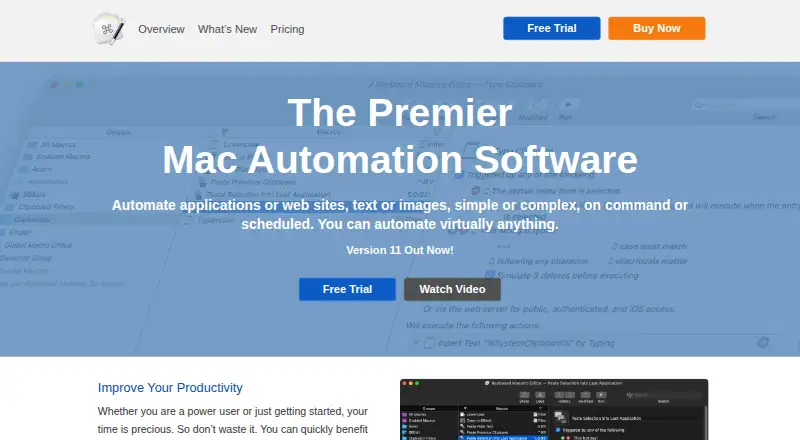
Keyboard Maestro is macOS automation software from Stairways Software for people who want to create and run detailed macros across applications, windows, websites, files, text, images, and scheduled workflows. It suits Mac users building complex keyboard workflows, especially those who need more than simple hot-key remapping. Macro groups can be limited to specific applications or windows, while triggers include hot keys, typed strings, application events, time, devices, URLs, and other system events.
The published plan is straightforward: Keyboard Maestro 11 costs $36 USD as a one-time, per-user license. That license covers version 11 indefinitely and allows use on up to five Macs. There is no free plan. The paid product includes the full macro environment, including clipboard history, unlimited named clipboards, application and window controls, text, image, file, and web automation actions, plus AppleScript, shell script, and JavaScript execution. For buyers who prefer a single purchase over recurring billing, the plan structure is easy to understand.
Its strongest fit is keyboard-centered Mac automation rather than hardware customization. Integrations and ecosystem connections include Safari, Google Chrome, Dropbox or other file-sharing systems, AppleScript, shell scripts, JavaScript, Stream Deck, and MIDI. The macro debugger adds a useful control point for workflows that span multiple actions. However, Keyboard Maestro should not be the first choice for buyers seeking dedicated mouse configuration, pointer sensitivity, polling-rate controls, device memory, or hardware profile slots. Choose it for broad, scriptable Mac workflows; choose a more hardware-focused tool for mouse and peripheral tuning.
Your product? Our editors can test Keyboard Maestro in depth and publish a review, labelled as paid · from $149/mo →
Keyboard Maestro pricing
All 1 Keyboard Maestro plans and prices →
Keyboard Maestro fact sheet
| Free plan | No |
|---|---|
| Paid from | $36 one-time |
| Supported operating systems | Macos |
| Macro support | Yes |
| Per-app profiles | Yes |
| Onboard device memory | Not verified |
| Polling rate control | Not verified |
| Sensitivity controls | Not verified |
| Profile slots | Not verified |
| Deployment | Desktop |
| Platforms | macOS |
| Integrations | 8 integrations: Safari, Google Chrome, Dropbox or other file-sharing systems, AppleScript, shell scripts, JavaScript … |
| Pricing | Paid (source) |
| Website | keyboardmaestro.com |
| Facts checked | 20 Sep 2026 |
Keyboard Maestro integrations
Keyboard Maestro lists 8 integrations on its own site.
- Safari
- Google Chrome
- Dropbox or other file-sharing systems
- AppleScript
- shell scripts
- JavaScript
- Stream Deck
- MIDI
Alternatives to Keyboard Maestro
- Razer SynapseA free Razer-focused hub for remapping, macros, profiles, and Chroma lighting.9.2
- Logi Options+A broad free toolkit for remapping, automation, profiles, and multi-computer control.9.1
- Logitech G HUBA free desktop suite for Logitech G lighting, profiles, and device settings.9.0



See all Keyboard Maestro alternatives →
Also Ranked In
Keyboard Maestro is ranked in 2 of our directories.
Used Keyboard Maestro? Be the first to review it
The editor score above is our own research. What this page doesn't have yet is a reader's view — what you used Keyboard Maestro for, what worked and what didn't. No stars are seeded and no review is paid for; an editor reads every one before it appears.
Write a reviewTwo minutes · verified accounts only · read by an editor before it appears
Featured on iTechGuides

Keyboard Maestro is listed in our Keyboard and Mouse Customization Software directory. Add the badge to your site — it links back to this page.
<a href="https://www.itechguides.com/products/keyboard-maestro/"><img src="https://www.itechguides.com/best/badge/keyboard-maestro.svg" alt="Featured on iTechGuides" width="230" height="46"></a>
Reviewed by iTechGuides Editors · Editorial team · Updated Oct 2026
Advertiser disclosure: iTechGuides is reader-supported. Vendors can pay for top positions in our rankings and for a place on other products' pages, and we may earn a commission when you click some links. Bought places stand at the number bought; this page and our disclosure say so. Paying vendors may get a fuller, more detailed review from our editors, and that review can change their score. How we rank.
Last updated · How we research and update