
KeePass
KeePass: A flexible local vault for technical users who value control and extensibility. Ranked #89 of 90 in Password Managers by our editors (5.2/10); pricing: Free plan; best for technical users wanting extensible free vaults.
At a glance
- Editor score5.2 / 10
- PricingFree plan
- Best forTechnical users wanting extensible free vaults
- Free planYes
- Paid fromFree
- Passkey supportYes
- Facts checked14 Sep 2026
Where it wins
- Encrypted databases support AES, ChaCha20 and Twofish.
- Plugins, synchronization and import/export extend the core vault.
- Groups, Auto-Type, key files and password generation support daily use.
Where it doesn't
- Verified platform coverage is limited to Windows, Linux and macOS.
- Business administration features are not included.
- Passkey support for KeePass 2.x depends on plugins.
Our verdict on KeePass
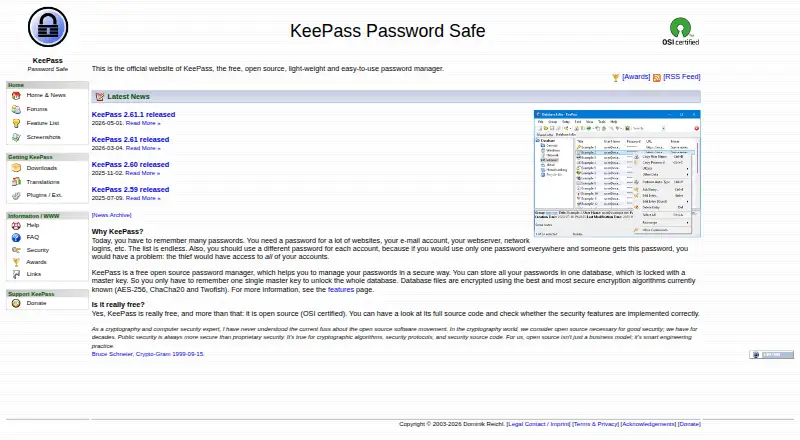
KeePass is a free, open-source password manager that stores credentials in encrypted database files. It is suited to technical users who want local control, detailed organization and the ability to adapt the application through plugins. The software supports KeePass 1.x and 2.x editions, with KeePass 2.x as the actively developed edition. Core capabilities include password generation, search, nested groups, Auto-Type, global hotkeys, drag-and-drop entry transfer and timed clipboard clearing. Database synchronization works across files and URLs, and shared database editing supports multiple users.
KeePass has one plan: Free and open source. The plan includes both the 1.x and 2.x editions, an open-source GPL license and portable installation. There are no paid tiers to compare. The published offering centers on encrypted local databases rather than a vendor-hosted subscription. Synchronization and storage workflows can connect with Dropbox, Microsoft OneDrive, Google Drive, FTP, HTTP, HTTPS and WebDAV. Import and export support covers many file formats, while master passwords, key files and Windows user-account key sources provide several ways to protect database access.
KeePass is less suitable for organizations seeking built-in business administration, since business admin features are not included. Verified platform coverage is limited to Windows, Linux and macOS, while mobile and browser applications are contributed ports rather than the core application. Passkey support for KeePass 2.x is available through plugins, so it is not presented as a standalone core feature. Choose an alternative if you want a centrally managed business service or a primary mobile and browser experience; choose KeePass if local encrypted files, shared editing and an extensible plugin architecture matter more.
Your product? Our editors can test KeePass in depth and publish a review, labelled as paid · from $149/mo →
KeePass pricing
KeePass fact sheet
| Free plan | Yes |
|---|---|
| Paid from | Free |
| Passkey support | Yes |
| Secure sharing | Yes |
| Business admin controls | No |
| Supported platforms | windows, linux, macos |
| Family plan | Not verified |
| Passwordless account login | Not verified |
| Pricing | Free plan |
| Website | keepass.info |
| Facts checked | 14 Sep 2026 |
Alternatives to KeePass
- Proton PassA broad free password manager with passkeys, sharing, and apps across major platforms.9.4
- 1PasswordBroad vault, passkey, sharing, and administration features, with no free plan.9.2
- NordPassA broad password manager with a capable free plan and clear business tiers.9.0


See all KeePass alternatives →
Used KeePass? Be the first to review it
The editor score above is our own research. What this page doesn't have yet is a reader's view — what you used KeePass for, what worked and what didn't. No stars are seeded and no review is paid for; an editor reads every one before it appears.
Write a reviewTwo minutes · verified accounts only · read by an editor before it appears
Featured on iTechGuides

KeePass is listed in our Password Managers directory. Add the badge to your site — it links back to this page.
<a href="https://www.itechguides.com/products/keepass/"><img src="https://www.itechguides.com/best/badge/keepass.svg" alt="Featured on iTechGuides" width="230" height="46"></a>
Reviewed by iTechGuides Editors · Editorial team · Updated Sep 2026
Advertiser disclosure: iTechGuides is reader-supported. Vendors can pay for top positions in our rankings and for a place on other products' pages, and we may earn a commission when you click some links. Bought places stand at the number bought; this page and our disclosure say so. Paying vendors may get a fuller, more detailed review from our editors, and that review can change their score. How we rank.
Last updated · How we research and update