JTrac
JTrac: A configurable self-hosted tracker for teams that need control over project fields and workflows. Ranked #37 of 41 in Issue Tracking Software by our editors (5.5/10); pricing: Open source; best for self-hosted teams needing configurable fields.
At a glance
- Editor score5.5 / 10
- PricingOpen source
- Best forSelf-hosted teams needing configurable fields
- Paid fromFree
- Custom workflowsYes
- Facts checked21 Sep 2026
Where it wins
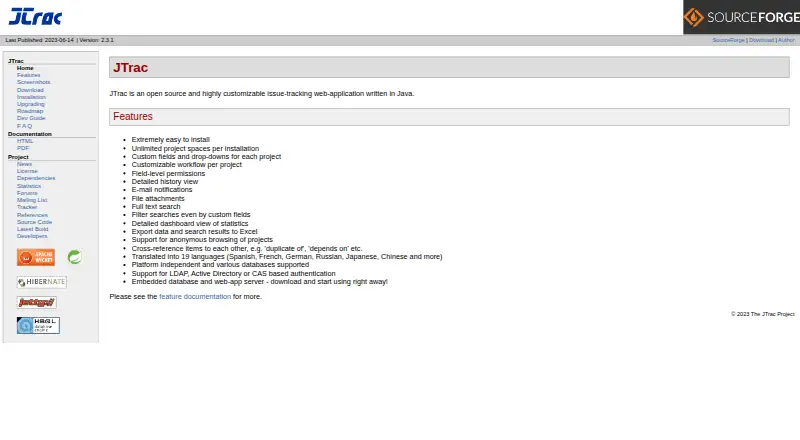
- Custom fields, drop-downs, workflows, roles, and field-level permissions
- Search, dashboards, history, attachments, exports, and cross-referencing
- Supports LDAP, Active Directory, CAS, SMTP, and Subversion integrations
Where it doesn't
- No built-in automation for issue workflows
- No roadmaps or time-tracking features
- Self-hosted deployment requires managing the web application environment
Our verdict on JTrac
JTrac is an open-source, Java-based web application for tracking bugs, tasks, action items, and other structured work items. It is designed for teams that want to manage their own issue-tracking environment and tailor project behavior rather than adopt a fixed hosted workflow. Each project can have its own custom fields, drop-downs, workflows, roles, and field-level permissions, making JTrac a practical fit for organizations with distinct tracking requirements across projects. It runs on web, Windows, macOS, and Linux environments through self-hosted deployment.
JTrac’s ecosystem fit centers on established infrastructure rather than a broad integration marketplace. It supports SMTP email for notifications, LDAP, Active Directory, and CAS for authentication, plus Subversion integration. Deployment can use the embedded web server and database or a WAR file in an existing servlet container. That flexibility suits teams with Java or servlet-container experience and existing directory services, while teams seeking a fully managed service may prefer a hosted alternative. Search covers full text and custom fields, and dashboards provide issue statistics for ongoing visibility.
The product’s strongest case is configurable issue management with a narrow, focused feature set. File attachments, detailed item history, Excel export, and cross-referencing support day-to-day tracking and record keeping. However, JTrac does not provide automation, roadmaps, or time tracking, and it does not list an API among its capabilities. Choose it when self-hosting, project-specific workflows, and permission control matter most. Consider an alternative if your team needs automated actions, planning roadmaps, time capture, or broader platform extensibility.
Your product? Our editors can test JTrac in depth and publish a review, labelled as paid · from $149/mo →
JTrac pricing
JTrac fact sheet
| Free plan | Not verified |
|---|---|
| Paid from | Free |
| Custom workflows | Yes |
| Workflow automation | No |
| Roadmaps | No |
| Time tracking | No |
| Single sign-on | Yes |
| Deployment | Self-hosted |
| Deployment | Self-hosted |
| Platforms | Web, Windows, macOS, Linux |
| Support | Community, Docs |
| Built for | Small business, Mid-market (editorial estimate) |
| Integrations | 5 integrations: SMTP email, LDAP, Active Directory, CAS, Subversion |
| Pricing | Open source |
| Website | j-trac.sourceforge.io |
| Facts checked | 21 Sep 2026 |
JTrac integrations
JTrac lists 5 integrations on its own site.
- SMTP email
- LDAP
- Active Directory
- CAS
- Subversion
Alternatives to JTrac
- JiraA mature, broad issue tracker with flexible views, automation, and a free tier.9.4
- YouTrackA value-focused issue tracker with agile planning, helpdesk, automation, and AI.9.2
- OpenProjectA broad open-source workspace for teams combining issue tracking with project planning.9.1



Used JTrac? Be the first to review it
The editor score above is our own research. What this page doesn't have yet is a reader's view — what you used JTrac for, what worked and what didn't. No stars are seeded and no review is paid for; an editor reads every one before it appears.
Write a reviewTwo minutes · verified accounts only · read by an editor before it appears
Featured on iTechGuides

JTrac is listed in our Issue Tracking Software directory. Add the badge to your site — it links back to this page.
<a href="https://www.itechguides.com/products/jtrac/"><img src="https://www.itechguides.com/best/badge/jtrac.svg" alt="Featured on iTechGuides" width="230" height="46"></a>
Reviewed by iTechGuides Editors · Editorial team · Updated Oct 2026
Advertiser disclosure: iTechGuides is reader-supported. Vendors can pay for top positions in our rankings and for a place on other products' pages, and we may earn a commission when you click some links. Bought places stand at the number bought; this page and our disclosure say so. Paying vendors may get a fuller, more detailed review from our editors, and that review can change their score. How we rank.
Last updated · How we research and update