
Joyoshare VidiKit
Joyoshare VidiKit: A paid Windows and macOS toolkit that pairs broad media conversion with recording and repair. Ranked #42 of 74 in Video Converter Software by our editors (4.9/10); pricing: Paid; best for users needing conversion plus recording and repair.
At a glance
- Editor score4.9 / 10
- PricingPaid
- Best forUsers needing conversion plus recording and repair
- Free planNo
- Paid from$39.95/device/yr
- Supported platformsCross-platform
- Facts checked24 Sep 2026
Where it wins
- Converts more than 150 media formats, including 4K video.
- Handles DVD discs, folders and ISO files with batch conversion.
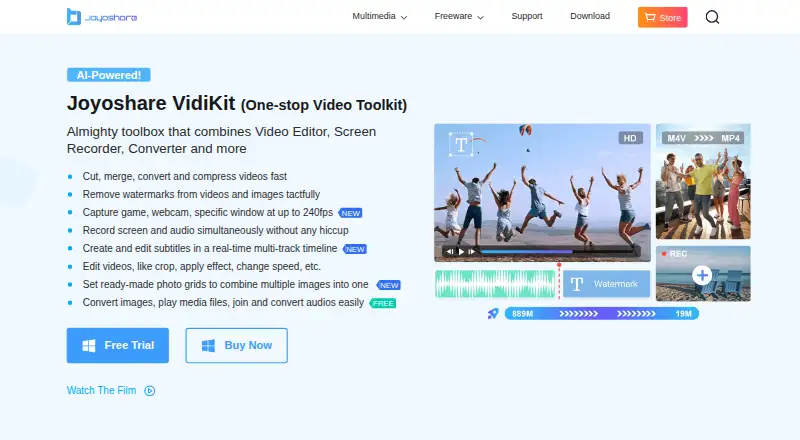
- Combines editing, compression, repair, screen recording and audio capture.
Where it doesn't
- No free plan; licenses start at $15.95 per device per month.
- Each listed license covers one PC.
- The toolset spans several workflows, which may be more than a converter-only need.
Our verdict on Joyoshare VidiKit
Joyoshare VidiKit brings video and DVD conversion together with editing, compression, repair, screen recording and audio capture in a desktop toolkit for Windows and macOS. It is aimed at people who want more than format changes alone, including solo users and small teams working with video, DVDs and audio. The converter supports more than 150 media formats, batch processing and 4K UHD conversion; DVD inputs include discs, folders and ISO files. Recording covers screens, games, webcams and windows, while audio capture can draw from system sound, microphones and external devices.
Its breadth is the main distinction. Alongside conversion, VidiKit includes trimming, merging, cropping, effects and subtitles, plus video and audio repair and batch video compression. Device presets are also part of the converter. A built-in media player and free photo and audio conversion utilities add adjacent tasks, while the paid toolkit unlocks use without watermarks or usage limits, according to the product description. That range suits buyers trying to consolidate conversion and basic media tasks in one desktop product; someone seeking only a straightforward converter may prefer a narrower tool.
Pricing is paid, with three per-device options: the 1-Month Plan is $15.95 per device per month, the 1-Year Plan is $39.95 per device per year, and the Perpetual Plan is $59.95 per device as a one-time payment. Each listed plan covers one PC and includes technical customer support. The monthly plan has a 14-day money-back guarantee and one month of free upgrades; yearly and perpetual plans have a 30-day guarantee, with one year or lifetime free upgrades respectively. All plans auto-renew except the one-time perpetual purchase; auto-renewing plans can be canceled at any time. Choose VidiKit if recording, repair or DVD workflows matter alongside conversion, but compare alternatives if you need a free plan or licenses for more than one PC.
Your product? Our editors can test Joyoshare VidiKit in depth and publish a review, labelled as paid · from $149/mo →
Joyoshare VidiKit pricing
All 3 Joyoshare VidiKit plans and prices →
Joyoshare VidiKit fact sheet
| Free plan | No |
|---|---|
| Paid from | $39.95/device/yr |
| Supported platforms | Cross-platform |
| Output formats | ASF, MOV, M4V, MP4, WMV, MKV, AVI, XviD, DV, MPEG-1, MPEG-2, VOB, 3GP, 3G2, DivX, WebM, FLV, F4V, SWF; audio formats including MP3, FLAC, WAV, AAC, AC3 and M4A |
| Batch conversion | Yes |
| Hardware acceleration | Not verified |
| Maximum output resolution | 4k |
| Audio extraction | Yes |
| Deployment | Desktop |
| Platforms | Windows, macOS |
| Support | Docs |
| Built for | Solo, Small business (editorial estimate) |
| Pricing | Paid (source) |
| Website | joyoshare.com |
| Facts checked | 24 Sep 2026 |
Alternatives to Joyoshare VidiKit
- FFmpegA powerful open-source toolkit for technical media workflows across major desktop platforms.9.4
- HandBrakeA capable free converter for everyday desktop encoding, presets, queues, and disc sources.9.3
- Adobe Media EncoderA deep Adobe-centered encoder for teams managing complex media pipelines.9.2



See all Joyoshare VidiKit alternatives →
Used Joyoshare VidiKit? Be the first to review it
The editor score above is our own research. What this page doesn't have yet is a reader's view — what you used Joyoshare VidiKit for, what worked and what didn't. No stars are seeded and no review is paid for; an editor reads every one before it appears.
Write a reviewTwo minutes · verified accounts only · read by an editor before it appears
Featured on iTechGuides

Joyoshare VidiKit is listed in our Video Converter Software directory. Add the badge to your site — it links back to this page.
<a href="https://www.itechguides.com/products/joyoshare-vidikit/"><img src="https://www.itechguides.com/best/badge/joyoshare-vidikit.svg" alt="Featured on iTechGuides" width="230" height="46"></a>
Guides on video converter software
- The Best Video Converter Apps for Mac in 2026Aug 2026
- 15 Best Video Converter Apps for iPhone in 2024: What Each App Is Actually Best ForAug 2026
- 10 Best Video Converter Apps for Windows 11Aug 2026
Reviewed by iTechGuides Editors · Editorial team · Updated Oct 2026
Advertiser disclosure: iTechGuides is reader-supported. Vendors can pay for top positions in our rankings and for a place on other products' pages, and we may earn a commission when you click some links. Bought places stand at the number bought; this page and our disclosure say so. Paying vendors may get a fuller, more detailed review from our editors, and that review can change their score. How we rank.
Last updated · How we research and update