
Joplin
Joplin: A privacy-focused Markdown notebook that works across desktop, mobile and web. Ranked #6 of 214 in Note-Taking Apps by our editors (8.6/10); pricing: Free plan · 14-day trial; best for open-source, privacy-conscious note takers.
At a glance
- Editor score8.6 / 10
- PricingFree plan · 14-day trial
- Best forOpen-source, privacy-conscious note takers
- Free planYes
- Paid from€2.40/mo
- Offline accessYes
- Facts checked20 Sep 2026
Where it wins
- Open-source, Markdown-based notes with offline-first local access
- End-to-end encrypted synchronisation and multiple storage options
- Broad platform coverage with clipping, publishing and plugins
Where it doesn't
- Collaboration and publishing features depend on Joplin Cloud
- Basic limits notes and attachments to 10 MB
- Advanced storage tiers cost more than the entry plan
Our verdict on Joplin
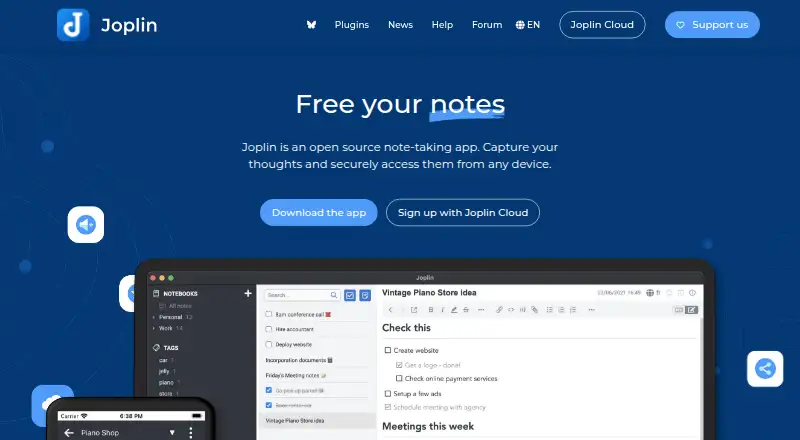
Joplin is an open-source note-taking and to-do application for individuals and teams who want Markdown editing, local access and control over synchronisation. It organises content with notebooks and tags, supports full-text search, and handles images, videos, PDFs and audio. Desktop and mobile apps are available alongside a web app and Chrome extension, while its Web Clipper saves web pages and screenshots. Evernote and Markdown imports support migration into the app.
The free application includes core note-taking features, offline-first access, plugins, themes and an extension API. Joplin Cloud adds paid collaboration and publishing capabilities. Basic costs €2.99 per month when billed monthly or €2.40 per month when billed annually, with 2 GB of storage, a 10 MB maximum note or attachment size, web access, note publishing and notebook collaboration. Pro costs €5.99 per month for 30 GB, 200 MB note or attachment limits, notebook sharing, Email to Note and priority support. Pro 100 GB costs €9.99 per month, while Teams costs €7.99 per user per month and adds multiple-user administration, share permissions and consolidated billing.
Joplin fits users who value open-source software, encrypted synchronisation and flexible storage choices. Joplin Cloud, Nextcloud, S3, WebDAV, Dropbox and OneDrive are supported for synchronisation, and notes are stored locally first. The platform also spans Windows, macOS, Linux, iOS, Android and the web. Its trade-off is that sharing, publishing and collaboration are tied to Joplin Cloud, while the Basic tier has modest storage and attachment limits. Users seeking a privacy-oriented, extensible notebook should consider Joplin; those needing broader collaboration at the entry tier may prefer an alternative.
Your product? Our editors can test Joplin in depth and publish a review, labelled as paid · from $149/mo →
Joplin pricing
All 5 Joplin plans and prices →
Joplin fact sheet
| Free plan | Yes |
|---|---|
| Paid from | €2.40/mo |
| Offline access | Yes |
| Supported platforms | web, Windows, macOS, Linux, iOS, Android, Chrome extension, API |
| Note sharing | Yes |
| Real-time collaboration | Yes |
| Storage limit | 2 GB |
| Integrations | Joplin Cloud, Nextcloud, S3, WebDAV, Dropbox, OneDrive, Local filesystem |
| Free trial | 14 days |
| Deployment | Cloud, Self-hosted, Desktop, Mobile, Browser extension |
| Platforms | Web, Windows, macOS, Linux, iOS, Android, Chrome extension |
| Compliance & security | GDPR, 2FA |
| Support | Community, Docs |
| Built for | Solo, Small business, Mid-market, Enterprise (editorial estimate) |
| Integrations | 7 integrations: Joplin Cloud, Nextcloud, S3, WebDAV, Dropbox, OneDrive … |
| Pricing | Free plan · 14-day trial (source) |
| Website | joplinapp.org |
| Facts checked | 20 Sep 2026 |
Joplin integrations
Joplin lists 7 integrations on its own site.
- Joplin Cloud
- Nextcloud
- S3
- WebDAV
- Dropbox
- OneDrive
- Local filesystem
Alternatives to Joplin
- Microsoft OneNoteA broad, collaborative note system with strong Microsoft integration and a capable free option.9.3
- NotionA flexible workspace for teams that want notes and knowledge bases alongside databases and collaboration.9.2
- EvernoteA broad note-taking workspace for organizing information, tasks, calendars, and documents.9.0


Joplin vs the competition
- Joplin vs Microsoft OneNote
- Joplin vs Notion
- Joplin vs Evernote
- Joplin vs Goodnotes
- Joplin vs Notability
- Joplin vs Zoho Notebook



Compare Joplin with any tool side by side →
Also Ranked In
Joplin is ranked in 4 of our directories.
Used Joplin? Be the first to review it
The editor score above is our own research. What this page doesn't have yet is a reader's view — what you used Joplin for, what worked and what didn't. No stars are seeded and no review is paid for; an editor reads every one before it appears.
Write a reviewTwo minutes · verified accounts only · read by an editor before it appears
Featured on iTechGuides

Joplin is listed in our Note-Taking Apps directory. Add the badge to your site — it links back to this page.
<a href="https://www.itechguides.com/products/joplin/"><img src="https://www.itechguides.com/best/badge/joplin.svg" alt="Featured on iTechGuides" width="230" height="46"></a>
Reviewed by iTechGuides Editors · Editorial team · Updated Oct 2026
Advertiser disclosure: iTechGuides is reader-supported. Vendors can pay for top positions in our rankings and for a place on other products' pages, and we may earn a commission when you click some links. Bought places stand at the number bought; this page and our disclosure say so. Paying vendors may get a fuller, more detailed review from our editors, and that review can change their score. How we rank.
Last updated · How we research and update