
JJManager
JJManager: A capable free manager for compatible JohnJohn 3D devices, with macros, lighting and scripts. Ranked #71 of 105 in Keyboard and Mouse Customization Software by our editors (5.3/10); pricing: Free plan; best for johnJohn 3D device owners.
At a glance
- Editor score5.3 / 10
- PricingFree plan
- Best forJohnJohn 3D device owners
- Free planYes
- Supported operating systemsCross-platform
- Founded2021 · Morro Alto, Maquiné, RS, Brazil
- Facts checked22 Sep 2026
Where it wins
- Free cross-platform desktop software for Windows, macOS and Linux
- Multi-step macros support keyboard, mouse, text and scripts
- Combines lighting, audio, updates and virtual-pad controls
Where it doesn't
- Customization is primarily tied to compatible JohnJohn 3D devices
- JJManager PRO is subscription-based and purchased in-app
- Advanced functions vary by supported device model
Our verdict on JJManager
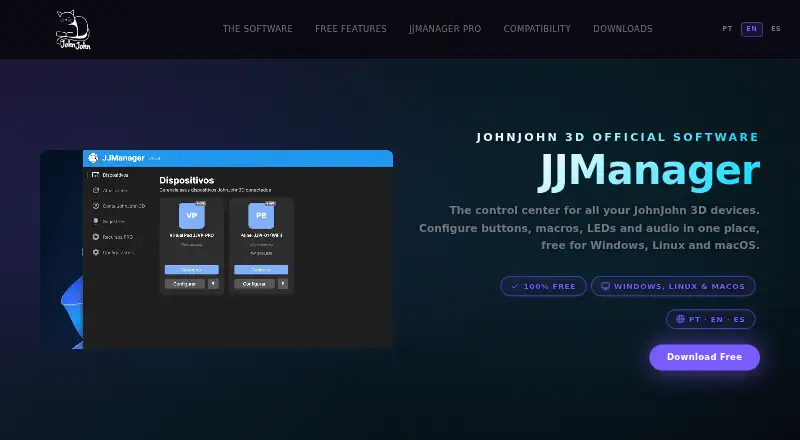
JJManager is JohnJohn 3D’s desktop software for configuring and managing compatible peripherals. It is aimed at sim racers, streamers, gamers and other users of the company’s keyboards, mice and related devices. The app runs on Windows, macOS and Linux, automatically recognizes compatible hardware, and brings device controls into one desktop interface. Its free functionality covers core customization, making it a practical fit for small setups centered on JohnJohn 3D equipment.
The strongest feature set is macro and device control. JJManager supports multi-step actions for keyboard, mouse and text inputs, along with file execution and Bash, Shell, Batch or PowerShell scripts through macros. Users can also customize LED lighting, control audio volume by application or channel, and receive firmware, software and plugin updates from the app. The JJVP-PRO virtual pad adds six macros and three audio channels. SimHub integration further suits users who want to connect the software with a compatible sim-racing setup.
JJManager’s main boundary is ecosystem focus: its verified customization is centered on compatible JohnJohn 3D peripherals rather than a broad mix of third-party hardware. JJManager PRO adds the JJVP-PRO virtual pad and model-specific advanced functions, but it is subscription-based and purchased inside the app. Choose JJManager if you own compatible JohnJohn 3D devices and want cross-platform macros, lighting, audio controls and scripting without an upfront free-tier cost. Consider another tool if your hardware is outside that device ecosystem or if you prefer software with a wider hardware focus.
Your product? Our editors can test JJManager in depth and publish a review, labelled as paid · from $149/mo →
JJManager pricing
JJManager fact sheet
| Free plan | Yes |
|---|---|
| Paid from | Not verified |
| Supported operating systems | Cross-platform |
| Macro support | Yes |
| Per-app profiles | Not verified |
| Onboard device memory | Not verified |
| Polling rate control | Not verified |
| Sensitivity controls | Not verified |
| Profile slots | Not verified |
| Deployment | Desktop |
| Platforms | Windows, macOS, Linux |
| Support | Community, Phone |
| Built for | Small business (editorial estimate) |
| Integrations | 1 integrations: SimHub |
| Pricing | Free plan |
| Website | johnjohn3d.com.br |
| Facts checked | 22 Sep 2026 |
JJManager integrations
JJManager lists 1 integrations on its own site.
- SimHub
Alternatives to JJManager
- Razer SynapseA free Razer-focused hub for remapping, macros, profiles, and Chroma lighting.9.2
- Logi Options+A broad free toolkit for remapping, automation, profiles, and multi-computer control.9.1
- Logitech G HUBA free desktop suite for Logitech G lighting, profiles, and device settings.9.0



See all JJManager alternatives →
Used JJManager? Be the first to review it
The editor score above is our own research. What this page doesn't have yet is a reader's view — what you used JJManager for, what worked and what didn't. No stars are seeded and no review is paid for; an editor reads every one before it appears.
Write a reviewTwo minutes · verified accounts only · read by an editor before it appears
Featured on iTechGuides

JJManager is listed in our Keyboard and Mouse Customization Software directory. Add the badge to your site — it links back to this page.
<a href="https://www.itechguides.com/products/jjmanager/"><img src="https://www.itechguides.com/best/badge/jjmanager.svg" alt="Featured on iTechGuides" width="230" height="46"></a>
Reviewed by iTechGuides Editors · Editorial team · Updated Oct 2026
Advertiser disclosure: iTechGuides is reader-supported. Vendors can pay for top positions in our rankings and for a place on other products' pages, and we may earn a commission when you click some links. Bought places stand at the number bought; this page and our disclosure say so. Paying vendors may get a fuller, more detailed review from our editors, and that review can change their score. How we rank.
Last updated · How we research and update