JCode
JCode: A capable open-source Android IDE for advanced on-device development workflows. Ranked #19 of 40 in Mobile Development IDEs by our editors (6.9/10); pricing: Free plan; best for advanced open-source Android IDE work.
At a glance
- Editor score6.9 / 10
- PricingFree plan
- Best forAdvanced open-source Android IDE work
- Free planYes
- Paid fromFree
- Emulator or simulatorNo
- Facts checked20 Sep 2026
Where it wins
- Language-server tooling supports diagnostics, completions, navigation, and formatting
- Build configurations, terminals, DAP debugging, and APK execution work on-device
- Git workflows and SDK, debugger, and developer-tool management are built in
Where it doesn't
- Android is the only supported mobile target
- No visual UI design tools are included
- The category specification lists emulator or simulator support as false
Our verdict on JCode
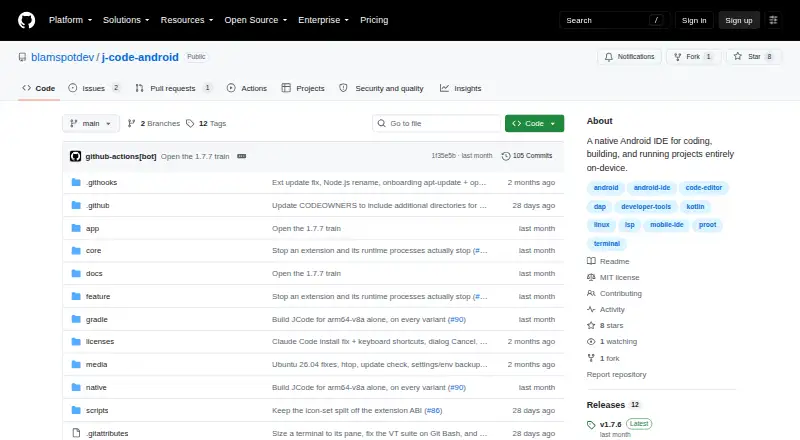
JCode is an open-source Android IDE for developers who want to edit, build, debug, and run software directly on Android devices. Its scope covers Kotlin, Java, and C++, with a canvas-based editor, language-server tooling, terminals, project workflows, Git operations, debugging, and developer-tool management. It is best suited to advanced Android development that benefits from an on-device environment rather than a desktop-first workflow.
Its strongest distinction is the breadth of its development toolchain inside one Android application. Language-server diagnostics, completions, navigation, symbol renaming, and formatting support day-to-day coding, while PTY terminals run through a bundled proot Linux environment. Per-project build and run configurations support multi-terminal workflows, and DAP debugging adds breakpoints, stepping, call stacks, variables, and a debug console. JCode can also build APKs and execute apps in an isolated on-device virtual device or app sandbox.
The open-source, free model makes JCode a focused option for developers who want substantial Android tooling without a paid plan structure. Git status, staging, commits, branches, and diffs are included, alongside management for SDKs, language servers, debuggers, database clients, and other developer tools. The trade-off is a narrow platform focus: Android is the supported mobile target, and the product does not include visual UI design tools. The category specification also lists emulator or simulator support as false, so developers needing a conventional emulator workflow or visual interface builder should choose another tool. JCode fits developers comfortable with code-driven, on-device Android work.
Your product? Our editors can test JCode in depth and publish a review, labelled as paid · from $149/mo →
JCode pricing
JCode fact sheet
| Free plan | Yes |
|---|---|
| Paid from | Free |
| Mobile targets | Android |
| Desktop platforms | Not verified |
| Emulator or simulator | No |
| Visual UI designer | Not verified |
| App packaging | Yes |
| Supported languages | Kotlin, Java, C++ |
| Deployment | Mobile |
| Platforms | Android |
| Built for | Solo, Small business (editorial estimate) |
| Pricing | Free plan |
| Website | github.com |
| Facts checked | 20 Sep 2026 |
Alternatives to JCode
- DelphiA mature Windows IDE for native Object Pascal desktop and mobile development.9.2
- Ionic FrameworkA capable web-first toolkit for hybrid iOS and Android development, not a native IDE.9.0
- MobileTogether DesignerA visual Windows IDE for designing, testing, and generating native mobile apps.8.7



Used JCode? Be the first to review it
The editor score above is our own research. What this page doesn't have yet is a reader's view — what you used JCode for, what worked and what didn't. No stars are seeded and no review is paid for; an editor reads every one before it appears.
Write a reviewTwo minutes · verified accounts only · read by an editor before it appears
Featured on iTechGuides

JCode is listed in our Mobile Development IDEs directory. Add the badge to your site — it links back to this page.
<a href="https://www.itechguides.com/products/jcode/"><img src="https://www.itechguides.com/best/badge/jcode.svg" alt="Featured on iTechGuides" width="230" height="46"></a>
Reviewed by iTechGuides Editors · Editorial team · Updated Oct 2026
Advertiser disclosure: iTechGuides is reader-supported. Vendors can pay for top positions in our rankings and for a place on other products' pages, and we may earn a commission when you click some links. Bought places stand at the number bought; this page and our disclosure say so. Paying vendors may get a fuller, more detailed review from our editors, and that review can change their score. How we rank.
Last updated · How we research and update