
InStaff
InStaff: Affordable employee communications with HR self-service modules and browser-based access. Ranked #41 of 74 in Intranet Software by our editors (5.1/10); pricing: 14-day trial; best for small businesses needing affordable employee communications.
At a glance
- Editor score5.1 / 10
- Pricing14-day trial
- Best forSmall businesses needing affordable employee communications
- Free planNo
- Paid from$1/user/mo
- Employee directoryYes
- Founded2014 · Mississauga, Ontario, Canada
- Facts checked22 Sep 2026
Where it wins
- Starts at $40 per month for portals serving up to 100 employees
- Combines announcements, directory, surveys, documents, and time off
- Offers role-based access, multi-factor authentication, and SOC 2 compliance
Where it doesn't
- Many HR and finance capabilities are priced as separate add-ons
- Access is web-based rather than provided through a native app
- Does not include single sign-on
Our verdict on InStaff
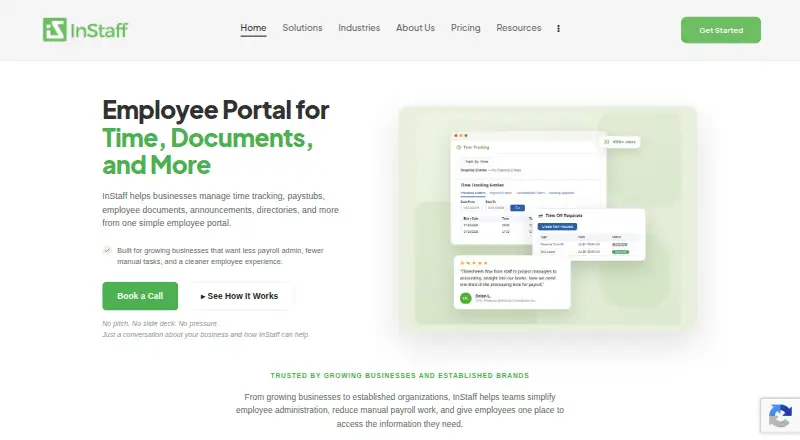
InStaff is a cloud-based employee portal for small businesses and established organizations that want employee communications and self-service without replacing an existing payroll system. It brings together an employee directory and org chart, scheduled and targeted announcements, surveys, document storage, electronic signatures, paystub and tax-form delivery, time tracking, time off, expenses, certifications, and role-based access. Employees access the portal through a browser, while HR and payroll teams configure modules, workflows, permissions, and integrations.
Pricing is organized around monthly portal tiers based on employee count. The Portal plan costs $40 per month for up to 100 employees, $80 per month for 101–500 employees, and $100 per month for 501+ employees. Each portal tier includes secure hosting, basic customer support, and regular product updates. A 14-day free trial is available without a card. Additional modules can increase the total cost: Time Tracking is $5 per user per month, Time Off Management is $1 per user per month, and Expense Management is $3 per user per month. Paystubs & Tax Forms and Employee Records Hub are available as modules with automated delivery, self-service pay history, centralized employee information, and permission controls.
For organizations working across payroll, accounting, or ERP systems, InStaff connects with Sage, QuickBooks, Microsoft Dynamics, SAP, Oracle, and Viewpoint. Its security features include role-based access, multi-factor authentication, and SOC 2 compliance, while support is provided through email, phone, and documentation. The trade-off is a web-only platform with no single sign-on and a modular pricing structure for several capabilities. Choose InStaff when affordable employee communications and practical HR self-service matter most; consider an alternative if native app access, SSO, or a more consolidated package is a priority.
Your product? Our editors can test InStaff in depth and publish a review, labelled as paid · from $149/mo →
InStaff pricing
All 12 InStaff plans and prices →
InStaff fact sheet
| Free plan | No |
|---|---|
| Paid from | $1/user/mo |
| Employee directory | Yes |
| News publishing | Yes |
| Page builder | Not verified |
| Mobile access | Not verified |
| SSO support | Not verified |
| Audience targeting | Yes |
| Free trial | 14 days · no card needed |
| Deployment | Cloud |
| Platforms | Web |
| Compliance & security | SOC 2, 2FA |
| Support | Email, Phone, Docs |
| Built for | Small business, Mid-market, Enterprise (editorial estimate) |
| Integrations | 6 integrations: Sage, QuickBooks, Microsoft Dynamics, SAP, Oracle, Viewpoint |
| Pricing | 14-day trial (source) |
| Website | instaff.org |
| Facts checked | 22 Sep 2026 |
InStaff integrations
InStaff lists 6 integrations on its own site.
- Sage
- QuickBooks
- Microsoft Dynamics
- SAP
- Oracle
- Viewpoint
Alternatives to InStaff
- Zoho ConnectA broad intranet suite with a free entry tier and low-cost paid plans.9.1
- MangoAppsA broad intranet suite for organizations coordinating desk-based and frontline teams.8.9
- StaffbaseA broad employee hub for connecting frontline and desk-based teams across web and mobile.8.8



See all InStaff alternatives →
Used InStaff? Be the first to review it
The editor score above is our own research. What this page doesn't have yet is a reader's view — what you used InStaff for, what worked and what didn't. No stars are seeded and no review is paid for; an editor reads every one before it appears.
Write a reviewTwo minutes · verified accounts only · read by an editor before it appears
Featured on iTechGuides

InStaff is listed in our Intranet Software directory. Add the badge to your site — it links back to this page.
<a href="https://www.itechguides.com/products/instaff/"><img src="https://www.itechguides.com/best/badge/instaff.svg" alt="Featured on iTechGuides" width="230" height="46"></a>
Reviewed by iTechGuides Editors · Editorial team · Updated Oct 2026
Advertiser disclosure: iTechGuides is reader-supported. Vendors can pay for top positions in our rankings and for a place on other products' pages, and we may earn a commission when you click some links. Bought places stand at the number bought; this page and our disclosure say so. Paying vendors may get a fuller, more detailed review from our editors, and that review can change their score. How we rank.
Last updated · How we research and update