
Icecream Image Resizer
Icecream Image Resizer: A straightforward Windows resizer with useful presets and a limited free batch workflow. Ranked #8 of 28 in Photo Resizing Software by our editors (6.8/10); pricing: Free plan · paid from $19.95; best for simple preset-driven Windows resizing.
At a glance
- Editor score6.8 / 10
- PricingFree plan · paid from $19.95
- Best forSimple preset-driven Windows resizing
- Free planYes
- Batch resizingYes
- Facts checked20 Sep 2026
Where it wins
- Supports batch resizing, manual dimensions, and predefined presets.
- Handles JPG, JPEG, PNG, BMP, GIF, and TIFF files.
- Includes watermarking, output controls, and estimated output size.
Where it doesn't
- The Free plan limits batch resizing to 3 files at once.
- The application is available for Windows only.
- Unlimited batches and a lifetime license require the PRO purchase.
Our verdict on Icecream Image Resizer
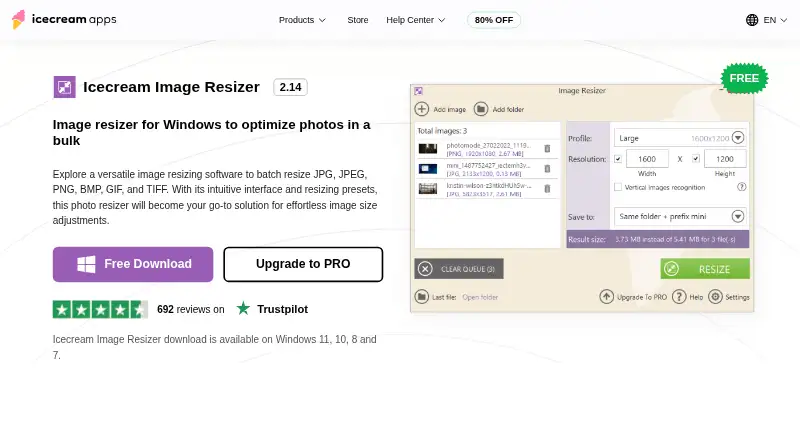
Icecream Image Resizer is a Windows desktop application for changing photo dimensions individually or in batches. It suits people who want a focused resizing utility rather than a broader image-editing application. Files can be imported from folders or through drag and drop, then adjusted with manual width and height values or predefined size presets. Supported formats include JPG, JPEG, PNG, BMP, GIF, and TIFF. Vertical image recognition, aspect-ratio handling, custom watermark placement, and output-size estimation add practical controls for routine image preparation.
The free and paid plans separate occasional resizing from higher-volume workflows. Free includes batch resizing with a limit of 3 files at once, manual dimensions, and presets. The PRO plan is listed at $19.95 as a one-time purchase and adds unlimited batch resizing, a lifetime license, social-media presets, and a drag-and-drop workflow. Output can be directed to a selected folder or subfolder, or used to overwrite originals, giving users control over how processed files are saved. For someone resizing a few images at a time, the free plan covers the core task; users working with larger batches have a clear reason to upgrade.
Its main strength is breadth within a narrow purpose: it combines dimensions, format support, presets, watermarking, folder processing, and output controls without expanding into unrelated editing features. The trade-off is platform scope, since it is designed for Windows desktop use. The Free plan’s 3-file batch limit may also slow larger jobs, while the PRO purchase is needed for unlimited batches and the lifetime license. Choose Icecream Image Resizer if you want preset-driven resizing on Windows with basic workflow controls. It is less suitable for users who need a non-Windows application or a wider photo-editing environment.
Icecream Image Resizer pricing
All 2 Icecream Image Resizer plans and prices →
Icecream Image Resizer fact sheet
| Free plan | Yes |
|---|---|
| Paid from | Not verified |
| Batch resizing | Yes |
| Output formats | JPG, JPEG, PNG, BMP, GIF, TIFF |
| Resize methods | Dimensions |
| Quality controls | Yes |
| Maximum batch size | Not verified |
| Supported platforms | Desktop |
| Money-back guarantee | 30 days |
| Deployment | Desktop |
| Platforms | Windows |
| Support | Docs |
| Built for | Solo, Small business (editorial estimate) |
| Pricing | Free plan · paid from $19.95 (source) |
| Website | icecreamapps.com |
| Facts checked | 20 Sep 2026 |
Alternatives to Icecream Image Resizer
- XnResizeA capable offline batch resizer with broad format support and detailed quality controls.9.0
- PhotoResize ProA capable desktop batch processor for creative teams handling large image collections.8.3
- ConverseenA capable free desktop tool for batch resizing, conversion, compression, and renaming.8.2


See all Icecream Image Resizer alternatives →
Icecream Image Resizer vs the competition
- Icecream Image Resizer vs XnResize
- Icecream Image Resizer vs PhotoResize Pro
- Icecream Image Resizer vs Converseen
- Icecream Image Resizer vs PixelMod
- Icecream Image Resizer vs BulkPic
- Icecream Image Resizer vs Light Image Resizer



Compare Icecream Image Resizer with any tool side by side →
Used Icecream Image Resizer? Be the first to review it
The editor score above is our own research. What this page doesn't have yet is a reader's view — what you used Icecream Image Resizer for, what worked and what didn't. No stars are seeded and no review is paid for; an editor reads every one before it appears.
Write a reviewTwo minutes · verified accounts only · read by an editor before it appears
Featured on iTechGuides

Icecream Image Resizer is listed in our Photo Resizing Software directory. Add the badge to your site — it links back to this page.
<a href="https://www.itechguides.com/products/icecream-image-resizer/"><img src="https://www.itechguides.com/best/badge/icecream-image-resizer.svg" alt="Featured on iTechGuides" width="230" height="46"></a>
Reviewed by iTechGuides Editors · Editorial team · Updated Sep 2026
Advertiser disclosure: iTechGuides is reader-supported. We may earn a commission when you click some links. How we rank.
Last updated · How we research and update