
iCab
iCab: A utility-rich Apple browser for users who want detailed control over browsing. Ranked #112 of 145 in Web Browsers by our editors (3.0/10); pricing: Free plan · paid from $10; best for apple users wanting deep browser customization.
At a glance
- Editor score3.0 / 10
- PricingFree plan · paid from $10
- Best forApple users wanting deep browser customization
- Free planYes
- Paid from$10 one-time
- Browser engineWebkit
- Facts checked21 Sep 2026
Where it wins
- Built-in ad, pop-up, malware and phishing filtering
- Download management, kiosk mode and web-archive creation
- iCloud sync for tabs, bookmarks, filters and search engines
Where it doesn't
- Available only on macOS and iOS
- The paid license covers one user
- The free version shows periodic shareware reminders
Our verdict on iCab
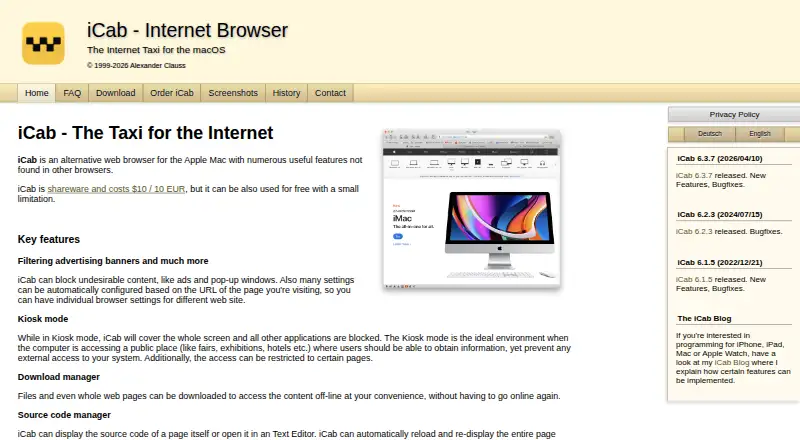
iCab is an alternative web browser for macOS, with the related iCab Mobile app extending the experience to iPhone and iPad. It suits Apple users who want more control over browsing behavior, interface configuration and page access than a basic browser typically provides. Its feature set combines everyday browsing with utility tools, including tabs and windows, downloads, content filtering, kiosk mode, source-code viewing and web-archive creation.
The pricing structure is straightforward. A free version can be used without a time limit, with periodic shareware reminder dialogs. The Single user license costs $10 as a one-time payment and covers one user on the user's computers. The paid option adds a way to use the product without relying on the free version's reminder dialogs. Across macOS and iCab Mobile, the browser's standout depth comes from configurable controls: users can manage filters, open tabs in the background or foreground, inspect and edit page source, create ZIP-based archives, and restrict page access through kiosk mode.
iCloud provides synchronization for tabs, bookmarks, reading lists, filters and search engines, giving the product a clear fit within Apple's ecosystem. iCab Mobile also includes profiles, tab groups and custom filters, while the related app offers downloads, widgets and Apple Watch support. The trade-off is platform scope: iCab is designed for macOS and iOS rather than a broader device environment. Choose it if Apple compatibility and detailed browser controls matter most; choose another browser if cross-platform availability or a simpler browsing setup is the priority.
iCab pricing
iCab fact sheet
| Free plan | Yes |
|---|---|
| Paid from | $10 one-time |
| Supported platforms | Desktop |
| Browser engine | Webkit |
| Built-in ad blocking | Yes |
| Tracking protection | Not verified |
| Extension support | Not verified |
| Cross-device sync | Not verified |
| Open source | Not verified |
| Money-back guarantee | 14 days |
| Deployment | Desktop |
| Platforms | macOS |
| Support | Email, Phone |
| Built for | Solo, Small business, Mid-market, Enterprise (editorial estimate) |
| Pricing | Free plan · paid from $10 (source) |
| Website | icab.de |
| Facts checked | 21 Sep 2026 |
Alternatives to iCab
- Google ChromeA complete free browser with broad platform coverage, sync, extensions, and built-in security.9.3
- Microsoft EdgeA free, cross-platform browser suited to Microsoft users who want broad compatibility.9.2
- Mozilla FirefoxA mature, privacy-focused browser for everyday browsing across desktop and mobile.9.1


Also listed in
Used iCab? Be the first to review it
The editor score above is our own research. What this page doesn't have yet is a reader's view — what you used iCab for, what worked and what didn't. No stars are seeded and no review is paid for; an editor reads every one before it appears.
Write a reviewTwo minutes · verified accounts only · read by an editor before it appears
Featured on iTechGuides

iCab is listed in our Web Browsers directory. Add the badge to your site — it links back to this page.
<a href="https://www.itechguides.com/products/icab/"><img src="https://www.itechguides.com/best/badge/icab.svg" alt="Featured on iTechGuides" width="230" height="46"></a>
Guides on web browsers
- How to Download Facebook Videos in a Web Browser or the Facebook AppAug 2026
- How to Join a Zoom Meeting Directly from Your Web BrowserAug 2026
- How to Search for a Word or Text on a Webpage in Any Web BrowserAug 2026
Reviewed by iTechGuides Editors · Editorial team · Updated Oct 2026
Advertiser disclosure: iTechGuides is reader-supported. Vendors can pay for top positions in our rankings and for a place on other products' pages, and we may earn a commission when you click some links. How we rank.
Last updated · How we research and update