HWall
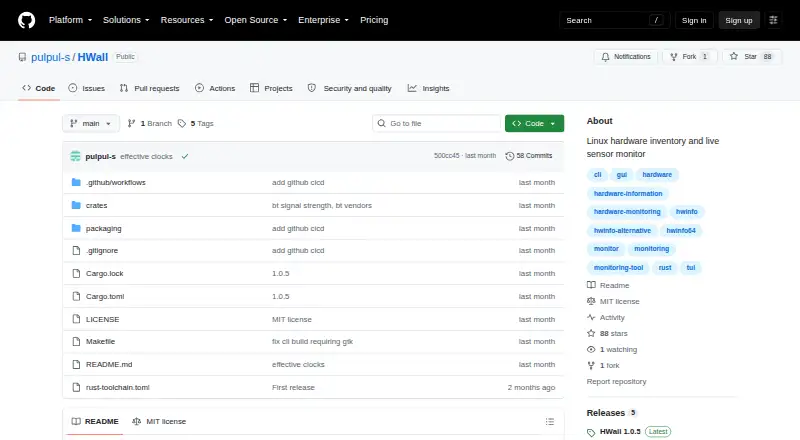
HWall: A free, open-source Linux monitor with live sensors, history, alerts, reports, and an HTTP API. Ranked #14 of 59 in Hardware Monitoring Software by our editors (7.3/10); pricing: Free plan; best for linux desktop and server sensor monitoring.
At a glance
- Editor score7.3 / 10
- PricingFree plan
- Best forLinux desktop and server sensor monitoring
- Free planYes
- Paid fromFree
- Remote monitoringNo
- Facts checked24 Sep 2026
Where it wins
- Broad live readings across temperature, power, storage, network, and utilization
- Hardware inventory includes processors, memory, graphics, firmware, and devices
- Alerts, bounded history, exports, reports, and an HTTP JSON API
Where it doesn't
- Linux-only support limits cross-platform monitoring
- Sensor history is bounded to a maximum of 24 hours
- User-defined custom sensors are not documented
Our verdict on HWall
HWall is a free, open-source hardware monitoring and inventory application for Linux desktops and servers. Written in Rust, it offers both a GTK 4 graphical interface and an interactive terminal monitor. Its read-only approach covers live temperatures, fan speeds, voltages, utilization, clocks, storage activity, network rates, and power readings, alongside hardware information for processors, memory, graphics, storage, Bluetooth, USB, PCI, batteries, firmware, and security devices. Optional SMART and NVMe health information adds storage-specific visibility.
For monitoring depth, HWall combines current, minimum, maximum, average, and sample-count statistics with configurable in-memory history and charts. The published documentation describes a default one-minute history setting and a shared maximum of 24 hours. CSV and JSON Lines exports support further analysis, while human-readable reports, filtered sensor output, JSON export, and JSON Lines streaming provide several ways to retrieve information. Per-sensor warning and critical thresholds can trigger desktop notifications. The HTTP JSON API exposes sensor, mixed, and hardware snapshots, making the tool suitable for workflows that need structured read-only data.
HWall fits Linux-focused users who want detailed local visibility without a paid tier, including administrators and developers working with kernel, firmware, driver, and helper-tool readings. Its ecosystem connects with lm-sensors, hwdata, BlueZ, ethtool, smartmontools, nvme-cli, nvidia-smi, and dmidecode. The main trade-offs are its Linux-only scope, bounded history, desktop-notification alert channel, and lack of documented user-defined custom sensors. Choose HWall when live Linux hardware data, inventory, exports, and an API matter more than long-term retention or multi-platform coverage.
Your product? Our editors can test HWall in depth and publish a review, labelled as paid · from $149/mo →
HWall pricing
HWall fact sheet
| Free plan | Yes |
|---|---|
| Paid from | Free |
| Supported platforms | Linux |
| Remote monitoring | No |
| Monitored device limit | Not verified |
| Sensor history | Not verified |
| Alert channels | desktop notifications |
| Custom sensor support | Not verified |
| Deployment | Desktop |
| Platforms | Linux |
| Built for | Solo, Small business (editorial estimate) |
| Integrations | 8 integrations: lm-sensors, hwdata, BlueZ, ethtool, smartmontools, nvme-cli … |
| Pricing | Free plan |
| Website | github.com |
| Facts checked | 24 Sep 2026 |
HWall integrations
HWall lists 8 integrations on its own site.
- lm-sensors
- hwdata
- BlueZ
- ethtool
- smartmontools
- nvme-cli
- NVIDIA utilities (nvidia-smi)
- dmidecode
Alternatives to HWall
- GlassmkrFree monitoring for Linux hardware, with hosted simplicity or self-hosted control.9.3
- Supermicro SuperDoctor 5A free, focused monitor for Supermicro server health, alerts, logs, and remote power control.9.2
- HWiNFOA deep Windows diagnostics suite for users who need detailed sensors, reports, and alerts.9.1

Used HWall? Be the first to review it
The editor score above is our own research. What this page doesn't have yet is a reader's view — what you used HWall for, what worked and what didn't. No stars are seeded and no review is paid for; an editor reads every one before it appears.
Write a reviewTwo minutes · verified accounts only · read by an editor before it appears
Featured on iTechGuides

HWall is listed in our Hardware Monitoring Software directory. Add the badge to your site — it links back to this page.
<a href="https://www.itechguides.com/products/hwall/"><img src="https://www.itechguides.com/best/badge/hwall.svg" alt="Featured on iTechGuides" width="230" height="46"></a>
Reviewed by iTechGuides Editors · Editorial team · Updated Oct 2026
Advertiser disclosure: iTechGuides is reader-supported. Vendors can pay for top positions in our rankings and for a place on other products' pages, and we may earn a commission when you click some links. Bought places stand at the number bought; this page and our disclosure say so. Paying vendors may get a fuller, more detailed review from our editors, and that review can change their score. How we rank.
Last updated · How we research and update