HFSExplorer
HFSExplorer: A focused desktop tool for browsing and extracting files from Mac volumes and disk images. Ranked #26 of 31 in File Viewer Software by our editors (6.1/10); pricing: Free plan; best for opening Mac disk images on desktop systems.
At a glance
- Editor score6.1 / 10
- PricingFree plan
- Best forOpening Mac disk images on desktop systems
- Free planYes
- Paid fromFree
- Facts checked23 Sep 2026
Where it wins
- Reads HFS, HFS+ and HFSX volumes in read-only mode
- Handles many DMG and sparse images, including compressed and AES-encrypted
- Free, open-source desktop app for Windows, macOS and Linux
Where it doesn't
- Requires Java to run
- Limited to read-only filesystem browsing and extraction
- Community support rather than a general-purpose preview experience
Our verdict on HFSExplorer
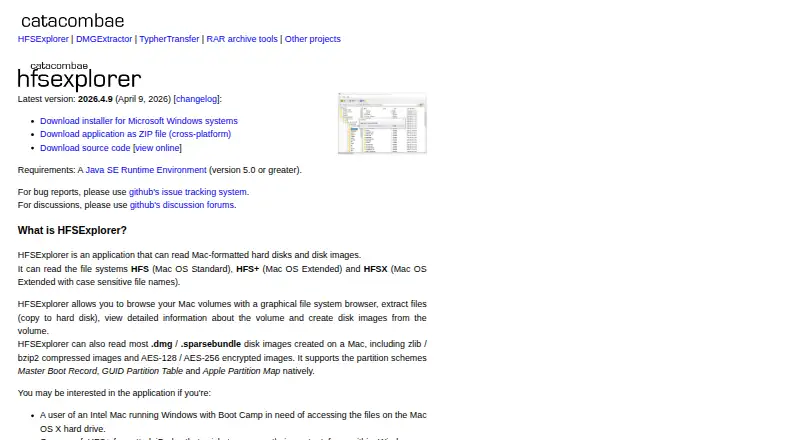
HFSExplorer is a desktop filesystem browser for people who need to inspect Mac-formatted disks on Windows, macOS or Linux. It reads HFS, HFS+ and HFSX volumes, lets users browse their contents, extract files and view detailed volume information. It can also create disk images from volumes. This is a focused utility for accessing Mac filesystems, not a general-purpose file viewer or preview tool, so it suits occasional disk access better than broad file-format review.
Its image support is a notable part of the offering. HFSExplorer reads many DMG, sparseimage and sparsebundle disk images, including compressed and AES-encrypted images. It also supports Master Boot Record, GUID Partition Table and Apple Partition Map partition schemes. These capabilities make it relevant when a disk or image uses a Mac filesystem or partition layout; the application reads volumes and images in read-only mode, so it is not intended for making changes to their contents.
The software is free and open-source under GPL version 3, with desktop availability across the three listed operating systems. Windows installers and a cross-platform ZIP distribution are available, and Java is required. Support is community-based. Choose HFSExplorer when the task is specifically to browse or extract files from supported Mac disks and images without modifying them. Choose another kind of viewer if the main need is previewing common documents, archives or code, or if you need broader file-viewing capabilities.
Your product? Our editors can test HFSExplorer in depth and publish a review, labelled as paid · from $149/mo →
HFSExplorer pricing
HFSExplorer fact sheet
| Free plan | Yes |
|---|---|
| Paid from | Free |
| Listed formats | Not verified |
| Primary access | Desktop |
| Maximum file size | Not verified |
| Archive preview | No |
| Office file preview | No |
| Code file preview | No |
| In-file search | Not verified |
| Deployment | Desktop |
| Platforms | Windows, macOS, Linux |
| Support | Community |
| Built for | Solo, Small business (editorial estimate) |
| Pricing | Free plan |
| Website | catacombae.org |
| Facts checked | 23 Sep 2026 |
Alternatives to HFSExplorer
- OpenText Brava!A cross-platform viewer for controlled document review, redaction, comparison, and publishing.9.3
- XnView MPA free image viewer with broad format support and paid commercial licensing.9.1
- OkularA capable open-source viewer for PDFs, forms, annotations, signatures, and more.8.9


See all HFSExplorer alternatives →
Used HFSExplorer? Be the first to review it
The editor score above is our own research. What this page doesn't have yet is a reader's view — what you used HFSExplorer for, what worked and what didn't. No stars are seeded and no review is paid for; an editor reads every one before it appears.
Write a reviewTwo minutes · verified accounts only · read by an editor before it appears
Featured on iTechGuides

HFSExplorer is listed in our File Viewer Software directory. Add the badge to your site — it links back to this page.
<a href="https://www.itechguides.com/products/hfsexplorer/"><img src="https://www.itechguides.com/best/badge/hfsexplorer.svg" alt="Featured on iTechGuides" width="230" height="46"></a>
Reviewed by iTechGuides Editors · Editorial team · Updated Oct 2026
Advertiser disclosure: iTechGuides is reader-supported. Vendors can pay for top positions in our rankings and for a place on other products' pages, and we may earn a commission when you click some links. Bought places stand at the number bought; this page and our disclosure say so. Paying vendors may get a fuller, more detailed review from our editors, and that review can change their score. How we rank.
Last updated · How we research and update