
XnView MP
XnView MP: A format-rich desktop viewer with serious cataloging, metadata, and batch tools. Ranked #1 of 33 in Photo Viewer Software by our editors (9.3/10); pricing: Free plan; best for cross-platform power users and photo managers.
At a glance
- Editor score9.3 / 10
- PricingFree plan
- Best forCross-platform power users and photo managers
- Free planYes
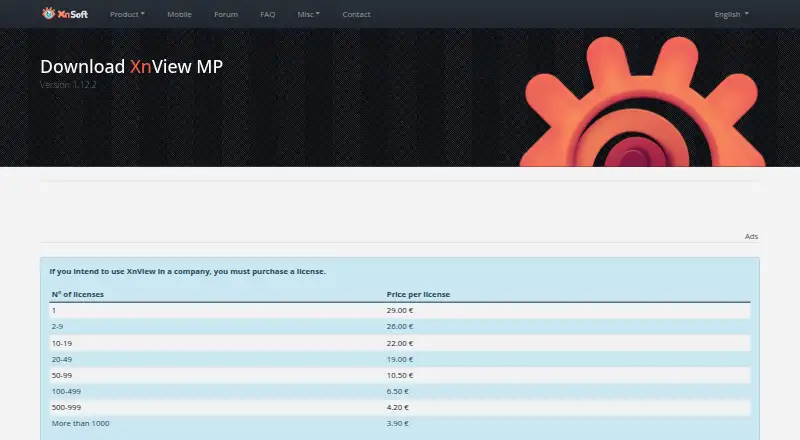
- Paid from€3.90/unit one-time
- Side-by-side compareYes
- Facts checked20 Sep 2026
Where it wins
- Opens more than 500 formats, including camera RAW files
- Compares up to four images side by side
- Combines catalog search, metadata editing, and batch tools
Where it doesn't
- Commercial company use requires a paid license
- Per-license pricing may complicate larger deployments
- Feature depth may exceed the needs of simple viewers
Our verdict on XnView MP
XnView MP is a desktop photo viewer and organizer for Windows, macOS, and Linux. It is suited to photographers, photo managers, and cross-platform power users who need more than basic image opening. The software handles more than 500 image formats, including camera RAW files, and supports thumbnail, filmstrip, full-screen, and slideshow views. It also brings comparison, cataloging, metadata, contact-sheet, batch, and image-adjustment tools into one desktop application.
Its strongest advantage is breadth within a photo-management workflow. Users can index catalogs, search by metadata, view and edit EXIF, IPTC, and XMP information, create contact sheets, batch-rename files, and convert images. Side-by-side comparison supports up to four images, while ICC profile and color-management support adds control for color-sensitive work. Integrations with Adobe Lightroom, Adobe Bridge, and Photo Mechanic improve its fit alongside established photo workflows. This makes it a practical choice for people managing varied image collections across Windows, macOS, and Linux rather than relying on a single operating system.
Pricing is straightforward but depends on how the software is used. It is free for private, educational, public-service, and nonprofit use. Commercial company use requires a one-time per-license purchase, starting at €29 per license for one license. The listed commercial tiers reduce the per-license price from €26 for 2–9 licenses to €3.90 for more than 1000 licenses. XnView MP is therefore a strong fit for users who value format coverage, catalog tools, and metadata control. Buyers who only need a lightweight viewer may find its broader workflow feature set unnecessary, while commercial teams must budget for licenses.
Your product? Our editors can test XnView MP in depth and publish a review, labelled as paid · from $149/mo →
XnView MP pricing
All 8 XnView MP plans and prices →
XnView MP fact sheet
| Free plan | Yes |
|---|---|
| Paid from | €3.90/unit one-time |
| Supported platforms | Windows, macOS, Linux |
| RAW image support | Yes |
| Side-by-side compare | Yes |
| Contact sheets | Yes |
| Color management | Yes |
| Metadata viewer | Yes |
| Deployment | Desktop |
| Platforms | Windows, macOS, Linux |
| Support | Docs |
| Built for | Solo, Small business, Mid-market (editorial estimate) |
| Integrations | 3 integrations: Adobe Lightroom, Adobe Bridge, Photo Mechanic |
| Pricing | Free plan (source) |
| Website | xnview.com |
| Facts checked | 20 Sep 2026 |
XnView MP integrations
XnView MP lists 3 integrations on its own site.
- Adobe Lightroom
- Adobe Bridge
- Photo Mechanic
Alternatives to XnView MP
- FastStone Image ViewerA free Windows viewer with RAW support, comparison, batch tools, editing, and scanning.9.1
- IrfanViewA practical Windows viewer for batch conversion, resizing, renaming, and RAW support.9.0
- GeeqieA capable free viewer for RAW files, comparisons, metadata, collections, and bulk file work.8.8


See all XnView MP alternatives →
XnView MP vs the competition
- XnView MP vs FastStone Image Viewer
- XnView MP vs IrfanView
- XnView MP vs Geeqie
- XnView MP vs Photo Mechanic
- XnView MP vs gThumb
- XnView MP vs Gwenview


Compare XnView MP with any tool side by side →
Also Ranked In
XnView MP is ranked in 5 of our directories.
Used XnView MP? Be the first to review it
The editor score above is our own research. What this page doesn't have yet is a reader's view — what you used XnView MP for, what worked and what didn't. No stars are seeded and no review is paid for; an editor reads every one before it appears.
Write a reviewTwo minutes · verified accounts only · read by an editor before it appears
Featured on iTechGuides

XnView MP is listed in our Photo Viewer Software directory. Add the badge to your site — it links back to this page.
<a href="https://www.itechguides.com/products/xnview-mp/"><img src="https://www.itechguides.com/best/badge/xnview-mp.svg" alt="Featured on iTechGuides" width="230" height="46"></a>
Reviewed by iTechGuides Editors · Editorial team · Updated Oct 2026
Advertiser disclosure: iTechGuides is reader-supported. Vendors can pay for top positions in our rankings and for a place on other products' pages, and we may earn a commission when you click some links. Bought places stand at the number bought; this page and our disclosure say so. Paying vendors may get a fuller, more detailed review from our editors, and that review can change their score. How we rank.
Last updated · How we research and update