
IrfanView
IrfanView: A practical Windows batch processor for private users and licensed businesses. Ranked #22 of 37 in Batch Photo Processing Software by our editors (7.1/10); pricing: Free plan; best for windows users needing lightweight batch conversion.
At a glance
- Editor score7.1 / 10
- PricingFree plan
- Best forWindows users needing lightweight batch conversion
- Free planYes
- Paid from$18/device one-time
- RAW processingYes
- Facts checked20 Sep 2026
Where it wins
- Batch conversion, renaming, resizing, and resampling
- Supports camera RAW and many image formats
- Command-line processing and lossless JPEG batch operations
Where it doesn't
- Commercial use requires a paid license
- Available for Windows only
- Batch automation is primarily manual
Our verdict on IrfanView
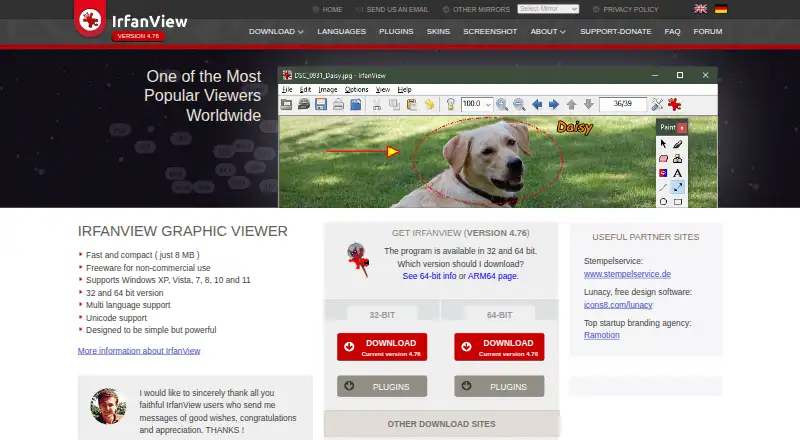
IrfanView is a lightweight Windows desktop image viewer with tools for batch conversion, renaming, resizing, resampling, and image operations. It suits private users, educators, charities, humanitarian organizations, and professionals who need a compact way to process groups of images. Its broader toolkit also covers image viewing, scanning, printing, slideshows, format conversion, and plugins for additional formats and functions.
Pricing is straightforward by use case. The freeware plan covers private, non-commercial use as well as educational, charity, and humanitarian use. Commercial users need a $18 one-time license, which is perpetual and valid for both 32-bit and 64-bit versions. The commercial license makes IrfanView a low-cost option for businesses that need a desktop batch utility, while private users can access the core product without a purchase.
Its strongest fit is batch work across varied image formats. IrfanView supports camera RAW files, lossless JPEG operations in batch mode, and output formats including BMP, GIF, ICO, JPG, JP2, PNG, PDF, RAW, TIF/TIFF, WebP, and others. Command-line processing options add a path for repeatable workflows, although the listed batch automation is manual. Plugins extend format and function support, but the product remains a Windows desktop tool rather than a cross-platform or cloud-based system. Choose it for focused local conversion and file preparation; consider another category option if you need broader platform coverage or a more automated workflow.
Your product? Our editors can test IrfanView in depth and publish a review, labelled as paid · from $149/mo →
IrfanView pricing
All 2 IrfanView plans and prices →
IrfanView fact sheet
| Free plan | Yes |
|---|---|
| Paid from | $18/device one-time |
| RAW processing | Yes |
| Bulk renaming | Yes |
| Bulk resizing | Yes |
| Output formats | BMP, ECW, EMF, GIF, ICO, JP2, JPG, JLS, JXL, PBM, PCX, PDF, PGM, PNG, PPM, QOI, RAW, TGA, TIF/TIFF, WebP |
| Supported platforms | Windows |
| Watched folders | Not verified |
| Batch automation level | Manual |
| Deployment | Desktop |
| Platforms | Windows |
| Support | Email, Docs |
| Built for | Solo, Small business (editorial estimate) |
| Pricing | Free plan (source) |
| Website | irfanview.com |
| Facts checked | 20 Sep 2026 |
Alternatives to IrfanView
- XnConvertA low-cost desktop tool for automated, multi-format batch image processing.9.4
- ImageMagickA capable command-line toolkit for developers building automated image pipelines.9.2
- BatchPhotoA capable desktop batch processor for high-volume conversion and repeatable image workflows.9.0


See all IrfanView alternatives →
Also Ranked In
IrfanView is ranked in 5 of our directories.
Used IrfanView? Be the first to review it
The editor score above is our own research. What this page doesn't have yet is a reader's view — what you used IrfanView for, what worked and what didn't. No stars are seeded and no review is paid for; an editor reads every one before it appears.
Write a reviewTwo minutes · verified accounts only · read by an editor before it appears
Featured on iTechGuides

IrfanView is listed in our Batch Photo Processing Software directory. Add the badge to your site — it links back to this page.
<a href="https://www.itechguides.com/products/irfanview/"><img src="https://www.itechguides.com/best/badge/irfanview.svg" alt="Featured on iTechGuides" width="230" height="46"></a>
Reviewed by iTechGuides Editors · Editorial team · Updated Oct 2026
Advertiser disclosure: iTechGuides is reader-supported. Vendors can pay for top positions in our rankings and for a place on other products' pages, and we may earn a commission when you click some links. Bought places stand at the number bought; this page and our disclosure say so. Paying vendors may get a fuller, more detailed review from our editors, and that review can change their score. How we rank.
Last updated · How we research and update