
GitMac
GitMac: An inexpensive macOS Git client with visual history, AI assistance, and a useful free plan. Ranked #32 of 61 in Version Control Software by our editors (5.7/10); pricing: Free plan; best for mac users wanting inexpensive AI Git tools.
At a glance
- Editor score5.7 / 10
- PricingFree plan
- Best forMac users wanting inexpensive AI Git tools
- Free planYes
- Paid from$12/yr
- Versioning modelDistributed
- Facts checked22 Sep 2026
Where it wins
- Free plan includes unlimited local repositories and GitHub integration
- AI assists with commits, code explanations, and conflict resolution
- Supports LFS, submodules, hooks, workflows, and visual history
Where it doesn't
- Available only for macOS 14 or later
- Free plan limits AI features to the basic tier
- The product is currently described as in public beta
Our verdict on GitMac
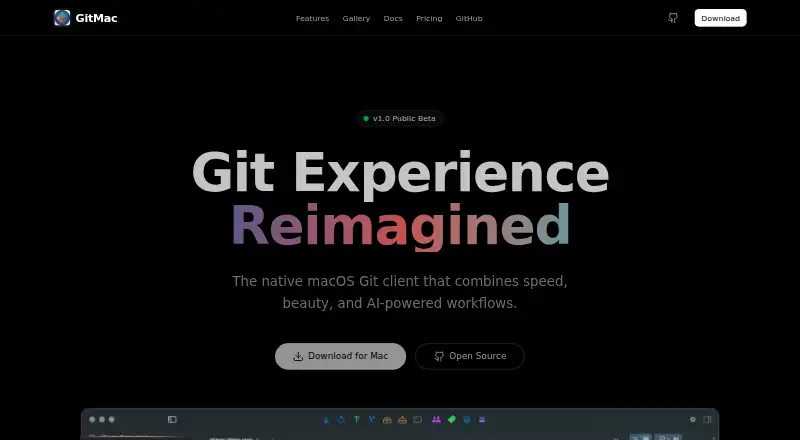
GitMac is a native macOS desktop client for Git repositories, aimed at individual developers and professionals. It brings repository management, branch, tag, stash, and remote controls into a visual interface, with a commit graph, syntax-highlighted diffs, line- and hunk-level staging, and an integrated Ghostty terminal. Its AI features cover generated commit messages, code explanations, and conflict resolution, while Git LFS, submodules, custom workflows, plugins, and Git hooks support broader repository needs. GitMac supports macOS 14 or later and is distributed as an open-source project with Free and Pro plans.
Pricing is straightforward. The Free plan costs $0 forever and includes unlimited local repositories, a visual commit graph, an integrated terminal, basic AI features, and GitHub integration. Pro costs $12 per year with annual billing. It adds unlimited AI-generated commits, all integrations, custom themes, priority support, early access to new features, and lifetime updates. Integrations include GitHub, Jira, Linear, Taiga, Notion, Microsoft Planner, and GitLab, giving Pro users connections across code hosting, issue tracking, planning, and documentation tools.
The main fit is for Mac developers who want a visual Git workflow without a recurring monthly price, especially those interested in AI-assisted commits and explanations. GitMac also suits repositories that need large-file handling through Git LFS, nested repositories through submodules, or more structured local automation through workflows and hooks. The narrower fit is teams working outside macOS or requiring a product described beyond its current public beta stage. Users who need Windows, Linux, or a broader platform footprint should choose an alternative; Mac users can start with Free and move to Pro when its expanded AI and integration features matter.
Your product? Our editors can test GitMac in depth and publish a review, labelled as paid · from $149/mo →
GitMac pricing
All 2 GitMac plans and prices →
GitMac fact sheet
| Free plan | Yes |
|---|---|
| Paid from | $12/yr |
| Versioning model | Distributed |
| Self-hosted deployment | No |
| Desktop platforms | macOS |
| Large-file handling | Extension |
| File locking | Not verified |
| Sparse checkout | Not verified |
| Nested repositories | Yes |
| Deployment | Desktop |
| Platforms | macOS |
| Support | Community, Docs |
| Built for | Solo, Small business (editorial estimate) |
| Integrations | 7 integrations: GitHub, Jira, Linear, Taiga, Notion, Microsoft Planner … |
| Pricing | Free plan (source) |
| Website | gitmac.app |
| Facts checked | 22 Sep 2026 |
GitMac integrations
GitMac lists 7 integrations on its own site.
- GitHub
- Jira
- Linear
- Taiga
- Notion
- Microsoft Planner
- GitLab
Alternatives to GitMac
- GitA broad, free distributed workflow for developers who need precise history control.9.4
- Perforce P4 (Helix Core)A strong choice for teams managing locked files, binaries, and large repositories.9.2
- UnityA broad game and application engine, but not a dedicated version-control system.9.0


Used GitMac? Be the first to review it
The editor score above is our own research. What this page doesn't have yet is a reader's view — what you used GitMac for, what worked and what didn't. No stars are seeded and no review is paid for; an editor reads every one before it appears.
Write a reviewTwo minutes · verified accounts only · read by an editor before it appears
Featured on iTechGuides

GitMac is listed in our Version Control Software directory. Add the badge to your site — it links back to this page.
<a href="https://www.itechguides.com/products/gitmac/"><img src="https://www.itechguides.com/best/badge/gitmac.svg" alt="Featured on iTechGuides" width="230" height="46"></a>
Reviewed by iTechGuides Editors · Editorial team · Updated Oct 2026
Advertiser disclosure: iTechGuides is reader-supported. Vendors can pay for top positions in our rankings and for a place on other products' pages, and we may earn a commission when you click some links. Bought places stand at the number bought; this page and our disclosure say so. Paying vendors may get a fuller, more detailed review from our editors, and that review can change their score. How we rank.
Last updated · How we research and update