Ghostnote
Ghostnote: A focused Mac app for attaching notes and todos directly to your digital workspace. Ranked #193 of 214 in Note-Taking Apps by our editors (3.0/10); pricing: 14-day trial; best for contextual notes attached to Mac files and apps.
At a glance
- Editor score3.0 / 10
- Pricing14-day trial
- Best forContextual notes attached to Mac files and apps
- Free planNo
- Facts checked20 Sep 2026
Where it wins
- Attaches notes and todos to files, folders, apps, and websites
- Supports custom scripting, shortcuts, menu-bar access, and RTF export
- Connects with Evernote, Dropbox, iCloud, and Google Drive
Where it doesn't
- Runs only on macOS
- Has no free plan
- Purchase link currently leads to a checkout error
Our verdict on Ghostnote
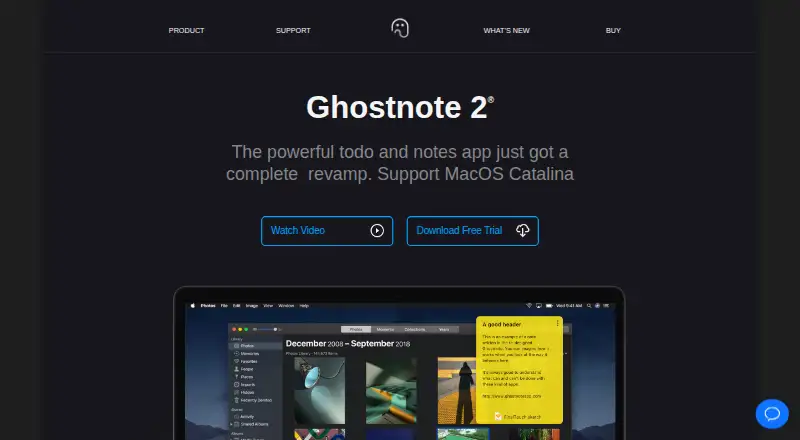
Ghostnote is a macOS note-taking and todo application built around context rather than standalone pages. It lets users attach notes and todos to files, folders, applications, documents, and websites, while also providing a browser for conventional and contextual notes. This makes it a strong fit for Mac users who want reminders, annotations, and working context to stay close to the items they reference. Its focused workflow is less suitable for people who need a cross-platform notebook or team-oriented workspace.
The standout feature is the ability to place notes inside the environments where work happens. Users can annotate documents inside applications, add notes to websites, and use customizable keyboard shortcuts to reach contextual notes quickly. Custom scripting adds another layer for users who want to tailor the workflow. Evernote integration and support for Dropbox, iCloud, and Google Drive folders extend its fit across existing personal file systems, while RTF export provides a straightforward way to take formatted content elsewhere.
Ghostnote is a paid product with a 14-day trial and no free plan. The purchase link currently leads to a checkout error, and the product site presents outdated compatibility information, including references to macOS Catalina and High Sierra. Those signals make the buying path less clear than the feature set itself. Choose Ghostnote if contextual Mac notes, application annotations, scripting, and local workflow shortcuts matter most. Choose another note-taking app if you need Windows or mobile support, collaboration, a free tier, or a clearer current purchasing experience.
Questions about Ghostnote
Is there a free trial of Ghostnote? Yes: a 14-day free trial.
What does Ghostnote run on? macOS. It runs as a desktop app.
What does Ghostnote integrate with? 4 integrations: Evernote, Dropbox, iCloud and Google Drive.
Who is Ghostnote built for? Solo users and small businesses (our editorial estimate).
Your product? Our editors can test Ghostnote in depth and publish a review, labelled as paid · from $149/mo →
Ghostnote pricing
Ghostnote fact sheet
| Free plan | No |
|---|---|
| Paid from | Not verified |
| Offline access | Not verified |
| Supported platforms | macOS |
| Note sharing | Not verified |
| Real-time collaboration | Not verified |
| Storage limit | Not verified |
| Integrations | Evernote, Dropbox, iCloud, Google Drive |
| Free trial | 14 days |
| Deployment | Desktop |
| Platforms | macOS |
| Support | Email, Docs |
| Built for | Solo, Small business (editorial estimate) |
| Integrations | 4 integrations: Evernote, Dropbox, iCloud, Google Drive |
| Pricing | 14-day trial |
| Website | ghostnoteapp.com |
| Facts checked | 20 Sep 2026 |
Ghostnote integrations
Ghostnote lists 4 integrations on its own site.
- Evernote
- Dropbox
- iCloud
- Google Drive
Alternatives to Ghostnote
- Microsoft OneNoteA broad, collaborative note system with strong Microsoft integration and a capable free option.9.3
- NotionA flexible workspace for teams that want notes and knowledge bases alongside databases and collaboration.9.2
- EvernoteA broad note-taking workspace for organizing information, tasks, calendars, and documents.9.0


See all Ghostnote alternatives →
Used Ghostnote? Be the first to review it
The editor score above is our own research. What this page doesn't have yet is a reader's view — what you used Ghostnote for, what worked and what didn't. No stars are seeded and no review is paid for; an editor reads every one before it appears.
Write a reviewTwo minutes · verified accounts only · read by an editor before it appears
Featured on iTechGuides

Ghostnote is listed in our Note-Taking Apps directory. Add the badge to your site — it links back to this page.
<a href="https://www.itechguides.com/products/ghostnote/"><img src="https://www.itechguides.com/best/badge/ghostnote.svg" alt="Featured on iTechGuides" width="230" height="46"></a>
Reviewed by iTechGuides Editors · Editorial team · Updated Nov 2026
Advertiser disclosure: iTechGuides is reader-supported. Vendors can pay for top positions in our rankings and for a place on other products' pages, and we may earn a commission when you click some links. Bought places stand at the number bought; this page and our disclosure say so. Paying vendors may get a fuller, more detailed review from our editors, and that review can change their score. How we rank.
Last updated · How we research and update