geemap
geemap: An open-source notebook toolkit for interactive Earth Engine maps and geospatial data. Ranked #28 of 64 in GIS Software by our editors (6.4/10); pricing: Free plan; best for notebook-based Earth Engine mapping.
At a glance
- Editor score6.4 / 10
- PricingFree plan
- Best forNotebook-based Earth Engine mapping
- Free planYes
- Paid fromFree
- Spatial analysisAdvanced
- Facts checked24 Sep 2026
Where it wins
- Connects Jupyter workflows with Google Earth Engine data
- Visualizes raster and vector layers with dataset inspection
- Supports drawing geometries and exporting maps and geospatial data
Where it doesn't
- Focused on notebook mapping rather than a complete GIS workflow
- No dashboard builder or mobile apps
- Support is through community channels and documentation
Our verdict on geemap
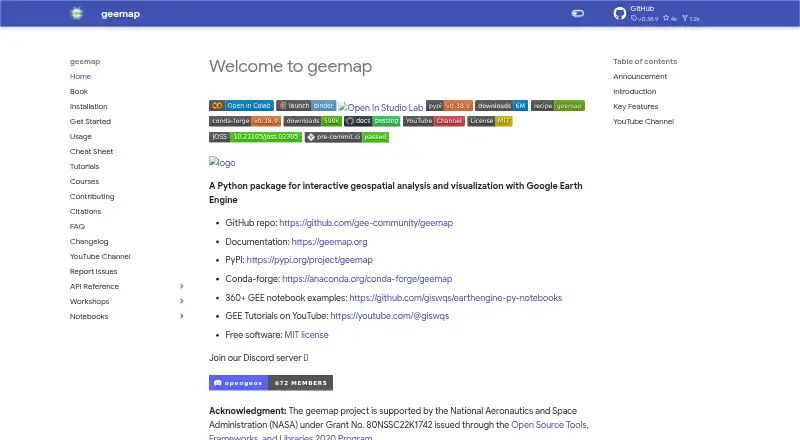
geemap is an open-source Python package for interactive maps and geospatial visualization, particularly with Google Earth Engine data. It is aimed at people who work in Jupyter notebooks and want to explore spatial data, add map layers, draw geometries, or export maps and geospatial data. Its fit is strongest for notebook-based mapping workflows, rather than users looking for a standalone, all-purpose GIS product.
The package connects Jupyter with Google Earth Engine and offers ipyleaflet and folium as map backends. Users can visualize raster and vector layers, inspect datasets, control map layers, and interactively draw points, lines, and polygons. This combination makes geemap useful for exploratory and presentation-oriented mapping within Python notebooks. It also supports both self-hosted notebooks and hosted notebook services, with deployment listed as hybrid. Buyers should consider whether their workflow centers on these notebook and mapping-library integrations before choosing it as their main geospatial environment.
geemap is distributed as open-source software, rather than a commercial subscription, and the published product information describes it as free. Community support and documentation are the listed support channels. The trade-off is scope: geemap does not include a dashboard builder or mobile apps, and its core value is tied to Python notebooks and Earth Engine-linked mapping. Choose it if that focused workflow matches your needs; consider another GIS product if you need a broader standalone environment, dashboards, or mobile applications.
Your product? Our editors can test geemap in depth and publish a review, labelled as paid · from $149/mo →
geemap pricing
geemap fact sheet
| Free plan | Yes |
|---|---|
| Paid from | Free |
| Deployment | Hybrid |
| Spatial analysis | Advanced |
| Web mapping | Yes |
| Dashboard builder | No |
| Raster data support | Yes |
| Mobile apps | No |
| Deployment | Self-hosted, Cloud |
| Platforms | Web, Windows, macOS, Linux |
| Support | Community, Docs |
| Built for | Solo, Small business, Mid-market, Enterprise (editorial estimate) |
| Integrations | 4 integrations: Google Earth Engine, ipyleaflet, folium, Jupyter |
| Pricing | Free plan |
| Website | geemap.org |
| Facts checked | 24 Sep 2026 |
geemap integrations
geemap lists 4 integrations on its own site.
- Google Earth Engine
- ipyleaflet
- folium
- Jupyter
Alternatives to geemap
- QGISA broad, no-cost GIS for advanced analysis, editing, mapping, and publishing.9.4
- GRASS GISA deep analytical GIS for technical teams that value open-source and scripted workflows.9.2
- Google Earth EngineA specialized GIS platform for large-scale satellite imagery, raster analysis, and geospatial computation.9.1



Used geemap? Be the first to review it
The editor score above is our own research. What this page doesn't have yet is a reader's view — what you used geemap for, what worked and what didn't. No stars are seeded and no review is paid for; an editor reads every one before it appears.
Write a reviewTwo minutes · verified accounts only · read by an editor before it appears
Featured on iTechGuides

geemap is listed in our GIS Software directory. Add the badge to your site — it links back to this page.
<a href="https://www.itechguides.com/products/geemap/"><img src="https://www.itechguides.com/best/badge/geemap.svg" alt="Featured on iTechGuides" width="230" height="46"></a>
Reviewed by iTechGuides Editors · Editorial team · Updated Oct 2026
Advertiser disclosure: iTechGuides is reader-supported. Vendors can pay for top positions in our rankings and for a place on other products' pages, and we may earn a commission when you click some links. Bought places stand at the number bought; this page and our disclosure say so. Paying vendors may get a fuller, more detailed review from our editors, and that review can change their score. How we rank.
Last updated · How we research and update