FTPUSE
FTPUSE: A focused free utility for making FTP shares available through Windows drive letters. Ranked #32 of 36 in FTP Clients by our editors (5.9/10); pricing: Free plan; best for mapping FTP as a Windows drive.
At a glance
- Editor score5.9 / 10
- PricingFree plan
- Best forMapping FTP as a Windows drive
- Free planYes
- Paid fromFree
- Protocol coverageFtp-only
- Facts checked21 Sep 2026
Where it wins
- Maps remote FTP paths to local drive letters
- Supports active/passive modes and custom TCP ports
- Makes mapped FTP drives accessible to other applications
Where it doesn't
- Windows-only utility
- Supports FTP rather than broader transfer protocols
- Command-line workflow may not suit graphical-client users
Our verdict on FTPUSE
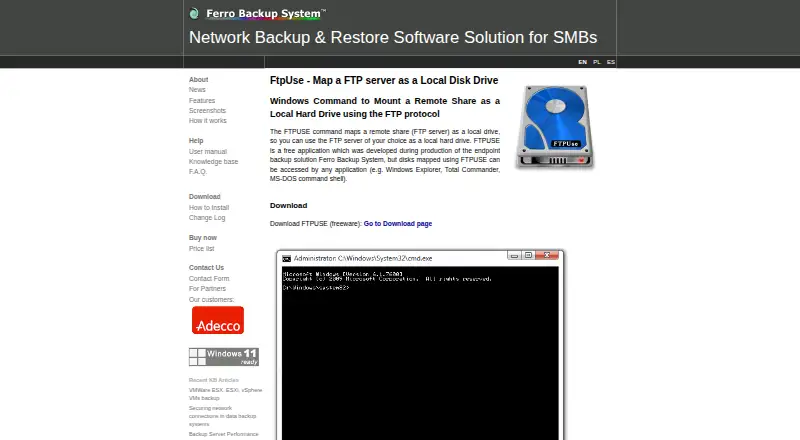
FTPUSE is a free Windows command-line utility from FERRO Software that maps an FTP server to a local drive letter. It is intended for people who need applications to access remote FTP resources through a familiar drive-based path rather than through a dedicated transfer window. Mapped drives can be accessed by Windows Explorer, Total Commander, the MS-DOS command shell, and other applications. FTPUSE supports remote paths, usernames, passwords, active or passive FTP modes, and custom TCP ports, giving administrators control over common connection parameters.
The product’s main strength is its narrow focus. Once an FTP resource is mapped, it can work with software that expects a local drive, while background execution with a hidden console keeps the command-line process out of the way. Debug mode provides visibility when diagnosing connection behavior, and established FTP drive mappings can be deleted when they are no longer needed. The installation package includes the FTPUSE application and DOKAN filesystem drivers, so setup involves installing both the utility and its filesystem component. Transfer automation is also listed as a capability, although the product remains centered on drive mapping rather than a broad workflow system.
FTPUSE is a practical choice for Windows users who need FTP access presented as a drive and who are comfortable with command-line configuration. Its free pricing makes it suitable when the required workflow is limited to FTP mapping, connection options, and access from other Windows applications. It is less suitable for users seeking a graphical FTP client, broader protocol coverage, or a conventional file-transfer workspace. The published support information covers Windows through Windows 10, and FTPUSE is distributed as version 2.2, published in 2015.
Your product? Our editors can test FTPUSE in depth and publish a review, labelled as paid · from $149/mo →
FTPUSE pricing
FTPUSE fact sheet
| Free plan | Yes |
|---|---|
| Paid from | Free |
| Protocol coverage | Ftp-only |
| Supported platforms | Windows |
| File synchronization | Not verified |
| Scheduled transfers | Not verified |
| Transfer automation | Yes |
| Concurrent transfers | Not verified |
| Portable version | Not verified |
| Deployment | Desktop |
| Platforms | Windows |
| Support | Docs |
| Built for | Solo, Small business (editorial estimate) |
| Pricing | Free plan |
| Website | ferrobackup.com |
| Facts checked | 21 Sep 2026 |
Alternatives to FTPUSE
- WinSCPA capable free Windows client for multi-protocol transfers, scripting, and SSH workflows.9.3
- FileZilla ClientA capable free FTP client for straightforward desktop file transfers.9.2
- CyberduckA broad, free FTP client for desktop transfers, synchronization, and automation.9.1



Used FTPUSE? Be the first to review it
The editor score above is our own research. What this page doesn't have yet is a reader's view — what you used FTPUSE for, what worked and what didn't. No stars are seeded and no review is paid for; an editor reads every one before it appears.
Write a reviewTwo minutes · verified accounts only · read by an editor before it appears
Featured on iTechGuides

FTPUSE is listed in our FTP Clients directory. Add the badge to your site — it links back to this page.
<a href="https://www.itechguides.com/products/ftpuse/"><img src="https://www.itechguides.com/best/badge/ftpuse.svg" alt="Featured on iTechGuides" width="230" height="46"></a>
Reviewed by iTechGuides Editors · Editorial team · Updated Oct 2026
Advertiser disclosure: iTechGuides is reader-supported. Vendors can pay for top positions in our rankings and for a place on other products' pages, and we may earn a commission when you click some links. Bought places stand at the number bought; this page and our disclosure say so. Paying vendors may get a fuller, more detailed review from our editors, and that review can change their score. How we rank.
Last updated · How we research and update