FSArchiver
FSArchiver: A focused Linux filesystem archiver, not a complete bare-metal imaging tool. Ranked #29 of 32 in Disk Imaging Software by our editors (6.4/10); pricing: Free plan; best for linux filesystem archiving specialists.
At a glance
- Editor score6.4 / 10
- PricingFree plan
- Best forLinux filesystem archiving specialists
- Free planYes
- Paid fromFree
- Bare-metal restoreNo
- Facts checked20 Sep 2026
Where it wins
- Compressed archives with multi-threaded compression and volume splitting
- Preserves labels, UUIDs, permissions, timestamps, links, xattrs, and ACLs
- Checksums, password encryption, and live backup support
Where it doesn't
- No bare-metal restore or bootable recovery media
- Linux-only platform focus with experimental NTFS support
- No cloud destination integration
Our verdict on FSArchiver
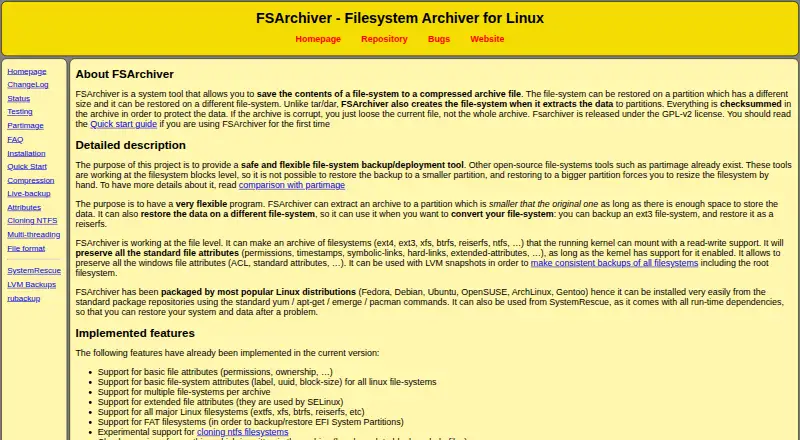
FSArchiver is an open-source Linux utility for saving filesystem contents to compressed archive files and restoring them to partitions. It suits administrators and technical users who need filesystem-level backups, metadata preservation, or restoration across partitions of different sizes and filesystem types. Archives can include multiple filesystems, and the tool can run from an installed Linux system or a live environment such as SystemRescue.
The published model is open source with a free plan, and its feature set centers on controlled archive creation and restoration rather than full-disk duplication. FSArchiver preserves filesystem labels, UUIDs, permissions, timestamps, links, extended attributes, and ACLs. It checks archive headers, data blocks, and files for corruption, supports password-based archive encryption, and can use multi-threaded compression. Large archives can be split into multiple volumes, while live backups can use LVM snapshots or network filesystems.
Platform fit is the main boundary. FSArchiver supports Linux and filesystems including ext2, ext3, ext4, reiserfs, reiser4, xfs, jfs, btrfs, FAT16, and FAT32; NTFS support is experimental. It restores filesystems to partitions, but does not provide verified bare-metal recovery or bootable recovery media. Choose FSArchiver when filesystem-level control, metadata retention, and archive portability matter more than complete-machine recovery. Choose a broader disk imaging tool when restoring an entire system or booting directly into a recovery environment is central to the workflow.
Your product? Our editors can test FSArchiver in depth and publish a review, labelled as paid · from $149/mo →
FSArchiver pricing
FSArchiver fact sheet
| Free plan | Yes |
|---|---|
| Paid from | Free |
| Bare-metal restore | No |
| Bootable recovery media | No |
| Incremental images | Not verified |
| Differential images | Not verified |
| Supported platforms | Linux; supported filesystems include ext2, ext3, ext4, reiserfs, reiser4, xfs, jfs, btrfs, FAT16/FAT32, and experimental NTFS |
| Image encryption | Yes |
| Cloud image destination | No |
| Deployment | Self-hosted |
| Platforms | Linux |
| Support | Docs |
| Built for | Solo, Small business (editorial estimate) |
| Pricing | Free plan |
| Website | fsarchiver.org |
| Facts checked | 20 Sep 2026 |
Alternatives to FSArchiver
- ClonezillaA capable free imaging toolkit for technical users and multi-computer deployment.9.3
- Macrium ReflectA Windows-focused imaging suite for detailed backup and resilient recovery.9.1
- Acronis True ImageA broad personal backup suite with cloning, recovery, mobile coverage and ransomware monitoring.9.0



See all FSArchiver alternatives →
Used FSArchiver? Be the first to review it
The editor score above is our own research. What this page doesn't have yet is a reader's view — what you used FSArchiver for, what worked and what didn't. No stars are seeded and no review is paid for; an editor reads every one before it appears.
Write a reviewTwo minutes · verified accounts only · read by an editor before it appears
Featured on iTechGuides

FSArchiver is listed in our Disk Imaging Software directory. Add the badge to your site — it links back to this page.
<a href="https://www.itechguides.com/products/fsarchiver/"><img src="https://www.itechguides.com/best/badge/fsarchiver.svg" alt="Featured on iTechGuides" width="230" height="46"></a>
Reviewed by iTechGuides Editors · Editorial team · Updated Oct 2026
Advertiser disclosure: iTechGuides is reader-supported. Vendors can pay for top positions in our rankings and for a place on other products' pages, and we may earn a commission when you click some links. Bought places stand at the number bought; this page and our disclosure say so. Paying vendors may get a fuller, more detailed review from our editors, and that review can change their score. How we rank.
Last updated · How we research and update