
Fred
Fred: A web research platform combining directional gaze capture with AI-assisted synthesis. Ranked #26 of 27 in Eye Tracking Software by our editors (6.4/10); pricing: Paid; best for usability teams wanting AI-assisted synthesis.
At a glance
- Editor score6.4 / 10
- PricingPaid
- Best forUsability teams wanting AI-assisted synthesis
- Input methodWebcam
- Facts checked22 Sep 2026
Where it wins
- Captures webcam gaze without dedicated eye-tracking hardware
- Combines gaze replay, tasks, recordings, and responses
- Adds AI-assisted research synthesis and reporting
Where it doesn't
- Eye tracking is limited to Team and Enterprise plans
- Webcam gaze provides directional rather than laboratory-grade evidence
- The workflow is web-based and requires a compatible computer webcam
Our verdict on Fred
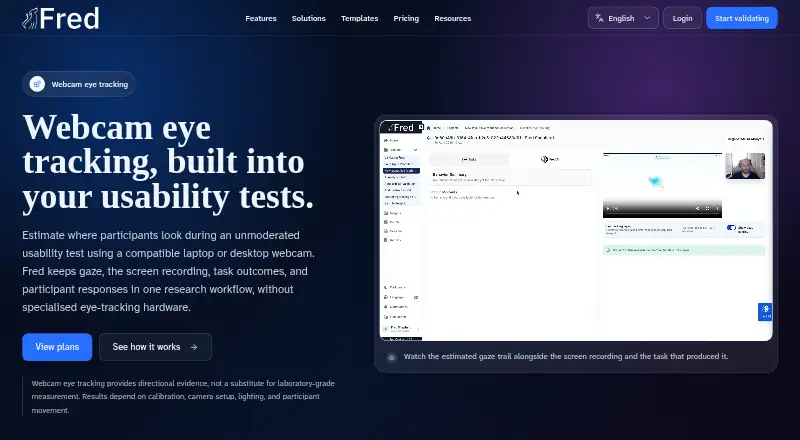
Fred is a web-based user research platform for product, research, design, agency, and enterprise teams running remote, unmoderated usability studies. Its eye-tracking feature uses a compatible laptop or desktop webcam to estimate participant gaze, with guided calibration and a separate eye-tracking consent option. Timestamped gaze points appear alongside task activity, screen recordings, participant responses, and session replay, giving teams one workflow for reviewing usability behavior. Fred is best suited to teams that want directional gaze evidence and AI-assisted synthesis without dedicated eye-tracking hardware.
The standout feature is the combination of webcam gaze capture and session context. Fred can replay gaze focus and the recent gaze trail with the recording, while connecting those observations to tasks and participant responses. That context can help researchers interpret where attention moved during a usability task rather than reviewing gaze points in isolation. The platform also includes AI-assisted research synthesis and reporting. Fred positions webcam eye tracking as directional evidence for human review, not laboratory-grade measurement, so teams needing highly controlled measurement should consider a more specialized approach.
Fred offers paid Startup, Researcher, Team, and Enterprise plans. Startup includes 5 seats, 1 project, 1 study per project, and 1 GB of storage; eye tracking is not included. Researcher raises the limits to 15 seats, 5 projects, 10 studies per project, and 15 GB of storage, while also excluding eye tracking. Team includes 25 seats, 15 projects, 30 studies per project, 50 GB of storage, and eye tracking. Enterprise adds custom limits, SSO and advanced security, multi-team rollout support, and eye tracking. Teams should choose Fred when remote usability research, contextual gaze review, and synthesis are priorities; those seeking laboratory-grade eye tracking or a non-web workflow should look elsewhere.
Your product? Our editors can test Fred in depth and publish a review, labelled as paid · from $149/mo →
Fred pricing
Fred fact sheet
| Free plan | Not verified |
|---|---|
| Paid from | Not verified |
| Input method | Webcam |
| Study mode | Remote |
| Participant limit | Not verified |
| Gaze visualizations | gaze focus; recent gaze trail |
| Export formats | Not verified |
| Supported platforms | compatible laptop or desktop webcam |
| Deployment | Cloud |
| Platforms | Web |
| Compliance & security | GDPR |
| Support | Docs |
| Built for | Small business, Mid-market, Enterprise (editorial estimate) |
| Pricing | Paid (source) |
| Website | meet-fred.com |
| Facts checked | 22 Sep 2026 |
Alternatives to Fred
- Tobii Pro LabA broad Windows toolkit for designing, recording, analyzing, and exporting eye-tracking research.9.4
- SR Research Data ViewerA deep EyeLink analysis workspace for research teams on Windows, macOS, or Linux.9.1
- LabvancedA flexible choice for affordable remote and in-lab eye-tracking studies.9.0



Used Fred? Be the first to review it
The editor score above is our own research. What this page doesn't have yet is a reader's view — what you used Fred for, what worked and what didn't. No stars are seeded and no review is paid for; an editor reads every one before it appears.
Write a reviewTwo minutes · verified accounts only · read by an editor before it appears
Featured on iTechGuides

Fred is listed in our Eye Tracking Software directory. Add the badge to your site — it links back to this page.
<a href="https://www.itechguides.com/products/fred/"><img src="https://www.itechguides.com/best/badge/fred.svg" alt="Featured on iTechGuides" width="230" height="46"></a>
Reviewed by iTechGuides Editors · Editorial team · Updated Oct 2026
Advertiser disclosure: iTechGuides is reader-supported. Vendors can pay for top positions in our rankings and for a place on other products' pages, and we may earn a commission when you click some links. Bought places stand at the number bought; this page and our disclosure say so. Paying vendors may get a fuller, more detailed review from our editors, and that review can change their score. How we rank.
Last updated · How we research and update