Fractal Note
Fractal Note: A flexible local-first outliner for users who want structured Markdown notes. Ranked #11 of 30 in Outliner Software by our editors (8.0/10); pricing: Open source; best for visual and database-style outliners.
At a glance
- Editor score8.0 / 10
- PricingOpen source
- Best forVisual and database-style outliners
- Paid fromFree
- App platformsmacOS, Windows, Linux, Chrome extension
- Facts checked20 Sep 2026
Where it wins
- Combines unlimited nesting with database and editable mind-map views
- Searches notes and attached files, with filtering and subtree scoping
- Exports to PDF or portable bundles and supports Chrome web clipping
Where it doesn't
- Windows and Linux implementations are not guaranteed
- Requires Visual Studio Code as its working environment
- Optional S3 backup and restore adds an external service dependency
Our verdict on Fractal Note
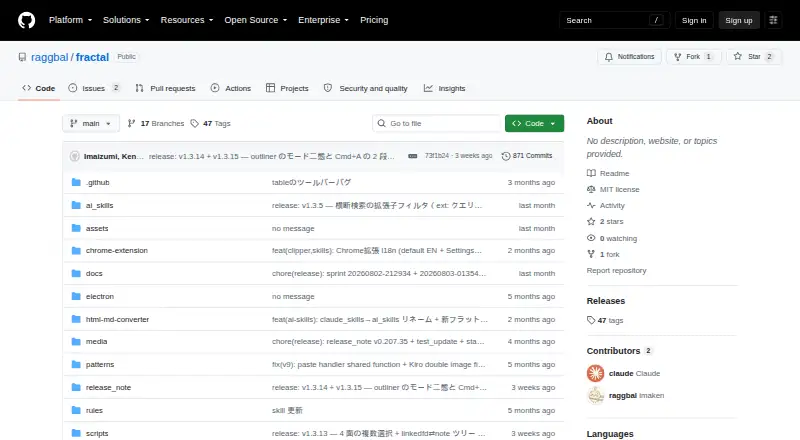
Fractal Note is a local-first note-taking and outlining environment inside Visual Studio Code. It is designed for people who want ordinary files on disk but need more structure than a conventional Markdown editor provides. Its core combines WYSIWYG Markdown editing with live rendering, a tree-based outliner with unlimited nesting, hierarchical Markdown subpages, tags, tasks, and outline navigation. Users can move between outliner, database, and editable mind-map views while collapsing sections, filtering content, and scoping work to a subtree.
Its strongest fit is breadth within a structured notes workflow. Full-text search covers notes and attached files, while local viewing supports PDF, Office, HTML, image, and text files. PDF export and portable export bundles provide practical ways to share or move material, and the Chrome web clipping extension can bring browser content into the workspace. The wider ecosystem includes Amazon S3 backup and restore, Amazon Translate, Visual Studio Code, and Chrome. AI skills for reading and editing notes are also included, alongside Markdown support and backlinks.
The main consideration is platform fit. Fractal Note is built around Visual Studio Code rather than presented as a standalone note application, so it suits users already comfortable with that environment. macOS is verified, while Windows and Linux implementations are available but not guaranteed. Optional Amazon S3 backup can support off-device recovery, but it introduces an additional service into an otherwise local-first workflow. Choose Fractal Note if you want visual outline navigation, database-style organization, file search, and Markdown-based storage in one environment. Choose another tool if you need a guaranteed experience across Windows or Linux, or prefer a dedicated standalone notes app.
Your product? Our editors can test Fractal Note in depth and publish a review, labelled as paid · from $149/mo →
Fractal Note pricing
Fractal Note fact sheet
| Free plan | Not verified |
|---|---|
| Paid from | Free |
| App platforms | macOS, Windows, Linux, Chrome extension |
| Export formats | PDF, Markdown |
| Offline access | Not verified |
| Markdown support | Yes |
| Real-time collaboration | Not verified |
| Backlinks | Yes |
| Navigation modes | Outliner, Database, Mindmap, collapse/expand, subtree scoping, filtering |
| Deployment | Desktop, Browser extension |
| Platforms | macOS, Windows, Linux, Chrome extension |
| Support | Community |
| Built for | Solo, Small business (editorial estimate) |
| Integrations | 4 integrations: Amazon S3, Amazon Translate, Visual Studio Code, Chrome |
| Pricing | Open source |
| Website | github.com |
| Facts checked | 20 Sep 2026 |
Fractal Note integrations
Fractal Note lists 4 integrations on its own site.
- Amazon S3
- Amazon Translate
- Visual Studio Code
- Chrome
Alternatives to Fractal Note
- CheckvistA flexible collaborative outliner with unlimited nesting, offline access, and low-cost task features.9.4
- DynalistDeep outlining and cross-platform access make Dynalist a strong fit for power users.9.2
- WorkflowyA mature outliner with broad platform coverage, sharing, exports, integrations, and AI tools.9.0



See all Fractal Note alternatives →
Used Fractal Note? Be the first to review it
The editor score above is our own research. What this page doesn't have yet is a reader's view — what you used Fractal Note for, what worked and what didn't. No stars are seeded and no review is paid for; an editor reads every one before it appears.
Write a reviewTwo minutes · verified accounts only · read by an editor before it appears
Featured on iTechGuides

Fractal Note is listed in our Outliner Software directory. Add the badge to your site — it links back to this page.
<a href="https://www.itechguides.com/products/fractal-note/"><img src="https://www.itechguides.com/best/badge/fractal-note.svg" alt="Featured on iTechGuides" width="230" height="46"></a>
Reviewed by iTechGuides Editors · Editorial team · Updated Oct 2026
Advertiser disclosure: iTechGuides is reader-supported. Vendors can pay for top positions in our rankings and for a place on other products' pages, and we may earn a commission when you click some links. Bought places stand at the number bought; this page and our disclosure say so. Paying vendors may get a fuller, more detailed review from our editors, and that review can change their score. How we rank.
Last updated · How we research and update