FormsHQ
FormsHQ: A web-based intake platform for teams that need forms tied to approval and document workflows. Ranked #7 of 27 in Client Intake Software by our editors (8.6/10); pricing: Free plan; best for workflow-heavy teams using AI-assisted forms.
At a glance
- Editor score8.6 / 10
- PricingFree plan
- Best forWorkflow-heavy teams using AI-assisted forms
- Free planYes
- Paid from$29/mo
- Client portalYes
- Facts checked20 Sep 2026
Where it wins
- AI-assisted form design from plain-language briefs
- Approval routing, document generation, payments, and signature gates
- CRM, spreadsheet, email, calendar, and automation handoffs
Where it doesn't
- Web-only access limits platform flexibility
- The free plan allows one published form and includes FormsHQ branding
- Advanced workflow features require higher paid tiers
Our verdict on FormsHQ
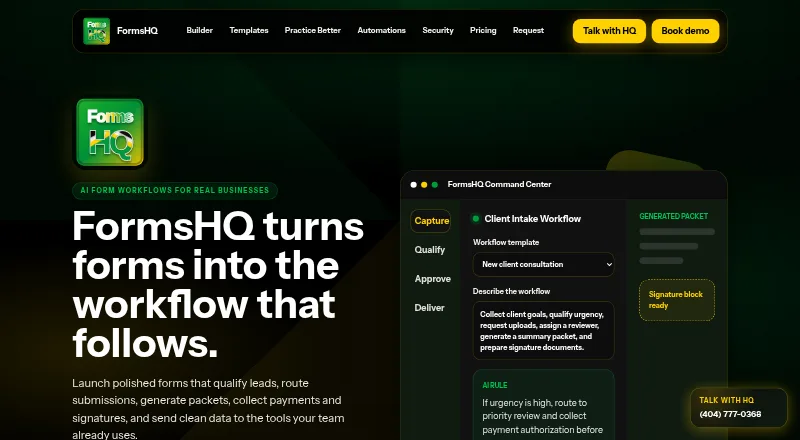
FormsHQ is a web-based form workflow product for service businesses and operational teams. It combines branded intake forms with conditional pages, submission qualification, reviewer assignment, approval routing, document generation, payment collection, and signature-ready documents. Vendor-presented use cases include legal intake, health intake, agency onboarding, loan prequalification, HR onboarding, and events or bookings. It is suited to teams that need more than a standalone form, particularly those managing intake through review, payment, documentation, or handoff stages.
Pricing follows a freemium model. The Starter Form plan is free and includes one published form, basic templates, email notifications, CSV export, and FormsHQ branding. Smart Forms costs $29 per month and adds custom branding, conditional logic, file uploads, payments, and redirects. Growth Workflows costs $99 per month and adds approval routing, PDF packets, CRM handoffs, team seats, and workflow analytics. Business Portal costs $249 per month and adds multi-form portals, reviewer roles, advanced document mapping, payment and signature gates, priority support, and launch QA. The tier structure makes the free plan appropriate for basic intake, while paid plans progressively support more involved operational processes.
Its main strength is workflow depth: submissions can be qualified and scored, routed to reviewers, converted into PDF packets, and connected to CRMs, spreadsheets, email, calendars, payment tools, and automation platforms. Client-facing requirements also extend beyond collection through portals, file uploads, payment authorization, and signature gates. The tradeoff is platform scope: FormsHQ is web-only, and the more complete workflow set sits above the free and entry-level plans. Choose it when intake is part of a broader approval or document process; teams seeking only simple forms may find the higher tiers unnecessary.
Your product? Our editors can test FormsHQ in depth and publish a review, labelled as paid · from $149/mo →
FormsHQ pricing
All 4 FormsHQ plans and prices →
FormsHQ fact sheet
| Free plan | Yes |
|---|---|
| Paid from | $29/mo |
| Client portal | Yes |
| E-signatures | Yes |
| Document uploads | Yes |
| Workflow automation | Conditional |
| Payment collection | Yes |
| Custom branding | Yes |
| Deployment | Cloud |
| Platforms | Web |
| Support | Email, Phone |
| Built for | Small business, Mid-market (editorial estimate) |
| Integrations | 6 integrations: email, spreadsheets, CRMs, calendars, payment tools, automation platforms |
| Pricing | Free plan (source) |
| Website | formshq.io |
| Facts checked | 20 Sep 2026 |
FormsHQ integrations
FormsHQ lists 6 integrations on its own site.
- spreadsheets
- CRMs
- calendars
- payment tools
- automation platforms
Alternatives to FormsHQ
- PorticoA broad client intake workflow with a free plan and paid automation tiers.9.4
- IntakeA low-cost intake platform with AI classification, payments, signatures, and automation access.9.2
- LaunchBayA paid web platform for turning client intake into structured project workflows.9.0



See all FormsHQ alternatives →
FormsHQ vs the competition
- FormsHQ vs Portico
- FormsHQ vs Intake
- FormsHQ vs LaunchBay
- FormsHQ vs Onvoy
- FormsHQ vs IntakeQ
- FormsHQ vs PlatoForms



Compare FormsHQ with any tool side by side →
Used FormsHQ? Be the first to review it
The editor score above is our own research. What this page doesn't have yet is a reader's view — what you used FormsHQ for, what worked and what didn't. No stars are seeded and no review is paid for; an editor reads every one before it appears.
Write a reviewTwo minutes · verified accounts only · read by an editor before it appears
Featured on iTechGuides

FormsHQ is listed in our Client Intake Software directory. Add the badge to your site — it links back to this page.
<a href="https://www.itechguides.com/products/formshq/"><img src="https://www.itechguides.com/best/badge/formshq.svg" alt="Featured on iTechGuides" width="230" height="46"></a>
Reviewed by iTechGuides Editors · Editorial team · Updated Oct 2026
Advertiser disclosure: iTechGuides is reader-supported. Vendors can pay for top positions in our rankings and for a place on other products' pages, and we may earn a commission when you click some links. Bought places stand at the number bought; this page and our disclosure say so. Paying vendors may get a fuller, more detailed review from our editors, and that review can change their score. How we rank.
Last updated · How we research and update