Foreceipt
Foreceipt: A low-cost receipt tracker with broad capture options and focused OCR. Ranked #6 of 29 in Receipt Scanner Apps by our editors (7.8/10); pricing: Free plan; best for budget-conscious users with high scan volume.
At a glance
- Editor score7.8 / 10
- PricingFree plan
- Best forBudget-conscious users with high scan volume
- Free planYes
- Paid from$5/mo
- Mobile platformsBoth
- Facts checked20 Sep 2026
Where it wins
- Free plan includes up to 100 receipts and 10 PDF/Excel reports
- Supports web, iOS, Android, email forwarding, and bank imports
- Business plan adds unlimited receipts and QuickBooks Online integration
Where it doesn't
- OCR covers only merchant, date, and total
- Free retention lasts up to 12 months
- Team collaboration is available only on the Business plan
Our verdict on Foreceipt
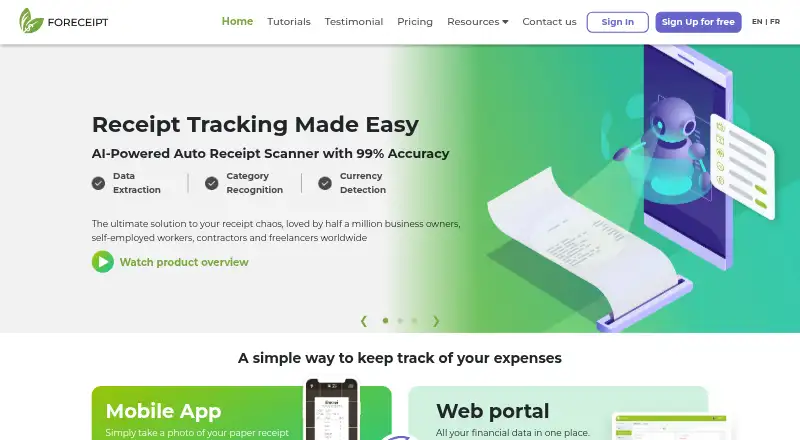
Foreceipt is a receipt-scanning and expense-management application for freelancers, self-employed workers, households, and businesses. It supports paper receipt capture, digital receipt forwarding by email, bank transaction imports from CSV and PDF, expense categorization, tax tracking, recurring expense management, and Excel or PDF reporting. Web, iOS, and Android access with synchronization make it suitable for users who move between devices, while team permissions and collaboration extend its use to business workflows.
The published plans show a useful progression for different volumes. The Free plan includes up to 100 receipts, retention for up to 12 months, and up to 10 PDF/Excel reports. Individual costs $5 per month with annual billing or $6.25 per month with monthly billing, and raises the allowance to 200 receipts per month, extends retention to 7 years, adds unlimited reports, and includes email support. Business costs $12 per month with annual billing or $15 per month with monthly billing, adding unlimited receipts, QuickBooks Online integration, team collaboration, unlimited reports, and email and phone support.
Foreceipt’s strongest fit is for users who need flexible receipt intake and practical expense organization rather than detailed receipt-level data extraction. OCR identifies the merchant, date, and total, while categorization, tax tracking, bank imports, and exportable reports support routine recordkeeping. Google Drive and QuickBooks Online provide integration options, although QuickBooks Online is reserved for Business subscribers. Choose Foreceipt for affordable individual tracking or higher-volume business receipt management; consider an alternative if line-item OCR or broader accounting connectivity is central to the workflow.
Your product? Our editors can test Foreceipt in depth and publish a review, labelled as paid · from $149/mo →
Foreceipt pricing
All 3 Foreceipt plans and prices →
Foreceipt fact sheet
| Free plan | Yes |
|---|---|
| Paid from | $5/mo |
| Monthly scan limit | 200 /mo |
| OCR field coverage | Merchant date and total |
| Line-item OCR | Not verified |
| Accounting integrations | Yes |
| Mobile platforms | Both |
| Export formats | Multiple |
| Deployment | Cloud, Mobile |
| Platforms | Web, iOS, Android |
| Support | Email, Phone, Docs |
| Built for | Solo, Small business, Mid-market, Enterprise (editorial estimate) |
| Integrations | 2 integrations: QuickBooks Online, Google Drive |
| Pricing | Free plan (source) |
| Website | foreceipt.com |
| Facts checked | 20 Sep 2026 |
Foreceipt integrations
Foreceipt lists 2 integrations on its own site.
- QuickBooks Online
- Google Drive
Alternatives to Foreceipt
- ShoeboxedA multi-channel receipt service with verified extraction, accounting sync, and paid-only plans.8.8
- AutoEntryA document-capture platform for accounting teams with complex review and coding workflows.8.6
- Affinda Receipt ExtractionA business-focused receipt extraction platform with full line-item OCR and workflow integrations.8.2



See all Foreceipt alternatives →
Foreceipt vs the competition
- Foreceipt vs Shoeboxed
- Foreceipt vs AutoEntry
- Foreceipt vs Affinda Receipt Extraction
- Foreceipt vs Taggun
- Foreceipt vs Receipt Reader AI
- Foreceipt vs Smart Receipts



Compare Foreceipt with any tool side by side →
Used Foreceipt? Be the first to review it
The editor score above is our own research. What this page doesn't have yet is a reader's view — what you used Foreceipt for, what worked and what didn't. No stars are seeded and no review is paid for; an editor reads every one before it appears.
Write a reviewTwo minutes · verified accounts only · read by an editor before it appears
Featured on iTechGuides

Foreceipt is listed in our Receipt Scanner Apps directory. Add the badge to your site — it links back to this page.
<a href="https://www.itechguides.com/products/foreceipt/"><img src="https://www.itechguides.com/best/badge/foreceipt.svg" alt="Featured on iTechGuides" width="230" height="46"></a>
Reviewed by iTechGuides Editors · Editorial team · Updated Oct 2026
Advertiser disclosure: iTechGuides is reader-supported. Vendors can pay for top positions in our rankings and for a place on other products' pages, and we may earn a commission when you click some links. Bought places stand at the number bought; this page and our disclosure say so. Paying vendors may get a fuller, more detailed review from our editors, and that review can change their score. How we rank.
Last updated · How we research and update