
FoneLab HyperTrans
FoneLab HyperTrans: A Windows-focused transfer tool with useful media and contact management. Ranked #29 of 44 in Phone Transfer Software by our editors (6.5/10); pricing: Paid; best for windows users needing basic cross-platform transfer.
At a glance
- Editor score6.5 / 10
- PricingPaid
- Best forWindows users needing basic cross-platform transfer
- Paid from$25/mo
- Mobile OS supportBoth
- Facts checked23 Sep 2026
Where it wins
- Transfers photos, messages, videos, music, and contacts
- Supports iPhone-to-Android and Android-to-iPhone transfers
- Includes SMS export, contact backup, and HEIC conversion
Where it doesn't
- Windows is the listed computer platform
- The 1 PC license covers only one computer
- App transfer is not included among the published features
Our verdict on FoneLab HyperTrans
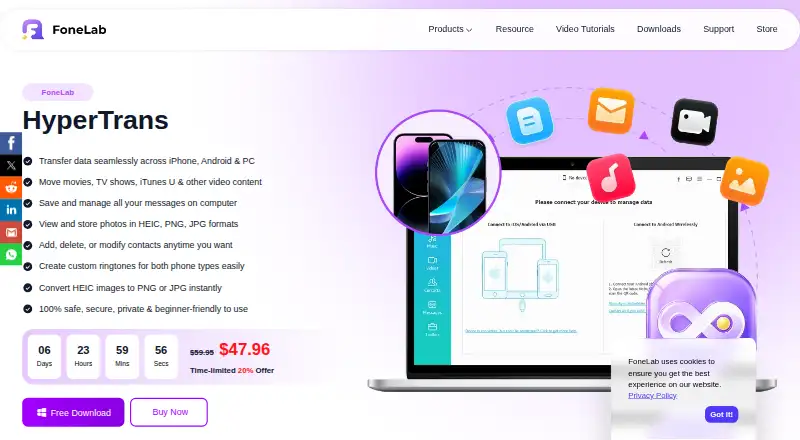
FoneLab HyperTrans is Windows software for moving and managing data between iPhone, Android phones, and a Windows PC. It is aimed at users who need phone-to-phone transfers, computer exports, and basic organization for photos, messages, videos, music, and contacts. Its scope also covers contact backup and restore, duplicate-contact detection, album management, ringtone creation, and HEIC conversion to JPG or PNG. The published compatibility information includes Windows, iOS, iPadOS, and Android devices.
Its strongest practical advantage is the range of everyday transfer and export tasks in one product. Phone-to-phone transfer works between iPhone and Android, while phone-to-PC transfers support common personal data types. SMS can be exported to CSV, HTML, or TXT, and photos can be exported, organized into albums, and handled for duplicates. Contact grouping and duplicate detection add useful cleanup tools, while iTunes integration provides an additional fit for users already managing media through that ecosystem.
Pricing favors buyers who expect continued use. The 1 Month License costs $25 per month, renews automatically, can be canceled at any time, and supports 1 PC. The 1 PC Lifetime License costs $59.95 one time and includes lifetime updates and technical support; the 3 PCs Lifetime License costs $99 one time with the same support and update terms. HyperTrans is a sensible choice for Windows users who want straightforward iPhone and Android transfers plus file management. Users who need a non-Windows desktop app or app-transfer workflows should choose a different tool.
Your product? Our editors can test FoneLab HyperTrans in depth and publish a review, labelled as paid · from $149/mo →
FoneLab HyperTrans pricing
All 3 FoneLab HyperTrans plans and prices →
FoneLab HyperTrans fact sheet
| Free plan | Not verified |
|---|---|
| Paid from | $25/mo |
| Mobile OS support | Both |
| Phone-to-phone transfer | Yes |
| Phone-to-computer transfer | Yes |
| App transfer | Not verified |
| Computer backup | Yes |
| Devices per license | Not verified |
| Deployment | Desktop |
| Platforms | Windows |
| Support | |
| Built for | Solo, Small business (editorial estimate) |
| Pricing | Paid (source) |
| Website | fonelab.com |
| Facts checked | 23 Sep 2026 |
Alternatives to FoneLab HyperTrans
- Samsung Smart SwitchA free transfer and backup utility for moving data into Samsung Galaxy devices.9.4
- vivo EasyShareA free migration tool for moving phone data across Android, iOS, Windows, and macOS.9.3
- Wondershare MobileTransA paid transfer suite for phones, computers, backups, apps, and messaging data.9.2


See all FoneLab HyperTrans alternatives →
Used FoneLab HyperTrans? Be the first to review it
The editor score above is our own research. What this page doesn't have yet is a reader's view — what you used FoneLab HyperTrans for, what worked and what didn't. No stars are seeded and no review is paid for; an editor reads every one before it appears.
Write a reviewTwo minutes · verified accounts only · read by an editor before it appears
Featured on iTechGuides

FoneLab HyperTrans is listed in our Phone Transfer Software directory. Add the badge to your site — it links back to this page.
<a href="https://www.itechguides.com/products/fonelab-hypertrans/"><img src="https://www.itechguides.com/best/badge/fonelab-hypertrans.svg" alt="Featured on iTechGuides" width="230" height="46"></a>
Reviewed by iTechGuides Editors · Editorial team · Updated Oct 2026
Advertiser disclosure: iTechGuides is reader-supported. Vendors can pay for top positions in our rankings and for a place on other products' pages, and we may earn a commission when you click some links. Bought places stand at the number bought; this page and our disclosure say so. Paying vendors may get a fuller, more detailed review from our editors, and that review can change their score. How we rank.
Last updated · How we research and update