
FoneDog Phone Transfer
FoneDog Phone Transfer: A Windows-focused transfer utility with contact cleanup and flexible license options. Ranked #27 of 44 in Phone Transfer Software by our editors (6.7/10); pricing: Paid; best for windows transfer with contact cleanup.
At a glance
- Editor score6.7 / 10
- PricingPaid
- Best forWindows transfer with contact cleanup
- Free planNo
- Paid from$39.95/device/yr
- Mobile OS supportBoth
- Facts checked23 Sep 2026
Where it wins
- Transfers contacts, messages, photos, videos, and audio
- Moves data between iOS, Android, and Windows PCs
- De-duplicates contacts and supports batch file deletion
Where it doesn't
- Windows support limits platform coverage
- No free plan is available
- Each license covers one PC
Our verdict on FoneDog Phone Transfer
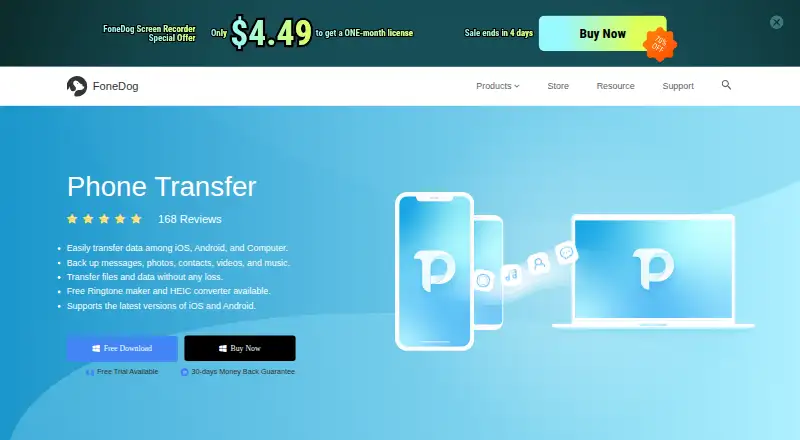
FoneDog Phone Transfer is desktop software for moving and managing data between iPhone, iPad, iPod touch, Android devices, and Windows PCs. It suits people who need to transfer content between iOS and Android, export phone data to a PC, import computer files to a phone, or back up and restore contacts. Its supported content includes contacts, messages, photos, videos, audio, voice memos, and other media, with additional tools for contact cleanup, ringtone creation, HEIC conversion, and file deletion.
Its strongest fit is Windows-centered device management. The software handles phone-to-phone transfers between iOS and Android, phone-to-PC exports, and PC-to-phone imports. Contact deduplication is a practical addition for users consolidating address books, while individual or batch deletion helps manage unwanted files. It can also create and transfer custom ringtones and convert HEIC images to JPEG or PNG. This breadth makes it more suitable for mixed-device households or users organizing phone data on a Windows PC than for buyers seeking a narrow backup utility.
Pricing is paid-only and offered in three licenses: the 1-Month License costs $39.95 per PC per month with auto-renewal; the 1-Year License costs $59.95 per PC per year with auto-renewal; and the Lifetime License costs $69.95 per PC as a one-time purchase. Each plan covers one PC. The Lifetime License is the clearest fit for continued use, while the monthly option suits short-term transfers. Choose FoneDog for Windows-based iOS, Android, and contact-management tasks. Choose an alternative if you need software for platforms beyond Windows or app transfer capabilities.
Your product? Our editors can test FoneDog Phone Transfer in depth and publish a review, labelled as paid · from $149/mo →
FoneDog Phone Transfer pricing
All 3 FoneDog Phone Transfer plans and prices →
FoneDog Phone Transfer fact sheet
| Free plan | No |
|---|---|
| Paid from | $39.95/device/yr |
| Mobile OS support | Both |
| Phone-to-phone transfer | Yes |
| Phone-to-computer transfer | Yes |
| App transfer | Not verified |
| Computer backup | Yes |
| Devices per license | 6 devices |
| Money-back guarantee | 30 days |
| Deployment | Desktop |
| Platforms | Windows, macOS |
| Support | |
| Built for | Solo, Small business (editorial estimate) |
| Pricing | Paid (source) |
| Website | fonedog.com |
| Facts checked | 23 Sep 2026 |
Alternatives to FoneDog Phone Transfer
- Samsung Smart SwitchA free transfer and backup utility for moving data into Samsung Galaxy devices.9.4
- vivo EasyShareA free migration tool for moving phone data across Android, iOS, Windows, and macOS.9.3
- Wondershare MobileTransA paid transfer suite for phones, computers, backups, apps, and messaging data.9.2


See all FoneDog Phone Transfer alternatives →
Used FoneDog Phone Transfer? Be the first to review it
The editor score above is our own research. What this page doesn't have yet is a reader's view — what you used FoneDog Phone Transfer for, what worked and what didn't. No stars are seeded and no review is paid for; an editor reads every one before it appears.
Write a reviewTwo minutes · verified accounts only · read by an editor before it appears
Featured on iTechGuides

FoneDog Phone Transfer is listed in our Phone Transfer Software directory. Add the badge to your site — it links back to this page.
<a href="https://www.itechguides.com/products/fonedog-phone-transfer/"><img src="https://www.itechguides.com/best/badge/fonedog-phone-transfer.svg" alt="Featured on iTechGuides" width="230" height="46"></a>
Reviewed by iTechGuides Editors · Editorial team · Updated Oct 2026
Advertiser disclosure: iTechGuides is reader-supported. Vendors can pay for top positions in our rankings and for a place on other products' pages, and we may earn a commission when you click some links. Bought places stand at the number bought; this page and our disclosure say so. Paying vendors may get a fuller, more detailed review from our editors, and that review can change their score. How we rank.
Last updated · How we research and update