
Fokus
Fokus: A broad AI planning workspace for turning priorities into scheduled work. Ranked #31 of 55 in AI Personal Assistants by our editors (5.9/10); pricing: Free plan; best for AI-first task and calendar planning.
At a glance
- Editor score5.9 / 10
- PricingFree plan
- Best forAI-first task and calendar planning
- Free planYes
- Paid from€15/mo
- Action automationYes
- Facts checked19 Sep 2026
Where it wins
- Automatically schedules tasks and time-blocks around calendar context
- Connects calendars, email, work tools, and task apps
- Available on web, desktop, mobile, and Chrome
Where it doesn't
- Pro pricing is presented as preview pricing after the beta
- Some capabilities, including transcription and voice, are add-ons
- Its broad workspace may be more than simple task tracking requires
Our verdict on Fokus
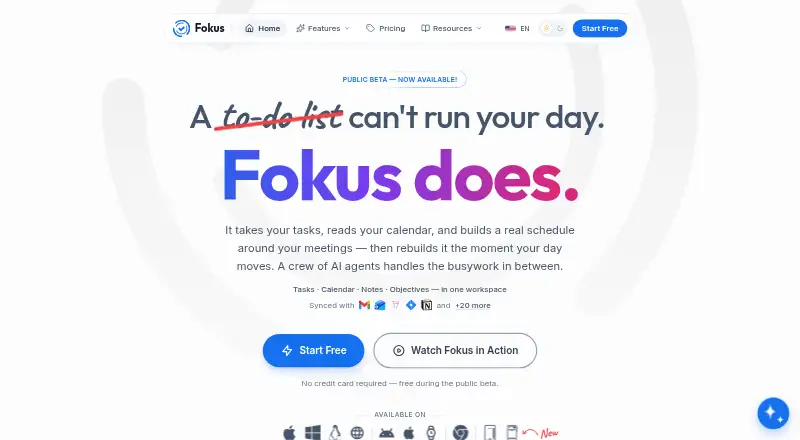
Fokus brings tasks, calendars, notes, objectives, and AI assistance into one daily planning workspace. It is aimed at people who want an AI-first way to organize priorities, schedule work, and connect personal productivity with email and workplace tools. The product is available on web, Windows, macOS, Linux, iOS, Android, and through a Chrome extension, giving it a wide platform footprint.
The free beta includes tasks, calendar, notes, objectives, and AI features during the public beta. The published Pro preview is €15 per month when billed annually and adds auto-scheduling, time-blocking, Captain Fokus, AI crew tasks, and 20+ integrations. The pricing page states that users are not charged until the beta ends. This makes Fokus easy to evaluate during the beta, while buyers planning for continued use should consider the transition to the paid Pro tier.
Its standout area is the connection between AI actions and time management. Captain Fokus can create, find, move, complete, and schedule workspace items, while automatic scheduling considers meetings, deadlines, priorities, and energy. Objective decomposition turns goals into concrete tasks, and Crew Tasks can run from schedules, calendar events, email labels, or manual triggers. Calendar synchronization covers Google Calendar, Outlook, and Apple Calendar; Gmail workflows support triage, drafting, labeling, and archiving. Fokus suits users who want one AI-led system across planning and execution. Those seeking only a lightweight task list may find its wider feature set unnecessary, especially where optional meeting transcription, email assistance, voice, and booking-page capabilities are involved.
Your product? Our editors can test Fokus in depth and publish a review, labelled as paid · from $149/mo →
Fokus pricing
All 2 Fokus plans and prices →
Fokus fact sheet
| Free plan | Yes |
|---|---|
| Paid from | €15/mo |
| Action automation | Yes |
| Calendar management | Yes |
| Task management | Yes |
| Email management | Yes |
| Connected apps | Not verified |
| Mobile apps | Yes |
| Browser extension | Yes |
| Deployment | Cloud, Desktop, Mobile, Browser extension |
| Platforms | Web, Windows, macOS, Linux, iOS, Android, Chrome extension |
| Integrations | 20 integrations: Google Calendar, Outlook, Apple Calendar, Gmail, Outlook Mail, Slack … |
| Pricing | Free plan (source) |
| Website | getfokus.com |
| Facts checked | 19 Sep 2026 |
Fokus integrations
Fokus lists 20 integrations on its own site.
- Google Calendar
- Outlook
- Apple Calendar
- Gmail
- Outlook Mail
- Slack
- Microsoft Teams
- Zoom
- Google Meet
- Google Tasks
- Microsoft To Do
- Apple Reminders
- Todoist
- Trello
- Asana
- Jira
- Linear
- RescueTime
- Toggl Track
- Notion
Alternatives to Fokus
- ChatGPTA broad AI assistant spanning chat, research, creation, analysis, and teamwork.9.4
- GeminiA broad AI assistant for users who want Google services, research, and creation tools together.9.3
- Microsoft CopilotA broad Copilot experience with especially strong Microsoft 365 integration.9.1



Also Ranked In
Fokus is ranked in 2 of our directories.
Used Fokus? Be the first to review it
The editor score above is our own research. What this page doesn't have yet is a reader's view — what you used Fokus for, what worked and what didn't. No stars are seeded and no review is paid for; an editor reads every one before it appears.
Write a reviewTwo minutes · verified accounts only · read by an editor before it appears
Featured on iTechGuides

Fokus is listed in our AI Personal Assistants directory. Add the badge to your site — it links back to this page.
<a href="https://www.itechguides.com/products/fokus/"><img src="https://www.itechguides.com/best/badge/fokus.svg" alt="Featured on iTechGuides" width="230" height="46"></a>
Reviewed by iTechGuides Editors · Editorial team · Updated Sep 2026
Advertiser disclosure: iTechGuides is reader-supported. Vendors can pay for top positions in our rankings and for a place on other products' pages, and we may earn a commission when you click some links. Bought places stand at the number bought; this page and our disclosure say so. Paying vendors may get a fuller, more detailed review from our editors, and that review can change their score. How we rank.
Last updated · How we research and update