
Fluence
Fluence: A broad free toolkit for live visuals, projection mapping, and multi-display performance. Ranked #9 of 24 in Projection Mapping Software by our editors (7.1/10); pricing: Free plan; best for free live performers and projection designers.
At a glance
- Editor score7.1 / 10
- PricingFree plan
- Best forFree live performers and projection designers
- Free planYes
- 3D mappingYes
- Facts checked20 Sep 2026
Where it wins
- Free access to layered composition, mapping, blending, and live inputs
- Advanced control through MIDI, OSC, keyboard, API, and MCP
- Supports 3D models, multi-display output, automation, recording, and export
Where it doesn't
- Free use includes a periodic watermark
- Desktop software for Windows and macOS
- Its broad feature set may require careful configuration for live shows
Our verdict on Fluence
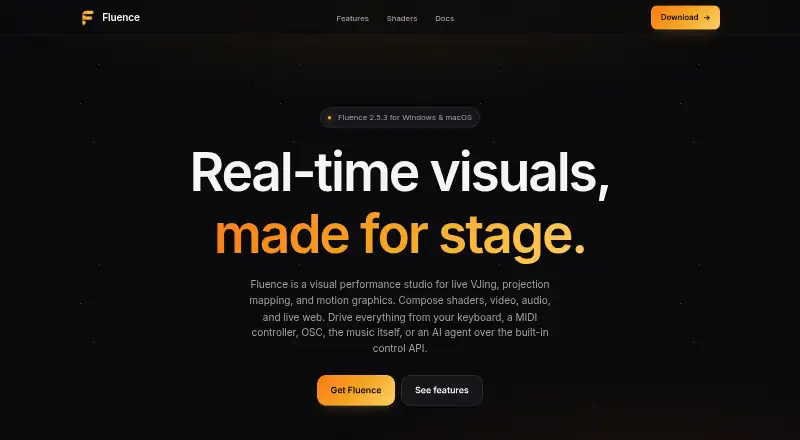
Fluence is a desktop visual performance studio for live VJing, projection mapping, and motion graphics. It suits performers and projection designers who need to combine prepared arrangements with real-time control. The workflow brings together layered composition, deck-style triggering, video, shaders, audio, live capture, timeline arrangements, warping, edge blending, multi-display output, recording, and export. It runs on Windows and Apple Silicon Macs, with the full feature set available before licensing, subject to a periodic watermark.
Its strongest area is breadth within a live visual workflow. Projection designers can work with slices and warping grids, blend overlapping projectors, and load OBJ or GLTF models with PBR rendering. Performers can take input from webcams, capture cards, screen capture, DeckLink, and NDI, then send output through Spout, Syphon, or NDI. Keyboard, MIDI, and OSC mappings add practical control options, while timeline automation and audio-reactive parameters support prepared sets and responsive performances. The local control API and MCP bridge also provide paths for external control and AI-agent-driven operation.
The freemium model makes Fluence accessible for free live work, while the periodic watermark is the main consideration for public-facing output. The published licensing path is a perpetual license, and the core workflow remains available before licensing. Fluence is a strong fit for performers and designers who value a wide set of mapping, input, control, and output options in one desktop application. Those seeking a narrower tool for straightforward playback or a workflow without a free-tier watermark may prefer a more focused alternative.
Fluence pricing
Fluence fact sheet
| Free plan | Yes |
|---|---|
| Paid from | Not verified |
| Workflow | Hybrid |
| Projection outputs | Not verified |
| Edge blending | Yes |
| Live video input | Yes |
| 3D mapping | Yes |
| Control protocols | Advanced |
| Deployment | Desktop |
| Platforms | Windows, macOS |
| Support | Email, Docs |
| Built for | Solo, Small business, Mid-market (editorial estimate) |
| Integrations | 6 integrations: Spout, Syphon, NDI, Blackmagic DeckLink, MIDI, OSC |
| Pricing | Free plan |
| Website | fluencelive.com |
| Facts checked | 20 Sep 2026 |
Fluence integrations
Fluence lists 6 integrations on its own site.
- Spout
- Syphon
- NDI
- Blackmagic DeckLink
- MIDI
- OSC
Alternatives to Fluence
- VIOSOA broad professional toolkit for planning, aligning, controlling, and playing projection shows.9.8
- Christie MystiqueA focused choice for automating alignment and projection mapping across Christie systems.8.8
- ScreenberryA broad, control-focused choice for projection mapping and live visual shows.8.5



See all Fluence alternatives →
Used Fluence? Be the first to review it
The editor score above is our own research. What this page doesn't have yet is a reader's view — what you used Fluence for, what worked and what didn't. No stars are seeded and no review is paid for; an editor reads every one before it appears.
Write a reviewTwo minutes · verified accounts only · read by an editor before it appears
Featured on iTechGuides

Fluence is listed in our Projection Mapping Software directory. Add the badge to your site — it links back to this page.
<a href="https://www.itechguides.com/products/fluence/"><img src="https://www.itechguides.com/best/badge/fluence.svg" alt="Featured on iTechGuides" width="230" height="46"></a>
Guides on projection mapping software
- 8 Best Projection Mapping Software Tools in 2026 (Paid & Free)Aug 2026
- Projection Mapping Software: 9 Best to Use in 2025 [Fresh List]Aug 2026
Reviewed by iTechGuides Editors · Editorial team · Updated Sep 2026
Advertiser disclosure: iTechGuides is reader-supported. We may earn a commission when you click some links. How we rank.
Last updated · How we research and update