
FlowCraft
FlowCraft: A flexible web diagram generator with broad format coverage and Mermaid-backed editing. Ranked #26 of 32 in AI Diagram Generators by our editors (6.8/10); pricing: Free plan; best for users needing many diagram templates.
At a glance
- Editor score6.8 / 10
- PricingFree plan
- Best forUsers needing many diagram templates
- Free planYes
- Mermaid supportYes
- Facts checked20 Sep 2026
Where it wins
- Supports 48+ diagram types, from flowcharts to system architecture diagrams
- Edits Mermaid-backed source and refines generated diagram elements
- Offers PNG, SVG, PDF, and Mermaid source exports plus sharing
Where it doesn't
- The product is web-based rather than a multi-platform desktop application
- The VS Code extension focuses on generating flowcharts from code
- Mermaid-backed editing may be less suitable for users avoiding diagram source syntax
Our verdict on FlowCraft
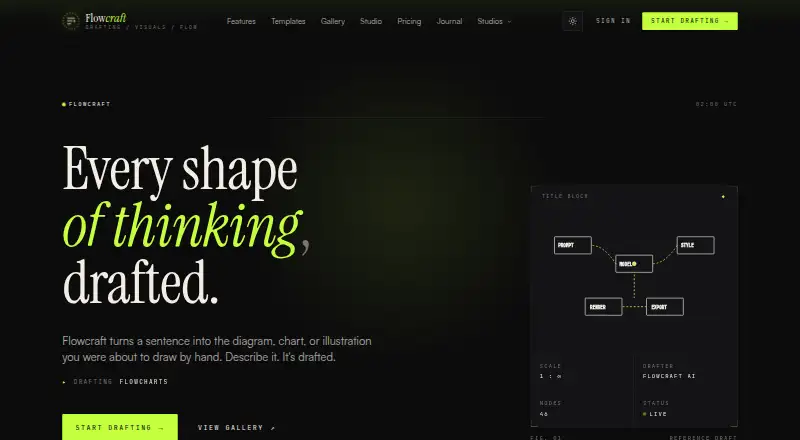
FlowCraft is a web-based AI diagram generator for turning natural-language descriptions or pasted documents into diagrams, charts, and illustrations. It is aimed at engineers, educators, analysts, founders, product teams, and healthcare users who need to create visual documentation or explain processes. Its coverage includes flowcharts, sequence diagrams, mind maps, ER diagrams, user journeys, system architecture diagrams, and process maps, making it a fit for users who need more than one diagram format.
The free plan gives FlowCraft a low-commitment entry point, while the published pricing model is freemium. Its main differentiator is the combination of natural-language generation with Mermaid-backed editing. Users can refine generated diagrams, adjust elements, save work in a library, and edit the underlying Mermaid source. That workflow can suit technical teams that want AI-assisted drafting without giving up source-level control. Templates add another starting point through editable diagram examples.
FlowCraft also connects diagram creation with sharing, export, and development workflows. Diagrams can be shared through public or private links and exported as PNG, SVG, PDF, or Mermaid source for presentations, documentation, and other uses. Its VS Code extension generates flowcharts from code, extending the product beyond the browser for a specific engineering workflow. Choose FlowCraft if you need broad diagram coverage, editable source, and several export formats in a web tool. Users seeking a desktop-first product or a broader code-integrated workflow may prefer a different fit.
Your product? Our editors can test FlowCraft in depth and publish a review, labelled as paid · from $149/mo →
FlowCraft pricing
FlowCraft fact sheet
| Free plan | Yes |
|---|---|
| Paid from | Not verified |
| AI diagram limit | Not verified |
| Mermaid support | Yes |
| Real-time collaboration | Not verified |
| Diagram import | Not verified |
| Platform | Web |
| Export formats | PNG, SVG, PDF, Mermaid source |
| Deployment | Cloud |
| Platforms | Web |
| Support | |
| Built for | Solo, Small business, Mid-market, Enterprise (editorial estimate) |
| Pricing | Free plan (source) |
| Website | flowcraft.app |
| Facts checked | 20 Sep 2026 |
Alternatives to FlowCraft
- OpenFlowKitA flexible free diagramming workspace for technical teams that prefer editable, portable outputs.9.4
- EraserA broad diagram workspace combining AI, diagram-as-code, collaboration, and integrations.9.3
- ArchwayA broad architecture diagram generator with AI input, collaboration, APIs, and self-hosting.9.2



See all FlowCraft alternatives →
Used FlowCraft? Be the first to review it
The editor score above is our own research. What this page doesn't have yet is a reader's view — what you used FlowCraft for, what worked and what didn't. No stars are seeded and no review is paid for; an editor reads every one before it appears.
Write a reviewTwo minutes · verified accounts only · read by an editor before it appears
Featured on iTechGuides

FlowCraft is listed in our AI Diagram Generators directory. Add the badge to your site — it links back to this page.
<a href="https://www.itechguides.com/products/flowcraft/"><img src="https://www.itechguides.com/best/badge/flowcraft.svg" alt="Featured on iTechGuides" width="230" height="46"></a>
Reviewed by iTechGuides Editors · Editorial team · Updated Oct 2026
Advertiser disclosure: iTechGuides is reader-supported. Vendors can pay for top positions in our rankings and for a place on other products' pages, and we may earn a commission when you click some links. Bought places stand at the number bought; this page and our disclosure say so. Paying vendors may get a fuller, more detailed review from our editors, and that review can change their score. How we rank.
Last updated · How we research and update