FlexInput
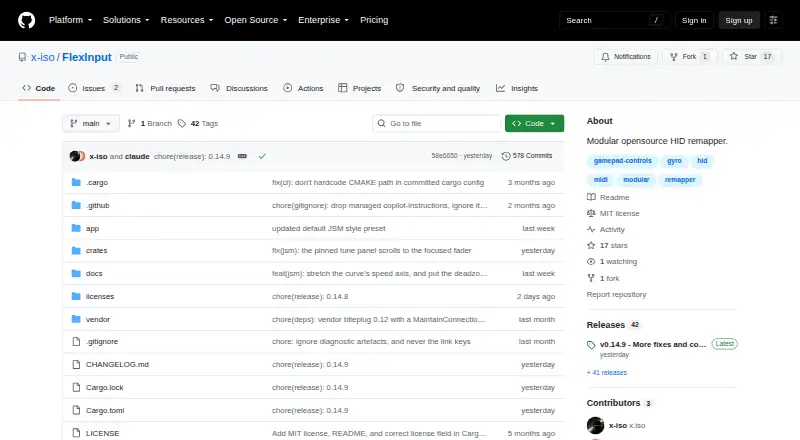
FlexInput: A flexible node-based mapper for technical users combining controllers, MIDI, motion, and network inputs. Ranked #9 of 27 in Game Controller Mapper Software by our editors (7.2/10); pricing: Free plan; best for technical users routing controllers, MIDI, and networks.
At a glance
- Editor score7.2 / 10
- PricingFree plan
- Best forTechnical users routing controllers, MIDI, and networks
- Free planYes
- Paid fromFree
- Virtual-controller outputYes
- Facts checked20 Sep 2026
Where it wins
- Visual node graph supports complex input routing and signal transformations
- Supports multiple controllers, MIDI, motion input, and virtual outputs
- Reusable patches and network transports support repeatable routing workflows
Where it doesn't
- Windows-only support limits cross-platform use
- Node-based routing may require technical setup and configuration
- No built-in AI features
Our verdict on FlexInput
FlexInput is an open-source Windows application for routing and remapping controller, MIDI, motion, and network inputs. Its node-based visual signal graph lets users transform axes, apply response curves, combine signals, and route results to virtual gamepads, keyboard and mouse devices, or another FlexInput instance. It is aimed at technical users who need more control than a straightforward button-remapping utility provides, including workflows involving XInput, DualShock 4, DualSense, Switch Pro, SDL3 controllers, Joy-Con 2, Bluetooth Classic gamepads, and MIDI devices.
Its strongest area is signal-routing depth. MIDI input and output include per-CC pins and CC Learn, while gyroscope and accelerometer inputs add motion data to the same routing model. Virtual XInput, DualShock 4/DualSense, keyboard, and mouse outputs cover several common destinations. Saved patches, response curves, and reusable sub-patches support repeatable configurations, and network routing includes LAN, PSK, and peer-to-peer transports. Automatic tab switching based on the foreground process can also adapt routing as the active application changes.
FlexInput is free and open source, with Windows 10/11 x64 support. Its ecosystem includes HidHide, HIDMaestro, and ViGEmBus, which may matter when managing device visibility or virtual-controller workflows. The trade-off is focus: this is a Windows-only tool centered on a visual routing graph, rather than a simple mapper for quick remaps. Choose it if you need controller standards, MIDI, motion, virtual outputs, or network routing in one environment. Choose an alternative if you need cross-platform support or a less technical configuration model.
Your product? Our editors can test FlexInput in depth and publish a review, labelled as paid · from $149/mo →
FlexInput pricing
FlexInput fact sheet
| Free plan | Yes |
|---|---|
| Paid from | Free |
| Keyboard/mouse output | Yes |
| Virtual-controller output | Yes |
| Profile switching | Not verified |
| Per-app profiles | Not verified |
| Platform support | Windows |
| Maximum profiles | Not verified |
| Controller input types | XInput, DualShock 4, DualSense, Switch Pro, SDL3 controllers, MIDI, Joy-Con 2, Bluetooth Classic gamepads |
| Deployment | Desktop |
| Platforms | Windows |
| Support | Community, Docs |
| Built for | Solo, Small business (editorial estimate) |
| Integrations | 3 integrations: HidHide, HIDMaestro, ViGEmBus |
| Pricing | Free plan |
| Website | github.com |
| Facts checked | 20 Sep 2026 |
FlexInput integrations
FlexInput lists 3 integrations on its own site.
- HidHide
- HIDMaestro
- ViGEmBus
Alternatives to FlexInput
- Steam InputA free, mature mapper for per-game controller profiles across Windows, macOS, and Linux.8.6
- DS4WindowsA capable free mapper for PlayStation controllers, limited to Windows PCs.7.9
- JoyShockMapperA free, gyro-focused mapper for Windows and Linux with deep binding controls.7.8


See all FlexInput alternatives →
Used FlexInput? Be the first to review it
The editor score above is our own research. What this page doesn't have yet is a reader's view — what you used FlexInput for, what worked and what didn't. No stars are seeded and no review is paid for; an editor reads every one before it appears.
Write a reviewTwo minutes · verified accounts only · read by an editor before it appears
Featured on iTechGuides

FlexInput is listed in our Game Controller Mapper Software directory. Add the badge to your site — it links back to this page.
<a href="https://www.itechguides.com/products/flexinput/"><img src="https://www.itechguides.com/best/badge/flexinput.svg" alt="Featured on iTechGuides" width="230" height="46"></a>
Reviewed by iTechGuides Editors · Editorial team · Updated Oct 2026
Advertiser disclosure: iTechGuides is reader-supported. Vendors can pay for top positions in our rankings and for a place on other products' pages, and we may earn a commission when you click some links. Bought places stand at the number bought; this page and our disclosure say so. Paying vendors may get a fuller, more detailed review from our editors, and that review can change their score. How we rank.
Last updated · How we research and update