
File Viewer
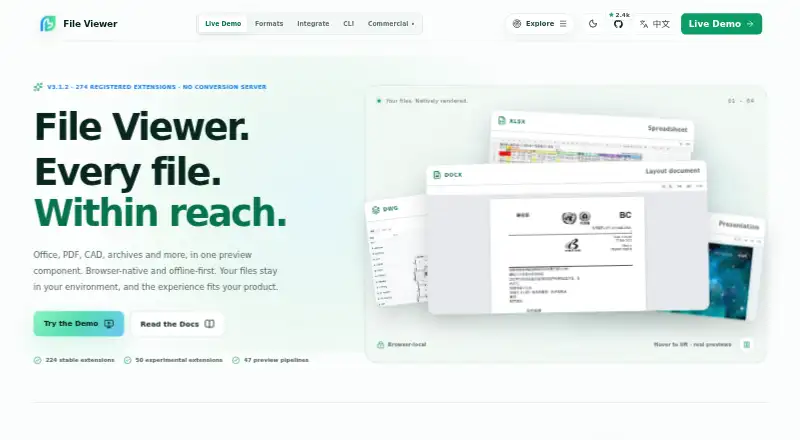
File Viewer: A broad, embeddable web viewer for read-only previews across 274 file extensions. Ranked #11 of 31 in File Viewer Software by our editors (7.8/10); pricing: Open source; best for developers needing an embeddable viewer.
At a glance
- Editor score7.8 / 10
- PricingOpen source
- Best forDevelopers needing an embeddable viewer
- Paid fromFree
- Facts checked22 Sep 2026
Where it wins
- Previews 274 registered extensions across 47 preview pipelines
- Supports nested archives, search, highlighted matches, and export
- Integrates with React, Vue, Svelte, jQuery, and Web Components
Where it doesn't
- Read-only previews do not provide in-file editing
- Web-only access may not suit native application requirements
- Printing, export, zoom, and navigation vary by file type
Our verdict on File Viewer
File Viewer is an open-source, browser-based component ecosystem for teams that need read-only file previews inside web applications. It covers Office documents, PDFs and OFD files, CAD drawings, archives, email, 3D assets, diagrams, code, media, and structured data. With 274 registered file extensions across 47 preview pipelines, it is aimed at developers building attachment viewing into products rather than users seeking a standalone desktop viewer. Its web focus and embeddable design make it a fit for applications that need browser-native access to varied file formats.
Its strongest advantage is breadth combined with useful document navigation. File Viewer supports nested archive entry preview, search with highlighted matches and next/previous navigation, plus printing, HTML export, zoom, and navigation where supported. Configurable renderer presets divide the implementation into lightweight, office, engineering, or full capabilities, giving teams a way to select an appropriate renderer scope. The project also supports Web Components, Vue, React, Svelte, and jQuery, which helps it fit different JavaScript application stacks.
Deployment flexibility is another important consideration. The viewer uses Workers, WASM, and self-hostable assets for offline-first browser rendering, and the published product details describe private or offline deployments without a conversion server. That approach suits teams that want to keep rendering within their own web application environment. However, File Viewer is read-only, so teams requiring document editing should choose an editing-focused alternative. It is also web-only, making it less suitable when native desktop or mobile viewers are required. Teams should also account for format-specific differences because several functions are available only where supported.
Your product? Our editors can test File Viewer in depth and publish a review, labelled as paid · from $149/mo →
File Viewer pricing
File Viewer fact sheet
| Free plan | Not verified |
|---|---|
| Paid from | Free |
| Listed formats | Not verified |
| Primary access | Web |
| Maximum file size | Not verified |
| Archive preview | Yes |
| Office file preview | Yes |
| Code file preview | Yes |
| In-file search | Yes |
| Deployment | Self-hosted |
| Platforms | Web |
| Support | Docs, Community |
| Built for | Small business, Mid-market, Enterprise (editorial estimate) |
| Pricing | Open source |
| Website | file-viewer.app |
| Facts checked | 22 Sep 2026 |
Alternatives to File Viewer
- OpenText Brava!A cross-platform viewer for controlled document review, redaction, comparison, and publishing.9.3
- XnView MPA free image viewer with broad format support and paid commercial licensing.9.1
- OkularA capable open-source viewer for PDFs, forms, annotations, signatures, and more.8.9


See all File Viewer alternatives →
Used File Viewer? Be the first to review it
The editor score above is our own research. What this page doesn't have yet is a reader's view — what you used File Viewer for, what worked and what didn't. No stars are seeded and no review is paid for; an editor reads every one before it appears.
Write a reviewTwo minutes · verified accounts only · read by an editor before it appears
Featured on iTechGuides

File Viewer is listed in our File Viewer Software directory. Add the badge to your site — it links back to this page.
<a href="https://www.itechguides.com/products/file-viewer/"><img src="https://www.itechguides.com/best/badge/file-viewer.svg" alt="Featured on iTechGuides" width="230" height="46"></a>
Reviewed by iTechGuides Editors · Editorial team · Updated Oct 2026
Advertiser disclosure: iTechGuides is reader-supported. Vendors can pay for top positions in our rankings and for a place on other products' pages, and we may earn a commission when you click some links. Bought places stand at the number bought; this page and our disclosure say so. Paying vendors may get a fuller, more detailed review from our editors, and that review can change their score. How we rank.
Last updated · How we research and update