
Fastfetch
Fastfetch: A free, open-source CLI for concise system, hardware, firmware, and package details. Ranked #23 of 33 in System Information Software by our editors (6.4/10); pricing: Free plan; best for customizable cross-platform CLI summaries.
At a glance
- Editor score6.4 / 10
- PricingFree plan
- Best forCustomizable cross-platform CLI summaries
- Free planYes
- Paid fromFree
- Operating systemsOther
- Facts checked20 Sep 2026
Where it wins
- Covers OS, hardware, BIOS, bootloader, packages, and network details
- Runs across Windows, macOS, Linux, and Android
- Supports JSONC configuration, JSON Schema, and machine-readable JSON output
Where it doesn't
- Focuses on concise display rather than deep diagnostics
- Does not provide inventory workflows
- Terminal-based output may not suit users seeking a graphical interface
Our verdict on Fastfetch
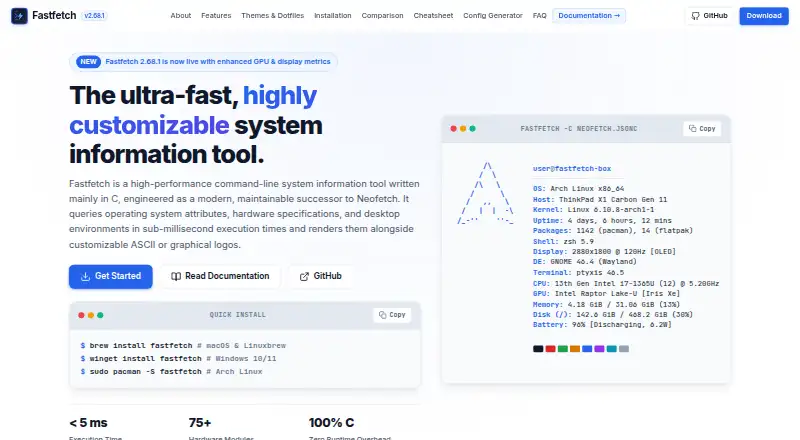
Fastfetch is an open-source command-line system information tool for users who want a concise, customizable summary of a computer or mobile device. It collects operating-system, hardware, desktop-environment, bootloader, package, and other system details, then presents them in a configurable terminal layout. Support covers Windows, macOS, Linux, Android, several BSD systems, Haiku, and SunOS, making it suitable for cross-platform personal workflows and command-line environments.
Fastfetch is distributed as open-source software under the MIT license, with no paid tiers in its published model. Users can install it through platform packages or downloadable archives. Configuration uses JSONC files and JSON Schema, while built-in and image logos can be customized for different terminal layouts. JSON output adds a practical option for machine processing, and integrations with Starship, Oh My Posh, Spotify, MPD, MPRIS, and Apple Music extend its usefulness in customized terminal setups.
Its main strength is breadth within a compact summary: Fastfetch can report CPU, GPU, memory, disk, battery, display, network, BIOS, bootloader, installed package managers, and package counts from one command-line tool. That makes it a strong choice for users who value readable system snapshots and configuration control across multiple operating systems. Its focus is narrower than deep diagnostics or inventory workflows, so users seeking detailed troubleshooting or asset-management processes should choose a more specialized product instead.
Your product? Our editors can test Fastfetch in depth and publish a review, labelled as paid · from $149/mo →
Fastfetch pricing
Fastfetch fact sheet
| Free plan | Yes |
|---|---|
| Paid from | Free |
| Operating systems | Other |
| Firmware details | Yes |
| Installed software | Yes |
| Portable version | Not verified |
| Report export | Not verified |
| Command-line interface | Yes |
| Deployment | Desktop, Mobile |
| Platforms | Windows, macOS, Linux, Android |
| Support | Community, Docs |
| Built for | Solo, Small business (editorial estimate) |
| Integrations | 6 integrations: Starship, Oh My Posh, Spotify, MPD, MPRIS, Apple Music |
| Pricing | Free plan |
| Website | fastfetch.dev |
| Facts checked | 20 Sep 2026 |
Fastfetch integrations
Fastfetch lists 6 integrations on its own site.
- Starship
- Oh My Posh
- Spotify
- MPD
- MPRIS
- Apple Music
Alternatives to Fastfetch
- AIDA64A deep monitoring and diagnostics suite for users who need benchmarks, alerts, and stress tests.9.2
- CPU-ZA focused, free utility for detailed CPU, memory, motherboard, and Android device information.8.9
- SpeccyA low-cost Windows utility for specifications, temperatures, drive health, and exports.8.7


See all Fastfetch alternatives →
Used Fastfetch? Be the first to review it
The editor score above is our own research. What this page doesn't have yet is a reader's view — what you used Fastfetch for, what worked and what didn't. No stars are seeded and no review is paid for; an editor reads every one before it appears.
Write a reviewTwo minutes · verified accounts only · read by an editor before it appears
Featured on iTechGuides

Fastfetch is listed in our System Information Software directory. Add the badge to your site — it links back to this page.
<a href="https://www.itechguides.com/products/fastfetch/"><img src="https://www.itechguides.com/best/badge/fastfetch.svg" alt="Featured on iTechGuides" width="230" height="46"></a>
Reviewed by iTechGuides Editors · Editorial team · Updated Oct 2026
Advertiser disclosure: iTechGuides is reader-supported. Vendors can pay for top positions in our rankings and for a place on other products' pages, and we may earn a commission when you click some links. Bought places stand at the number bought; this page and our disclosure say so. Paying vendors may get a fuller, more detailed review from our editors, and that review can change their score. How we rank.
Last updated · How we research and update