
Elgato Wave Link
Elgato Wave Link: A free mixer for creators who need flexible routing, multiple mixes, and plugin effects. Ranked #3 of 30 in Audio Enhancement Software by our editors (9.1/10); pricing: Free plan; best for free cross-platform stream mixing.
At a glance
- Editor score9.1 / 10
- PricingFree plan
- Best forFree cross-platform stream mixing
- Free planYes
- Paid fromFree
- Noise reductionYes
- Facts checked20 Sep 2026
Where it wins
- Free on Windows and macOS with no subscriptions or feature gates
- Supports up to five independent output mixes and eight software channels
- Works with VST3, Audio Unit, AI Voice Focus, and Stream Deck controls
Where it doesn't
- Limited to Windows and macOS
- Supports up to four hardware inputs
- Plugin support differs between Windows and macOS
Our verdict on Elgato Wave Link
Elgato Wave Link is free audio mixing and routing software for streamers, podcasters, gamers, and other creators. It works with any microphone or audio interface recognized by a Windows or macOS computer, including non-Elgato devices. The software separates applications and hardware inputs into channels, routes sources to output mixes, groups multiple applications, and applies effects. It is a strong fit for creators who want software-based control over microphone, game, chat, and other audio sources without a subscription.
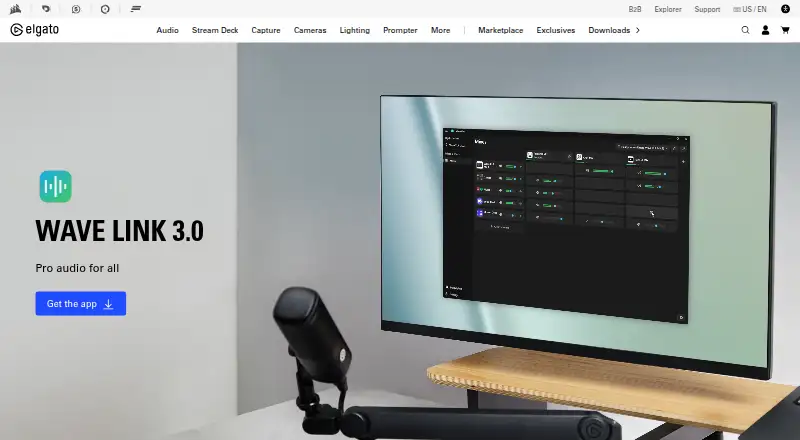
Wave Link’s standout capability is its routing and mixing depth. It supports up to five independent output mixes, up to eight software input channels, and up to four hardware inputs. A horizontal routing matrix shows signal paths, while application grouping helps organize several sources into channels. Creators can add VST3 effects on Windows or Audio Unit effects on macOS, and AI-powered Voice Focus can remove background noise. Stream Deck integration adds controls for volume, muting, effects, and mixes, while OBS Studio fits the streaming workflow.
The Free plan includes Windows and macOS support, compatibility with any recognized microphone or audio interface, and no subscription or feature gates. That makes Wave Link particularly suitable for creators who need multiple stream mixes and flexible routing at no software cost. Its limits are platform coverage and input capacity: it is not available beyond Windows and macOS, and hardware inputs are capped at four. Plugin formats also vary by operating system. Choose Wave Link for cross-platform creator audio routing; consider another option if you need broader platform support or more hardware inputs.
Your product? Our editors can test Elgato Wave Link in depth and publish a review, labelled as paid · from $149/mo →
Elgato Wave Link pricing
All 1 Elgato Wave Link plans and prices →
Elgato Wave Link fact sheet
| Free plan | Yes |
|---|---|
| Paid from | Free |
| Noise reduction | Yes |
| Equalizer | Yes |
| Virtual surround | Not verified |
| Audio routing | Yes |
| App-specific profiles | Not verified |
| Supported platforms | Windows, macOS |
| Equalizer bands | Not verified |
| Deployment | Desktop |
| Platforms | Windows, macOS |
| Integrations | 4 integrations: OBS Studio, Elgato Stream Deck, VST3 plugins, Audio Unit plugins |
| Pricing | Free plan (source) |
| Website | elgato.com |
| Facts checked | 20 Sep 2026 |
Elgato Wave Link integrations
Elgato Wave Link lists 4 integrations on its own site.
- OBS Studio
- Elgato Stream Deck
- VST3 plugins
- Audio Unit plugins
Alternatives to Elgato Wave Link
- SteelSeries SonarA capable free Windows audio suite for gamers and streamers who want detailed control.9.4
- VoicemeeterA deep Windows audio router with free tiers for mixing, effects, and network audio.9.2
- SplitwaveA free, cross-platform audio router for live processing, recording, streaming, and DAW workflows.9.0


See all Elgato Wave Link alternatives →
Elgato Wave Link vs the competition
- Elgato Wave Link vs SteelSeries Sonar
- Elgato Wave Link vs Voicemeeter
- Elgato Wave Link vs Splitwave
- Elgato Wave Link vs RØDE UNIFY
- Elgato Wave Link vs Patchd
- Elgato Wave Link vs FxSound


Compare Elgato Wave Link with any tool side by side →
Also Ranked In
Elgato Wave Link is ranked in 3 of our directories.
Used Elgato Wave Link? Be the first to review it
The editor score above is our own research. What this page doesn't have yet is a reader's view — what you used Elgato Wave Link for, what worked and what didn't. No stars are seeded and no review is paid for; an editor reads every one before it appears.
Write a reviewTwo minutes · verified accounts only · read by an editor before it appears
Featured on iTechGuides

Elgato Wave Link is listed in our Audio Enhancement Software directory. Add the badge to your site — it links back to this page.
<a href="https://www.itechguides.com/products/elgato-wave-link/"><img src="https://www.itechguides.com/best/badge/elgato-wave-link.svg" alt="Featured on iTechGuides" width="230" height="46"></a>
Reviewed by iTechGuides Editors · Editorial team · Updated Oct 2026
Advertiser disclosure: iTechGuides is reader-supported. Vendors can pay for top positions in our rankings and for a place on other products' pages, and we may earn a commission when you click some links. Bought places stand at the number bought; this page and our disclosure say so. Paying vendors may get a fuller, more detailed review from our editors, and that review can change their score. How we rank.
Last updated · How we research and update