EarTrumpet
EarTrumpet: A free, open-source mixer for per-app volume control and Windows audio routing. Ranked #20 of 30 in Audio Enhancement Software by our editors (7.0/10); pricing: Free plan; best for free Windows volume management.
At a glance
- Editor score7.0 / 10
- PricingFree plan
- Best forFree Windows volume management
- Free planYes
- Paid fromFree
- Facts checked20 Sep 2026
Where it wins
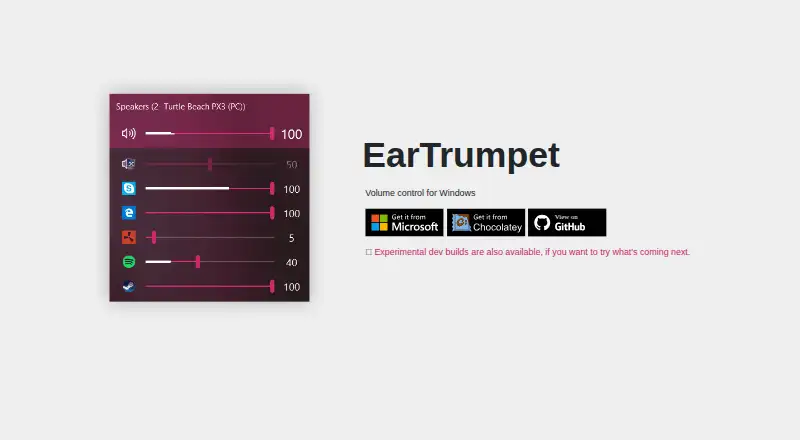
- Per-application volume mixing with audio peaking visualization
- Moves applications between playback devices
- Configurable hotkeys and default-device management
Where it doesn't
- Supports Windows 10 and Windows 11 only
- Does not provide equalizer controls
- Does not provide noise processing
Our verdict on EarTrumpet
EarTrumpet is a free, open-source Windows utility for managing application and system audio. It is designed for Windows users who want more direct control than the built-in volume controls provide, including per-application mixing, playback-device switching, and default-device management. The standalone mixer also includes multi-channel-aware audio peaking visualization, configurable hotkeys, light and dark modes, modern context menus, and Microsoft Store automatic updates.
Its strongest fit is application-aware routing. Users can move applications between playback devices and manage the default playback device from the same utility, which suits setups with multiple speakers, headsets, or other playback hardware. The peaking visualization adds a visual layer to volume management, while configurable hotkeys support quick adjustments. Distribution through the Microsoft Store, alongside other installation methods, gives Windows users a straightforward way to obtain the utility and receive automatic updates through the Store.
EarTrumpet stays focused on volume control and routing rather than broader audio processing. The published feature set does not include an equalizer, noise processing, virtual surround, or app-specific profiles, so users looking for those capabilities should choose software centered on audio effects or signal enhancement instead. For Windows 10 and Windows 11 users who primarily need free per-application volume management, device switching, and playback-device controls, EarTrumpet is a focused option. It is less suitable for anyone seeking advanced sound shaping or noise reduction in the same tool.
Your product? Our editors can test EarTrumpet in depth and publish a review, labelled as paid · from $149/mo →
EarTrumpet pricing
All 1 EarTrumpet plans and prices →
EarTrumpet fact sheet
| Free plan | Yes |
|---|---|
| Paid from | Free |
| Noise reduction | Not verified |
| Equalizer | Not verified |
| Virtual surround | Not verified |
| Audio routing | Yes |
| App-specific profiles | Not verified |
| Supported platforms | Windows 10 and Windows 11 |
| Equalizer bands | Not verified |
| Deployment | Desktop |
| Platforms | Windows |
| Pricing | Free plan (source) |
| Website | eartrumpet.app |
| Facts checked | 20 Sep 2026 |
Alternatives to EarTrumpet
- SteelSeries SonarA capable free Windows audio suite for gamers and streamers who want detailed control.9.4
- VoicemeeterA deep Windows audio router with free tiers for mixing, effects, and network audio.9.2
- Elgato Wave LinkA free mixer for creators who need flexible routing, multiple mixes, and plugin effects.9.1


See all EarTrumpet alternatives →
Used EarTrumpet? Be the first to review it
The editor score above is our own research. What this page doesn't have yet is a reader's view — what you used EarTrumpet for, what worked and what didn't. No stars are seeded and no review is paid for; an editor reads every one before it appears.
Write a reviewTwo minutes · verified accounts only · read by an editor before it appears
Featured on iTechGuides

EarTrumpet is listed in our Audio Enhancement Software directory. Add the badge to your site — it links back to this page.
<a href="https://www.itechguides.com/products/eartrumpet/"><img src="https://www.itechguides.com/best/badge/eartrumpet.svg" alt="Featured on iTechGuides" width="230" height="46"></a>
Reviewed by iTechGuides Editors · Editorial team · Updated Oct 2026
Advertiser disclosure: iTechGuides is reader-supported. Vendors can pay for top positions in our rankings and for a place on other products' pages, and we may earn a commission when you click some links. Bought places stand at the number bought; this page and our disclosure say so. Paying vendors may get a fuller, more detailed review from our editors, and that review can change their score. How we rank.
Last updated · How we research and update