DupScout
DupScout: A Windows duplicate finder with scheduled scans, SHA-256 matching, and extensive reporting. Ranked #33 of 37 in Duplicate File Finders by our editors (5.4/10); pricing: Paid; best for organizations needing scheduled duplicate reports.
At a glance
- Editor score5.4 / 10
- PricingPaid
- Best forOrganizations needing scheduled duplicate reports
- Paid from$250 one-time
- Platform coverageWindows
- Facts checked19 Sep 2026
Where it wins
- Scans local disks, network shares, and NAS storage devices.
- Uses SHA-256 hashes to identify identical files.
- Supports scheduling, automation, SQL output, and multiple report formats.
Where it doesn't
- Starts at a $250 one-time price.
- Runs on Windows rather than across multiple desktop platforms.
- Replacing duplicates with links is limited to supported editions.
Our verdict on DupScout
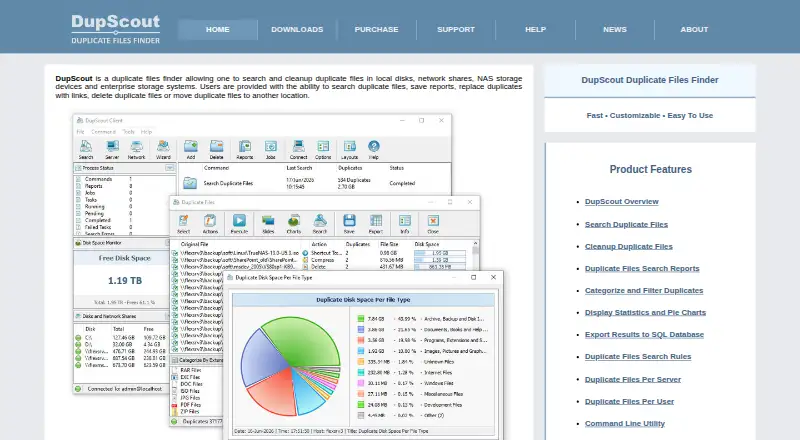
DupScout is a Windows duplicate-file finder for organizations managing local disks, network shares, NAS devices, and enterprise storage systems. It identifies identical files with SHA-256 signatures, presents duplicate sets for review, and supports cleanup by deleting or moving files. Supported editions can also replace duplicates with links. Directory exclusions, pattern-matched paths, filters, previews, charts, and command-line operation make it suited to controlled file-management workflows rather than casual one-off cleanup.
Pricing is structured as two one-time plans. According to the vendor's pricing page, Server costs $250 and supports up to 100 million files and 100 TB of disk space, along with network and NAS searches, scheduled duplicate-file operations, and a command-line utility. Enterprise costs $450 and adds unlimited files and disk space, a web-based management interface, batch searches, multi-user configurations, and OS-native user authentication. The published plans make Server the practical fit for defined capacity limits, while Enterprise is aimed at larger or more shared environments.
Reporting and automation are the standout strengths. DupScout exports results to HTML, PDF, Excel, text, CSV, and XML, and can export duplicate-file results to SQL databases. Scheduled and automated operations support recurring analysis, while previews and exclusions provide control before cleanup actions run. Organizations that need recurring reports across Windows-based local, network, or NAS storage should consider DupScout. Users seeking a low-cost tool for a single desktop or a platform beyond Windows may prefer a different duplicate-file finder.
Your product? Our editors can test DupScout in depth and publish a review, labelled as paid · from $149/mo →
DupScout pricing
All 2 DupScout plans and prices →
DupScout fact sheet
| Free plan | Not verified |
|---|---|
| Paid from | $250 one-time |
| Platform coverage | Windows |
| Scan locations | Local disks, directories, network shares, NAS storage devices |
| Match methods | SHA-256 file hash comparison |
| File preview | Yes |
| Automatic selection | Yes |
| Recycle Bin / Trash | Not verified |
| Folder exclusions | Yes |
| Deployment | Desktop |
| Platforms | Windows |
| Integrations | 1 integrations: SQL databases |
| Pricing | Paid (source) |
| Website | dupscout.com |
| Facts checked | 19 Sep 2026 |
DupScout integrations
DupScout lists 1 integrations on its own site.
- SQL databases
Alternatives to DupScout
- AllDupA fully free Windows duplicate finder with broad matching and cleanup controls.9.0
- CzkawkaA free, scriptable duplicate finder for technical users across Windows, macOS, Linux, and Android.8.8
- Wise Duplicate FinderA Windows duplicate finder with free manual cleanup and Pro date-based selection.8.7


See all DupScout alternatives →
Used DupScout? Be the first to review it
The editor score above is our own research. What this page doesn't have yet is a reader's view — what you used DupScout for, what worked and what didn't. No stars are seeded and no review is paid for; an editor reads every one before it appears.
Write a reviewTwo minutes · verified accounts only · read by an editor before it appears
Featured on iTechGuides

DupScout is listed in our Duplicate File Finders directory. Add the badge to your site — it links back to this page.
<a href="https://www.itechguides.com/products/dupscout/"><img src="https://www.itechguides.com/best/badge/dupscout.svg" alt="Featured on iTechGuides" width="230" height="46"></a>
Reviewed by iTechGuides Editors · Editorial team · Updated Sep 2026
Advertiser disclosure: iTechGuides is reader-supported. Vendors can pay for top positions in our rankings and for a place on other products' pages, and we may earn a commission when you click some links. Bought places stand at the number bought; this page and our disclosure say so. Paying vendors may get a fuller, more detailed review from our editors, and that review can change their score. How we rank.
Last updated · How we research and update