
DT Database Backup Wizard
DT Database Backup Wizard: A Windows backup tool with broad database coverage, export formats, and storage destinations. Ranked #19 of 27 in Database Backup Software by our editors (7.2/10); pricing: Paid; best for windows teams needing broad export options.
At a glance
- Editor score7.2 / 10
- PricingPaid
- Best forWindows teams needing broad export options
- Facts checked20 Sep 2026
Where it wins
- Supports eight database engines plus ODBC sources
- Offers hourly scheduling, retention, AES-256 encryption, and compression
- Exports to local, FTP, SFTP, cloud, and drive destinations
Where it doesn't
- Runs on Windows only
- Paid plans are divided by server count
- Restore verification is outside the documented feature set
Our verdict on DT Database Backup Wizard
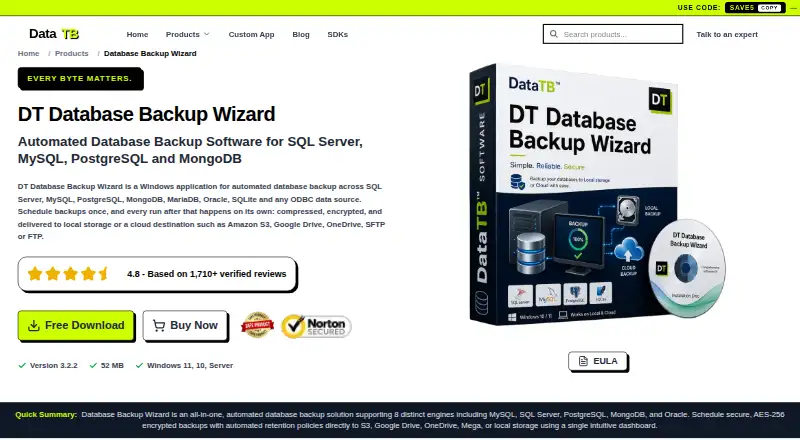
DT Database Backup Wizard is a Windows desktop application for organizations managing backups across SQL Server, MySQL, PostgreSQL, MongoDB, MariaDB, Oracle, SQLite, and ODBC data sources. It supports scheduled and manual runs, with hourly, daily, weekly, and custom scheduling options. The product is a strong fit for Windows teams that need one workflow across different database systems, especially when exports must support more than a single backup format or destination.
Its standout strength is breadth. Users can create full, schema-only, data-only, or date-filtered exports, and preview live tables and records before starting a backup. Backup jobs can target local storage, FTP, SFTP, Amazon S3, OneDrive, Google Drive, or Mega. Automatic retention policies help manage older backups, while AES-256 encryption and compression address storage and transfer considerations. Activity history includes run status and error details, giving administrators a clear record of backup activity.
The plan structure is straightforward: Starter covers one server, Standard covers two, Home covers five, Corporate covers ten, and Enterprise covers twenty with 24/7 dedicated support. Each plan includes full access, so the main distinction is server capacity, with dedicated support added at the Enterprise level. The trade-off is platform scope: this is Windows software rather than a cross-platform service, and the documented feature set emphasizes backup creation, export control, storage, retention, and run history. Choose it if broad database and destination support matter more than cross-platform deployment or restore-focused workflows; teams with those priorities should consider a different category fit.
Your product? Our editors can test DT Database Backup Wizard in depth and publish a review, labelled as paid · from $149/mo →
DT Database Backup Wizard pricing
All 5 DT Database Backup Wizard plans and prices →
DT Database Backup Wizard fact sheet
| Free plan | Not verified |
|---|---|
| Paid from | Not verified |
| Point-in-time recovery | Not verified |
| Backup frequency | Hourly |
| Retention period | Not verified |
| Restore verification | Not verified |
| Deployment model | Hybrid |
| Supported databases | SQL Server, MySQL, PostgreSQL, MongoDB, MariaDB, Oracle, SQLite, ODBC |
| Money-back guarantee | 30 days |
| Deployment | Desktop |
| Platforms | Windows |
| Support | Email, Community, Docs · 24/7 |
| Built for | Small business, Mid-market, Enterprise (editorial estimate) |
| Integrations | 6 integrations: FTP, SFTP, Amazon S3, OneDrive, Google Drive, Mega |
| Pricing | Paid (source) |
| Website | datatbs.com |
| Facts checked | 20 Sep 2026 |
DT Database Backup Wizard integrations
DT Database Backup Wizard lists 6 integrations on its own site.
- FTP
- SFTP
- Amazon S3
- OneDrive
- Google Drive
- Mega
Alternatives to DT Database Backup Wizard
- DatabasusA flexible self-hosted backup tool with strong PostgreSQL recovery capabilities.9.4
- DBAegisA centralized, open-source option for backup operations across many database engines.9.2
- DatabasementA flexible open-source backup manager for teams comfortable operating self-hosted infrastructure.9.0


See all DT Database Backup Wizard alternatives →
Used DT Database Backup Wizard? Be the first to review it
The editor score above is our own research. What this page doesn't have yet is a reader's view — what you used DT Database Backup Wizard for, what worked and what didn't. No stars are seeded and no review is paid for; an editor reads every one before it appears.
Write a reviewTwo minutes · verified accounts only · read by an editor before it appears
Featured on iTechGuides

DT Database Backup Wizard is listed in our Database Backup Software directory. Add the badge to your site — it links back to this page.
<a href="https://www.itechguides.com/products/dt-database-backup-wizard/"><img src="https://www.itechguides.com/best/badge/dt-database-backup-wizard.svg" alt="Featured on iTechGuides" width="230" height="46"></a>
Reviewed by iTechGuides Editors · Editorial team · Updated Oct 2026
Advertiser disclosure: iTechGuides is reader-supported. Vendors can pay for top positions in our rankings and for a place on other products' pages, and we may earn a commission when you click some links. Bought places stand at the number bought; this page and our disclosure say so. Paying vendors may get a fuller, more detailed review from our editors, and that review can change their score. How we rank.
Last updated · How we research and update