
Disk Bench
Disk Bench: A free Windows tool for timing file copies, reads, and test-file creation. Ranked #27 of 29 in Disk Benchmark Software by our editors (6.0/10); pricing: Free plan; best for basic Windows file-copy benchmarking.
At a glance
- Editor score6.0 / 10
- PricingFree plan
- Best forBasic Windows file-copy benchmarking
- Free planYes
- Paid fromFree
- Facts checked20 Sep 2026
Where it wins
- Times individual file and complete-directory copies
- Supports parallel reads and configurable test-file blocks
- Offers command-line switches and result logging
Where it doesn't
- Windows-only platform support
- Requires Microsoft .NET Framework
- Focuses on file operations rather than broader disk metrics
Our verdict on Disk Bench
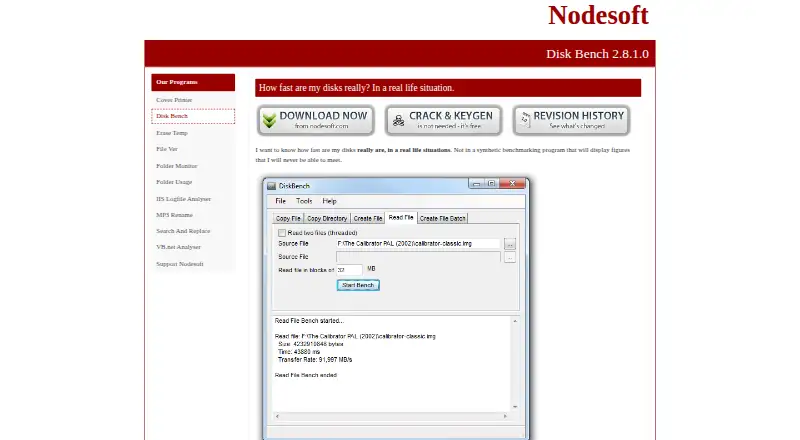
Disk Bench is a free Windows utility from Nodesoft for measuring file-system performance through timed file operations. It suits users who want a straightforward way to compare file and directory transfers, read one or more files, or create test files using configurable blocks. The tool works with the current filesystem rather than synthetic tests, making it relevant to basic real-world file-copy benchmarking.
Its strongest area is practical file-operation coverage. Disk Bench can copy a file between locations and time the operation, copy complete directories while logging the result, and perform reads, including parallel reads. It can also retain destination files after a test, which is useful when the resulting files need to remain available for inspection or follow-up work. Command-line switches support benchmark execution outside the main interactive workflow, while log files provide a record of results.
The Free plan includes file copy, read, and creation benchmarks alongside command-line operation. Disk Bench runs on Windows and requires Microsoft .NET Framework; Nodesoft states that its programs are tested on Windows 10 and 11. Its focus is narrower than tools built around a wider set of disk measurements: the documented workflow centers on file transfers, reads, directory copies, and test-file creation rather than a broad metrics suite. Choose Disk Bench for free, scriptable Windows file-operation benchmarks. Choose an alternative if your evaluation depends on a wider range of specialized disk measurements or cross-platform support.
Your product? Our editors can test Disk Bench in depth and publish a review, labelled as paid · from $149/mo →
Disk Bench pricing
All 1 Disk Bench plans and prices →
Disk Bench fact sheet
| Free plan | Yes |
|---|---|
| Paid from | Free |
| Random I/O tests | Not verified |
| Sequential tests | Not verified |
| IOPS measurement | Not verified |
| Latency measurement | Not verified |
| Supported platforms | Windows |
| Command-line interface | Yes |
| Deployment | Desktop |
| Platforms | Windows |
| Support | |
| Built for | Solo, Small business (editorial estimate) |
| Pricing | Free plan (source) |
| Website | nodesoft.com |
| Facts checked | 20 Sep 2026 |
Alternatives to Disk Bench
- CrystalDiskMarkA configurable Windows disk benchmark with detailed speed, IOPS, and latency results.9.0
- fioA free, open-source benchmark for detailed storage and filesystem performance analysis.8.8
- HD Tune ProA capable Windows drive benchmark and diagnostic utility with a one-time license.8.5

See all Disk Bench alternatives →
Used Disk Bench? Be the first to review it
The editor score above is our own research. What this page doesn't have yet is a reader's view — what you used Disk Bench for, what worked and what didn't. No stars are seeded and no review is paid for; an editor reads every one before it appears.
Write a reviewTwo minutes · verified accounts only · read by an editor before it appears
Featured on iTechGuides

Disk Bench is listed in our Disk Benchmark Software directory. Add the badge to your site — it links back to this page.
<a href="https://www.itechguides.com/products/disk-bench/"><img src="https://www.itechguides.com/best/badge/disk-bench.svg" alt="Featured on iTechGuides" width="230" height="46"></a>
Reviewed by iTechGuides Editors · Editorial team · Updated Oct 2026
Advertiser disclosure: iTechGuides is reader-supported. Vendors can pay for top positions in our rankings and for a place on other products' pages, and we may earn a commission when you click some links. Bought places stand at the number bought; this page and our disclosure say so. Paying vendors may get a fuller, more detailed review from our editors, and that review can change their score. How we rank.
Last updated · How we research and update