Digler
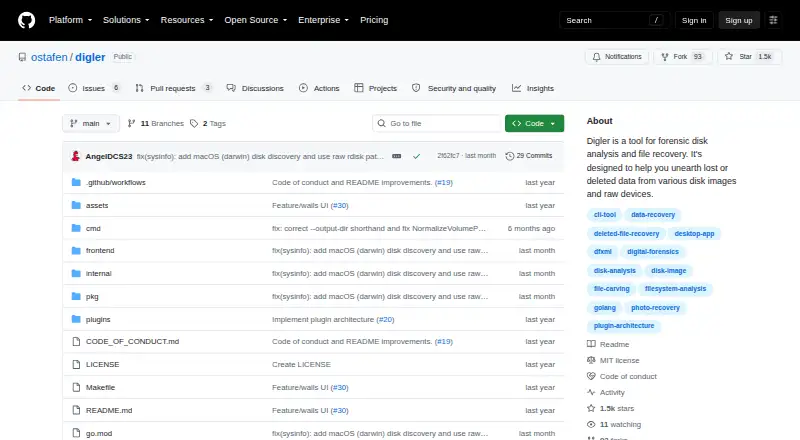
Digler: A cross-platform forensic recovery tool for disk images, raw devices, and partitions. Ranked #82 of 129 in Data Recovery Software by our editors (3.0/10); pricing: Free plan; best for open-source forensic recovery across platforms.
At a glance
- Editor score3.0 / 10
- PricingFree plan
- Best forOpen-source forensic recovery across platforms
- Free planYes
- Paid fromFree
- Facts checked19 Sep 2026
Where it wins
- Scans disk images, raw devices, physical disks, and partitions
- Recovers deleted files independently of the underlying file system
- Offers DFXML reports, plugins, and command-line and desktop interfaces
Where it doesn't
- Digler is described as being in early development
- Selective file recovery takes place after a scan
- FUSE-based browsing of recovered files is available on Linux
Our verdict on Digler
Digler is an open-source data recovery and digital forensics tool for people who need to examine storage sources and recover deleted files across Linux, macOS, and Windows. It works with disk images, raw devices, physical disks, and partitions, and provides both command-line and desktop interfaces. Its filesystem-agnostic recovery approach makes it relevant when the underlying file system is not the focus of the investigation. Digler is a fit for forensic workflows and technically capable users; it is less suited to buyers seeking a polished, general-purpose recovery utility for routine repairs.
The forensic workflow combines scanning with reporting and selective recovery. Digler can analyze physical disks and partitions as well as images and raw devices, then identify deleted files without relying on a particular file system. DFXML reporting provides a structured forensic output, while selective recovery lets users choose files from scan results. On Linux, FUSE-based browsing offers another way to inspect recovered files. Recovery happens after scanning, so users looking for an immediate file-by-file restore flow should consider whether this sequence fits their process.
Digler is open source and has a free plan, with no paid tier described. Custom file-scanner plugins provide an extension point for users who need specialized scanning, but that flexibility is most useful to teams able to assess and adapt the tool themselves. The repository describes the project as being in early development and lists v0.1.0 as its latest release, a relevant caveat for production-critical recovery work. Choose Digler for cross-platform forensic analysis, open-source access, and reporting; consider an alternative if a mature, broadly supported recovery product is a priority.
Your product? Our editors can test Digler in depth and publish a review, labelled as paid · from $149/mo →
Digler pricing
Digler fact sheet
| Free plan | Yes |
|---|---|
| Paid from | Free |
| Recovery sources | disk images, raw devices, physical disks, disk partitions |
| Operating systems | Linux, macOS, Windows |
| Free recovery limit | Not verified |
| Memory card recovery | Not verified |
| RAID recovery | Not verified |
| Bootable recovery | Not verified |
| File preview | Not verified |
| Deployment | Desktop |
| Platforms | Linux, macOS, Windows |
| Pricing | Free plan |
| Website | github.com |
| Facts checked | 19 Sep 2026 |
Alternatives to Digler
- R-StudioA broad recovery toolkit for professionals handling disks, RAID, images, and networks.9.3
- TestDiskA capable free choice for partition repair, filesystem recovery, and file undelete.9.1
- RecoveritA broad recovery toolkit with strong media repair and storage-device coverage.9.0


Used Digler? Be the first to review it
The editor score above is our own research. What this page doesn't have yet is a reader's view — what you used Digler for, what worked and what didn't. No stars are seeded and no review is paid for; an editor reads every one before it appears.
Write a reviewTwo minutes · verified accounts only · read by an editor before it appears
Featured on iTechGuides

Digler is listed in our Data Recovery Software directory. Add the badge to your site — it links back to this page.
<a href="https://www.itechguides.com/products/digler/"><img src="https://www.itechguides.com/best/badge/digler.svg" alt="Featured on iTechGuides" width="230" height="46"></a>
Reviewed by iTechGuides Editors · Editorial team · Updated Oct 2026
Advertiser disclosure: iTechGuides is reader-supported. Vendors can pay for top positions in our rankings and for a place on other products' pages, and we may earn a commission when you click some links. Bought places stand at the number bought; this page and our disclosure say so. Paying vendors may get a fuller, more detailed review from our editors, and that review can change their score. How we rank.
Last updated · How we research and update