
CrossDesk
CrossDesk: A flexible open-source choice for browser-based remote control and self-hosted connectivity. Ranked #89 of 134 in Remote Desktop Software by our editors (5.4/10); pricing: Open source; best for open-source teams wanting browser-based remote control.
At a glance
- Editor score5.4 / 10
- PricingOpen source
- Best forOpen-source teams wanting browser-based remote control
- Paid fromFree
- Facts checked20 Sep 2026
Where it wins
- Controls Windows, macOS, and Linux desktops from multiple client types
- Combines audio, video, clipboard, file transfer, and multi-display switching
- Supports P2P, TURN relay, and self-hosted signaling and relay services
Where it doesn't
- The native iOS client requires building and signing with Xcode
- Windows protected-desktop control requires a companion service
- Teams need to assess their own deployment and relay-service requirements
Our verdict on CrossDesk
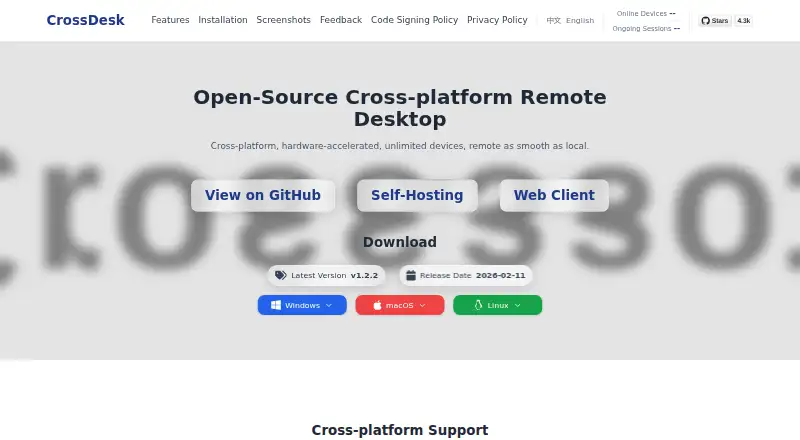
CrossDesk is an open-source remote desktop application for controlling Windows, macOS, and Linux computers through desktop clients, web browsers, or a native iOS/iPadOS controller. It is aimed at teams that want browser-based remote access without limiting control to a single operating system. Its core feature set covers keyboard and mouse input with shortcut support, text clipboard synchronization, file transfer with a configurable receiving directory, and switching across multiple devices and displays.
Connectivity is a key part of the product's design. CrossDesk supports direct peer-to-peer connections and TURN relaying, giving teams options for different network conditions. It also supports self-hosted signaling and relay services, which suits organizations that want more control over the supporting infrastructure. Optional SRTP encryption is included in the published description. Live video and audio support includes H.264 and AV1, while browser access and the native iOS/iPadOS controller extend remote control beyond traditional desktop clients.
CrossDesk is a strong fit for open-source teams that value platform coverage, browser access, and infrastructure flexibility. The GPL-3.0 license aligns with teams that want an open-source project, while file transfer, multi-display switching, and mobile control make it useful for varied remote-support workflows. There are practical deployment considerations: Windows protected-desktop control uses a companion service, and the native iOS client requires building and signing with Xcode. Teams seeking a straightforward mobile installation or a broader ecosystem of documented integrations should evaluate whether CrossDesk's open-source, self-managed orientation matches their operating model.
Your product? Our editors can test CrossDesk in depth and publish a review, labelled as paid · from $149/mo →
CrossDesk pricing
CrossDesk fact sheet
| Free plan | Not verified |
|---|---|
| Paid from | Free |
| Access mode | Not verified |
| Supported platforms | Windows, macOS, Linux, Web, iOS/iPadOS |
| File transfer | Yes |
| Session recording | Not verified |
| Managed devices | Not verified |
| Mobile apps | Yes |
| Deployment | Cloud, Self-hosted, Desktop, Mobile |
| Platforms | Web, Windows, macOS, Linux, iOS |
| Support | Email, Docs |
| Built for | Solo, Small business (editorial estimate) |
| Pricing | Open source |
| Website | crossdesk.cn |
| Facts checked | 20 Sep 2026 |
Alternatives to CrossDesk
- StarDeskA remote desktop app: reach your own Windows PC or Mac from Windows, macOS, Android or iOS.9.7
- TeamViewer RemoteA mature remote support platform with broad coverage, integrations, and AI features.9.4
- SplashtopA paid remote-access suite with low entry pricing, broad platforms, and deep integrations.9.2


See all CrossDesk alternatives →
Used CrossDesk? Be the first to review it
The editor score above is our own research. What this page doesn't have yet is a reader's view — what you used CrossDesk for, what worked and what didn't. No stars are seeded and no review is paid for; an editor reads every one before it appears.
Write a reviewTwo minutes · verified accounts only · read by an editor before it appears
Featured on iTechGuides

CrossDesk is listed in our Remote Desktop Software directory. Add the badge to your site — it links back to this page.
<a href="https://www.itechguides.com/products/crossdesk/"><img src="https://www.itechguides.com/best/badge/crossdesk.svg" alt="Featured on iTechGuides" width="230" height="46"></a>
Reviewed by iTechGuides Editors · Editorial team · Updated Oct 2026
Advertiser disclosure: iTechGuides is reader-supported. Vendors can pay for top positions in our rankings and for a place on other products' pages, and we may earn a commission when you click some links. Bought places stand at the number bought; this page and our disclosure say so. Paying vendors may get a fuller, more detailed review from our editors, and that review can change their score. How we rank.
Last updated · How we research and update