Core Temp
Core Temp: A focused Windows monitor for per-core temperatures, processor load, power data, and logging. Ranked #21 of 59 in Hardware Monitoring Software by our editors (6.8/10); pricing: Free plan; best for windows CPU temperature monitoring.
At a glance
- Editor score6.8 / 10
- PricingFree plan
- Best forWindows CPU temperature monitoring
- Free planYes
- Paid from$6/device one-time
- Remote monitoringYes
- Facts checked24 Sep 2026
Where it wins
- Per-core temperature, load, frequency, TDP, and power readings
- Free personal-use edition with logging, plugins, and remote monitoring
- Supports Intel, AMD, and VIA x86 processors
Where it doesn't
- Windows desktop application only
- Commercial license is priced per physical machine
- Coverage is centered on processor data rather than broad hardware monitoring
Our verdict on Core Temp
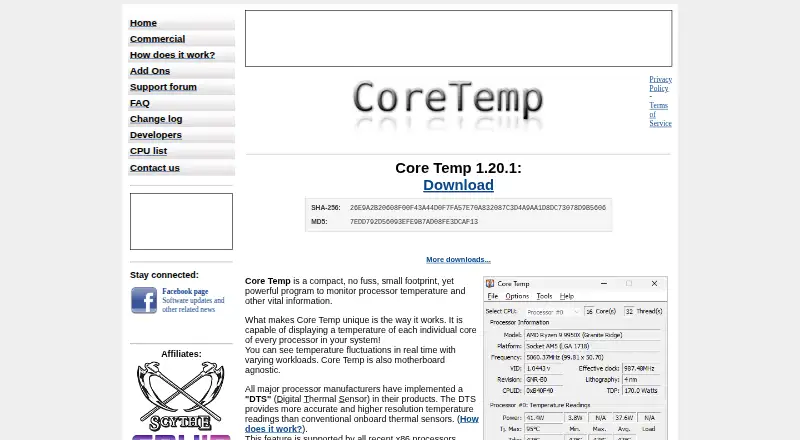
Core Temp is a Windows hardware-monitoring utility for viewing processor Digital Thermal Sensor data in real time. It is aimed at people who need clear per-core CPU temperatures, processor information, and related readings such as load, frequency, TDP, and power where supported. The system-tray display keeps readings accessible during normal desktop use, while logging provides a way to record measurements over time. Support for recent Intel, AMD, and VIA x86 processors gives it a focused role for Windows users tracking CPU behavior rather than managing an entire hardware inventory.
Its ecosystem extends beyond the main desktop application. Core Temp plug-ins add an extension path, and the shared-memory interface allows companion applications to read monitoring data. Remote monitoring is available through the Core Temp Remote Server plug-in and companion clients, while Core Temp Gadget and CoreTempMC provide additional ways to surface information. Windows Event Log reporting covers overheat protection events, and system-tray notifications provide another alert channel. These options suit users who want to connect processor readings to a Windows-based desktop or monitoring setup without moving to a broader platform.
Pricing is straightforward: Personal use is free, and the plan is a Windows desktop application. The Commercial license costs $25 USD per physical machine as a one-time purchase, with one license required per physical machine and volume pricing available. That structure makes Core Temp a practical fit for personal monitoring and small commercial deployments focused on CPU conditions. It is less suitable for teams seeking cross-platform coverage or a wider view of storage, memory, graphics, and other hardware categories. Choose it when processor temperature visibility is the priority; consider a broader hardware-monitoring product when system-wide coverage matters more than CPU detail.
Your product? Our editors can test Core Temp in depth and publish a review, labelled as paid · from $149/mo →
Core Temp pricing
All 10 Core Temp plans and prices →
Core Temp fact sheet
| Free plan | Yes |
|---|---|
| Paid from | $6/device one-time |
| Supported platforms | Windows; Android companion app |
| Remote monitoring | Yes |
| Monitored device limit | Not verified |
| Sensor history | Not verified |
| Alert channels | Not verified |
| Custom sensor support | No |
| Deployment | Desktop, Mobile |
| Platforms | Windows, Android |
| Support | Community |
| Built for | Solo, Small business, Mid-market, Enterprise (editorial estimate) |
| Pricing | Free plan (source) |
| Website | alcpu.com |
| Facts checked | 24 Sep 2026 |
Alternatives to Core Temp
- GlassmkrFree monitoring for Linux hardware, with hosted simplicity or self-hosted control.9.3
- Supermicro SuperDoctor 5A free, focused monitor for Supermicro server health, alerts, logs, and remote power control.9.2
- HWiNFOA deep Windows diagnostics suite for users who need detailed sensors, reports, and alerts.9.1

See all Core Temp alternatives →
Used Core Temp? Be the first to review it
The editor score above is our own research. What this page doesn't have yet is a reader's view — what you used Core Temp for, what worked and what didn't. No stars are seeded and no review is paid for; an editor reads every one before it appears.
Write a reviewTwo minutes · verified accounts only · read by an editor before it appears
Featured on iTechGuides

Core Temp is listed in our Hardware Monitoring Software directory. Add the badge to your site — it links back to this page.
<a href="https://www.itechguides.com/products/core-temp/"><img src="https://www.itechguides.com/best/badge/core-temp.svg" alt="Featured on iTechGuides" width="230" height="46"></a>
Reviewed by iTechGuides Editors · Editorial team · Updated Oct 2026
Advertiser disclosure: iTechGuides is reader-supported. Vendors can pay for top positions in our rankings and for a place on other products' pages, and we may earn a commission when you click some links. Bought places stand at the number bought; this page and our disclosure say so. Paying vendors may get a fuller, more detailed review from our editors, and that review can change their score. How we rank.
Last updated · How we research and update