
ColourSpace
ColourSpace: Deep profiling, LUT, HDR and virtual-production tools for advanced calibration work. Ranked #5 of 24 in Display Calibration Software by our editors (8.4/10); pricing: Paid; best for advanced colorists and virtual-production teams.
At a glance
- Editor score8.4 / 10
- PricingPaid
- Best forAdvanced colorists and virtual-production teams
- Free planNo
- Paid from£125 one-time
- ICC profile exportNo
- Facts checked20 Sep 2026
Where it wins
- Volumetric profiling with interactive 3D graphs and 3D LUT workflows
- HDR, camera and image-sequence workflows support virtual production
- Direct integrations span displays, probes, LUT hardware and pattern generators
Where it doesn't
- Higher licence levels reach £2,075 one-time
- macOS requires Windows emulation
- ICC, VCGT and LUT-extraction tools are separate products
Our verdict on ColourSpace
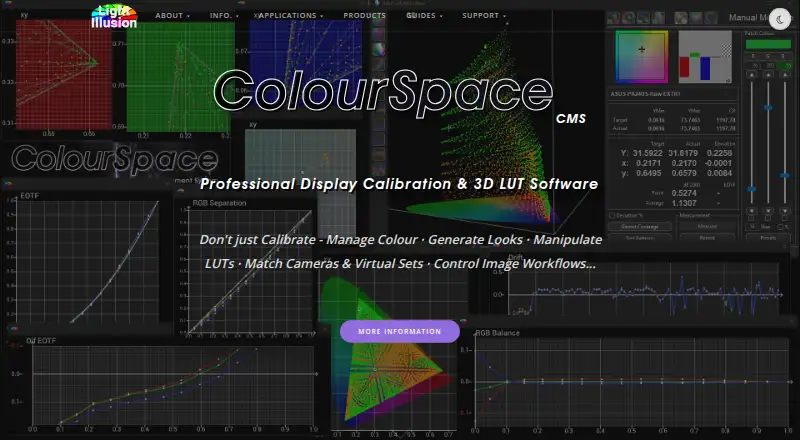
ColourSpace is display calibration and colour-management software from Light Illusion Ltd. It is aimed at advanced colorists, post-production and broadcast teams, display manufacturers, AV installers, home-cinema specialists, and virtual-production crews. Its feature set covers manual display measurement, volumetric profiling, 3D LUT generation and manipulation, post-calibration verification, HDR workflows for PQ/ST2084 and HLG, and camera or image-sequence probe workflows for virtual sets and LED walls.
The published plans use one-time pricing. ColourSpace DPS costs £125 and includes advanced manual calibration, cube-based display characterisation, volumetric 3D graphs, and 3D LUT generation. LTE costs £625 and adds entry-level professional calibration, mainstream probe support, external test-pattern generators, and Resolve and Mistika integration. CAL costs £1,435 with professional calibration, supported test-pattern-generator and display integrations, plus LUT import and export. PRO costs £2,075 and adds video-wall support, multi-threading, large native LUT sizes, and camera data. Home-cinema options range from HTL at £425 to HTP at £1,275 and HTX at £1,475, with higher tiers adding hardware generator, integrated-TV, video-processor, multi-threading, LUT-size, SpaceMan, and SpaceMatch capabilities.
ColourSpace fits workflows that depend on detailed profiling and broad hardware connectivity. Integrations include ASUS ProArt, Flanders Scientific, EIZO, BenQ, TVLogic, LG displays and TVs, Brompton, Megapixel, and other listed display and processor brands. It is native Windows x64 software; macOS operation uses Windows emulation. The application also supports custom patch sets, preset patch-list CSV import, multi-monitor calibration, and direct links to probes, LUT hardware, displays, and test-pattern generators. Choose ColourSpace when calibration depth, LUT control, HDR, or virtual-production support matters more than a simple workflow. Choose an alternative if you need native macOS operation, a perpetual free plan, or built-in ICC, VCGT, and LUT-extraction tools.
Your product? Our editors can test ColourSpace in depth and publish a review, labelled as paid · from $149/mo →
ColourSpace pricing
All 7 ColourSpace plans and prices →
ColourSpace fact sheet
| Free plan | No |
|---|---|
| Paid from | £125 one-time |
| ICC profile export | No |
| LUT calibration | Yes |
| Multi-monitor calibration | Yes |
| HDR calibration | Yes |
| Monitor limit | Not verified |
| Supported platforms | Windows; macOS via Windows emulation |
| Deployment | Desktop |
| Platforms | Windows, macOS |
| Compliance & security | GDPR |
| Support | Community, Docs |
| Built for | Solo, Small business, Mid-market, Enterprise (editorial estimate) |
| Integrations | 20 integrations: ASUS ProArt, Flanders Scientific, EIZO, BenQ, Boland, Konvision … |
| Pricing | Paid (source) |
| Website | lightillusion.com |
| Facts checked | 20 Sep 2026 |
ColourSpace integrations
ColourSpace lists 20 integrations on its own site.
- ASUS ProArt
- Flanders Scientific
- EIZO
- BenQ
- Boland
- Konvision
- TVLogic
- AEQ Kroma
- Craltech
- Lilliput
- LG Pro monitors
- Dell
- LG TVs
- Brompton
- Megapixel
- AJA ColorBox
- Lumagen Radiance
- madVR Envy
- madVR HTPC software
- Videworks Tetratune
Alternatives to ColourSpace
- X-Rite i1ProfilerA deep X-Rite workflow suite for precise display calibration, profiling, and QA.9.2
- EIZO ColorNavigator 7A capable free choice for hardware LUT calibration on compatible EIZO ColorEdge displays.8.9
- Datacolor SpyderSpyder builds custom display profiles across modern monitors, but requires a compatible sensor.8.7

See all ColourSpace alternatives →
ColourSpace vs the competition
- ColourSpace vs X-Rite i1Profiler
- ColourSpace vs EIZO ColorNavigator 7
- ColourSpace vs Datacolor Spyder
- ColourSpace vs NEC SpectraView II
- ColourSpace vs QUBYX PerfectLum
- ColourSpace vs ArgyllCMS


Compare ColourSpace with any tool side by side →
Also Ranked In
ColourSpace is ranked in 3 of our directories.
Used ColourSpace? Be the first to review it
The editor score above is our own research. What this page doesn't have yet is a reader's view — what you used ColourSpace for, what worked and what didn't. No stars are seeded and no review is paid for; an editor reads every one before it appears.
Write a reviewTwo minutes · verified accounts only · read by an editor before it appears
Featured on iTechGuides

ColourSpace is listed in our Display Calibration Software directory. Add the badge to your site — it links back to this page.
<a href="https://www.itechguides.com/products/colourspace/"><img src="https://www.itechguides.com/best/badge/colourspace.svg" alt="Featured on iTechGuides" width="230" height="46"></a>
Reviewed by iTechGuides Editors · Editorial team · Updated Oct 2026
Advertiser disclosure: iTechGuides is reader-supported. Vendors can pay for top positions in our rankings and for a place on other products' pages, and we may earn a commission when you click some links. Bought places stand at the number bought; this page and our disclosure say so. Paying vendors may get a fuller, more detailed review from our editors, and that review can change their score. How we rank.
Last updated · How we research and update