Code Assistant
Code Assistant: A flexible open-source coding agent for developers who want control over models and workflows. Ranked #56 of 102 in AI Coding Assistants by our editors (3.7/10); pricing: Free plan; best for developers wanting an open-source graphical agent.
At a glance
- Editor score3.7 / 10
- PricingFree plan
- Best forDevelopers wanting an open-source graphical agent
- Free planYes
- Paid fromNone
- Coding agentYes
- Facts checked22 Sep 2026
Where it wins
- Autonomously reads, edits, searches, and runs commands across projects
- Works through native GUI, terminal, headless MCP, and ACP modes
- Supports branching sessions, sandboxing, browser testing, and multiple providers
Where it doesn't
- Requires users to configure their own model provider and API credentials
- Support is centered on documentation and community channels
- Code completion and indexing are outside its documented feature focus
Our verdict on Code Assistant
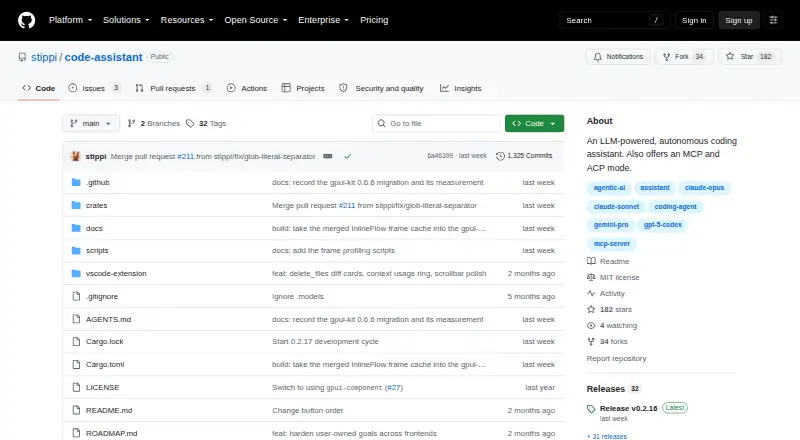
Code Assistant is an open-source AI coding agent written in Rust for developers who want a locally run assistant across desktop, terminal, and editor workflows. It combines a native graphical interface with terminal access, a headless Model Context Protocol server, and Agent Client Protocol integration. The intended audience is developers working alone or in small to mid-market teams who want to choose their own model provider and maintain control over how the agent works with project files and commands.
The published product details show an open-source model with a free plan rather than a vendor-hosted subscription structure. Users configure their own provider and API credentials, with support for providers including Anthropic, OpenAI, Ollama, Vertex AI, and OpenRouter. That approach gives teams flexibility across cloud and locally run models, but it also makes provider setup part of adoption. Ecosystem fit is broad: Code Assistant integrates with Zed, Claude Desktop, Visual Studio Code, and other Model Context Protocol clients, while supporting Windows, macOS, Linux, and self-hosted deployment.
Its standout area is autonomous project work. The agent can inspect codebases, search and edit files, execute commands, stream model responses, and maintain persistent project sessions with branching. Command sandboxing and permission tiers provide control over execution, while browser sessions support testing web applications. Automatic context compaction is designed for longer sessions. Developers seeking an open-source graphical agent with multiple interfaces and configurable providers should consider Code Assistant. Those primarily seeking a conventional completion and indexing tool, or a fully managed service with vendor-provided model access, should look elsewhere.
Your product? Our editors can test Code Assistant in depth and publish a review, labelled as paid · from $99/mo →
Code Assistant pricing
Code Assistant fact sheet
| Free plan | Yes |
|---|---|
| Paid from | None |
| Code completion | Not verified |
| Chat assistance | Yes |
| Coding agent | Yes |
| Supported IDEs | Zed, Visual Studio Code |
| Codebase indexing | Not verified |
| Terminal access | Yes |
| Deployment | Cloud, Desktop, Self-hosted |
| Platforms | Windows, macOS, Linux |
| Support | Docs, Community |
| Built for | Solo, Small business, Mid-market (editorial estimate) |
| Integrations | 4 integrations: Zed, Claude Desktop, Visual Studio Code, Model Context Protocol clients |
| Pricing | Free plan |
| Website | github.com |
| Facts checked | 22 Sep 2026 |
Code Assistant integrations
Code Assistant lists 4 integrations on its own site.
- Zed
- Claude Desktop
- Visual Studio Code
- Model Context Protocol clients
Alternatives to Code Assistant
- GitHub CopilotA broad coding assistant with a free entry point and agent workflows.9.3
- Claude CodeA strong fit for multi-step coding work across codebases, tools, and pull requests.9.2
- DevinA broad autonomous coding workspace with usage-based plan differences.9.1


See all Code Assistant alternatives →
Also Ranked In
Code Assistant is ranked in 2 of our directories.
Used Code Assistant? Be the first to review it
The editor score above is our own research. What this page doesn't have yet is a reader's view — what you used Code Assistant for, what worked and what didn't. No stars are seeded and no review is paid for; an editor reads every one before it appears.
Write a reviewTwo minutes · verified accounts only · read by an editor before it appears
Featured on iTechGuides

Code Assistant is listed in our AI Coding Assistants directory. Add the badge to your site — it links back to this page.
<a href="https://www.itechguides.com/products/code-assistant/"><img src="https://www.itechguides.com/best/badge/code-assistant.svg" alt="Featured on iTechGuides" width="230" height="46"></a>
Guides on AI coding assistants
- Top 6 AI Coding Assistants in 2024: Which One Fits Your Workflow?Aug 2026
- Top 10 AI Coding Assistants of 2026: Which Tool Is Best for Your Workflow?Aug 2026
- Best Self-Hosted AI Coding Assistants for Private CodebasesOct 2026
Reviewed by iTechGuides Editors · Editorial team · Updated Oct 2026
Advertiser disclosure: iTechGuides is reader-supported. Vendors can pay for top positions in our rankings and for a place on other products' pages, and we may earn a commission when you click some links. How we rank.
Last updated · How we research and update