
CloudMounter
CloudMounter: A practical cross-platform client for mounting SFTP and cloud storage as local drives. Ranked #28 of 31 in SFTP Client Software by our editors (6.5/10); pricing: Free plan; best for mac or Windows users mounting SFTP drives.
At a glance
- Editor score6.5 / 10
- PricingFree plan
- Best forMac or Windows users mounting SFTP drives
- Free planYes
- Paid from$29/device/yr
- Supported platformsmacOS, Windows
- Facts checked20 Sep 2026
Where it wins
- Mounts SFTP servers as local drives with OpenSSH, PPK, FIDO/FIDO2, and 2FA support
- Works with Finder on macOS and File Explorer on Windows
- Connects to SFTP, FTP-family protocols, WebDAV, Amazon S3, and major cloud services
Where it doesn't
- Automation is not included
- The macOS annual plans are limited to one or five Macs
- Its broad cloud-storage focus may exceed the needs of SFTP-only users
Our verdict on CloudMounter
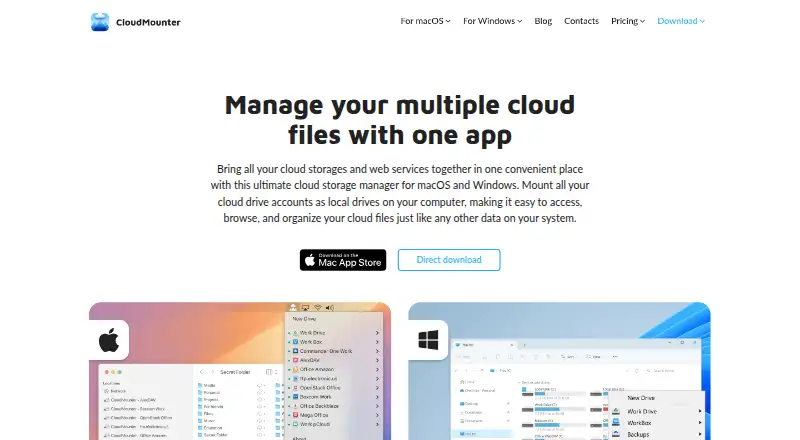
CloudMounter is a desktop application for macOS and Windows that mounts SFTP servers, cloud-storage accounts, and other remote services as local drives. It is aimed at users who want to browse, organize, open, edit, and transfer remote files through Finder or File Explorer rather than manage a separate synchronization folder. SFTP support includes OpenSSH, PPK, FIDO/FIDO2 keys, and 2FA, while supported connections also include FTP, FTPS, FTPES, WebDAV, and Amazon S3.
Pricing is freemium, with paid licensing differing by platform. On macOS, Personal — macOS annual costs $29 per year for 1 Mac and personal use, with a 7-day trial. Team — macOS annual costs $99 per year for 5 Macs and business and personal use, also with a 7-day trial. On Windows, Personal — Windows costs $29.99 one time for 1 PC, while Team — Windows costs $99.99 one time for 5 PCs. Windows also includes a 14-day Pro trial. These options make the product suitable for individual users and small teams, but the license limits matter when several devices need access.
Its strongest distinction is the combination of local-drive mounting and a wide integration set. CloudMounter connects with Dropbox, Google Drive, Microsoft OneDrive, Amazon S3, Box, MEGA, Backblaze B2, pCloud, OpenStack Swift, FTP-family services, SFTP, and WebDAV. It can also transfer files between cloud services without downloading them locally first, and it provides AES-256 client-side encryption. Choose CloudMounter if your workflow spans SFTP and cloud storage across macOS or Windows. Choose a narrower SFTP client instead if automation is central or broader cloud connectivity is unnecessary.
Your product? Our editors can test CloudMounter in depth and publish a review, labelled as paid · from $149/mo →
CloudMounter pricing
All 6 CloudMounter plans and prices →
CloudMounter fact sheet
| Free plan | Yes |
|---|---|
| Paid from | $29/device/yr |
| Supported protocols | FTP, FTPS, FTPES, SFTP, WebDAV |
| Supported platforms | macOS, Windows |
| Folder synchronization | No |
| SSH key authentication | Yes |
| Remote file editing | Yes |
| Automation support | None |
| Deployment | Desktop |
| Platforms | Windows, macOS |
| Compliance & security | 2FA |
| Support | Email, Docs |
| Built for | Solo, Small business, Mid-market, Enterprise (editorial estimate) |
| Integrations | 14 integrations: Dropbox, Google Drive, Microsoft OneDrive, Amazon S3, Box, MEGA … See all → |
| Pricing | Free plan (source) |
| Website | cloudmounter.net |
| Facts checked | 20 Sep 2026 |
CloudMounter integrations
CloudMounter lists 14 integrations on its own site.
- Dropbox
- Google Drive
- Microsoft OneDrive
- Amazon S3
- Box
- MEGA
- Backblaze B2
- pCloud
- OpenStack Swift
- FTP
- FTPS
- FTPES
- SFTP
- WebDAV
See all CloudMounter integrations →
Alternatives to CloudMounter
- WinSCPA capable free SFTP client for Windows users who need scripting and synchronization.9.4
- CyberduckA versatile, open-source SFTP client for cross-platform file transfers and cloud connections.9.2
- FileZilla ClientA capable free SFTP client for cross-platform file transfers and remote file management.9.0



See all CloudMounter alternatives →
Also Ranked In
CloudMounter is ranked in 3 of our directories.
Used CloudMounter? Be the first to review it
The editor score above is our own research. What this page doesn't have yet is a reader's view — what you used CloudMounter for, what worked and what didn't. No stars are seeded and no review is paid for; an editor reads every one before it appears.
Write a reviewTwo minutes · verified accounts only · read by an editor before it appears
Featured on iTechGuides

CloudMounter is listed in our SFTP Client Software directory. Add the badge to your site — it links back to this page.
<a href="https://www.itechguides.com/products/cloudmounter/"><img src="https://www.itechguides.com/best/badge/cloudmounter.svg" alt="Featured on iTechGuides" width="230" height="46"></a>
Reviewed by iTechGuides Editors · Editorial team · Updated Oct 2026
Advertiser disclosure: iTechGuides is reader-supported. Vendors can pay for top positions in our rankings and for a place on other products' pages, and we may earn a commission when you click some links. Bought places stand at the number bought; this page and our disclosure say so. Paying vendors may get a fuller, more detailed review from our editors, and that review can change their score. How we rank.
Last updated · How we research and update