
ClickCharts
ClickCharts: A capable offline diagramming tool for template-led visual work, with limited collaboration. Ranked #22 of 44 in Diagramming Software by our editors (7.0/10); pricing: Free plan; best for offline template-driven chart creation.
At a glance
- Editor score7.0 / 10
- PricingFree plan
- Best forOffline template-driven chart creation
- Free planYes
- Facts checked20 Sep 2026
Where it wins
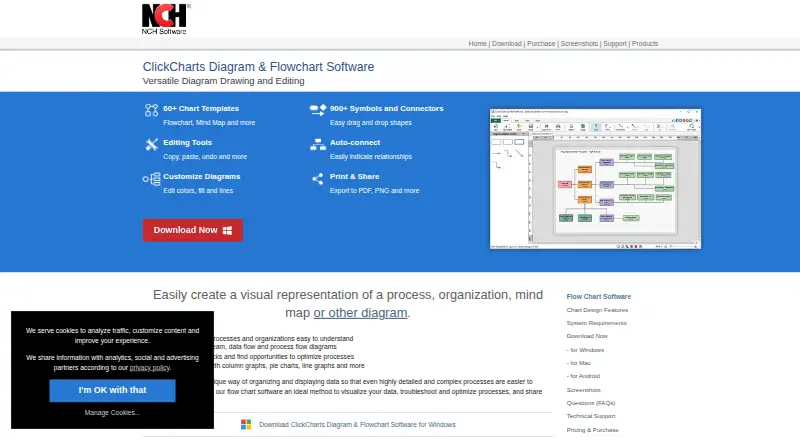
- More than 60 templates cover flowcharts, UML, BPMN, graphs, and more.
- 900+ symbols and automatic connections support detailed diagram creation.
- Desktop and Android apps include PDF and image export options.
Where it doesn't
- No collaboration features are provided for shared diagram editing.
- No integrations are listed for connecting diagrams with other services.
- Coverage is limited to Windows, macOS, and Android.
Our verdict on ClickCharts
ClickCharts is a freemium diagramming application for individuals, students, educators, engineers, programmers, and process-improvement users who need to create visual documents. Its template library covers flowcharts, BPMN, data-flow, process-flow, UML, ER, mind maps, organizational charts, networks, electrical diagrams, Venn diagrams, fishbone diagrams, value-stream diagrams, and graphs. The free version is available for non-commercial use, while the application runs on Windows, macOS, and Android.
Its main strength is breadth within a desktop-focused workflow. More than 60 chart templates provide starting points, and the 900+ symbols and connectors support diagrams ranging from organizational visuals to technical schematics. Automatic connection support, customizable fonts, colors, fills, strokes, symbols, and connectors give users control over presentation. Graph creation adds column, bar, pie, doughnut, line, and scatter formats, with data import available for automatically generating and editing graphs. Multiple diagrams can also be opened and edited simultaneously.
ClickCharts fits users who prefer working locally and need printable or exportable diagrams rather than a collaboration-first workspace. Printing and export to PDF and image formats support document sharing, and the published format list includes options such as PNG, JPG/JPEG, PDF, PSD, and TIFF. It is less suitable for teams that need built-in collaboration or integrations with other services, and its platform coverage is narrower than tools that support a wider range of environments. Choose it for offline, template-driven chart creation; consider an alternative when shared editing and connected workflows are central requirements.
Your product? Our editors can test ClickCharts in depth and publish a review, labelled as paid · from $149/mo →
ClickCharts pricing
ClickCharts fact sheet
| Free plan | Yes |
|---|---|
| Paid from | Not verified |
| Real-time collaboration | Not verified |
| Diagram types | Block, BPMN, brainstorming, data flow, electrical, ER, family tree, fishbone, flowchart, mind map, network, organizational, process flow, UML class, Venn, VSM, graph |
| Desktop apps | Yes |
| Offline editing | Not verified |
| Import/export formats | CCD, PSD, TGA, GIF, JPG/JPEG, BMP, PCX, PNM/PBM/PGM/PPM, PNG, PGF, PDF, RAS, TIF/TIFF, WBMP |
| Editor seat limit | Not verified |
| Deployment | Desktop, Mobile |
| Platforms | Windows, macOS, Android |
| Support | Docs, Community |
| Built for | Solo, Small business (editorial estimate) |
| Pricing | Free plan (source) |
| Website | nchsoftware.com |
| Facts checked | 20 Sep 2026 |
Alternatives to ClickCharts
- draw.ioA broad, free diagramming editor with strong format support and collaboration options.9.4
- LucidchartA broad, collaborative diagramming workspace for business and technical teams.9.3
- Microsoft VisioA mature Microsoft-focused diagramming suite with web, Teams, and desktop options.9.1


See all ClickCharts alternatives →
Used ClickCharts? Be the first to review it
The editor score above is our own research. What this page doesn't have yet is a reader's view — what you used ClickCharts for, what worked and what didn't. No stars are seeded and no review is paid for; an editor reads every one before it appears.
Write a reviewTwo minutes · verified accounts only · read by an editor before it appears
Featured on iTechGuides

ClickCharts is listed in our Diagramming Software directory. Add the badge to your site — it links back to this page.
<a href="https://www.itechguides.com/products/clickcharts/"><img src="https://www.itechguides.com/best/badge/clickcharts.svg" alt="Featured on iTechGuides" width="230" height="46"></a>
Reviewed by iTechGuides Editors · Editorial team · Updated Oct 2026
Advertiser disclosure: iTechGuides is reader-supported. Vendors can pay for top positions in our rankings and for a place on other products' pages, and we may earn a commission when you click some links. Bought places stand at the number bought; this page and our disclosure say so. Paying vendors may get a fuller, more detailed review from our editors, and that review can change their score. How we rank.
Last updated · How we research and update