ckb-next
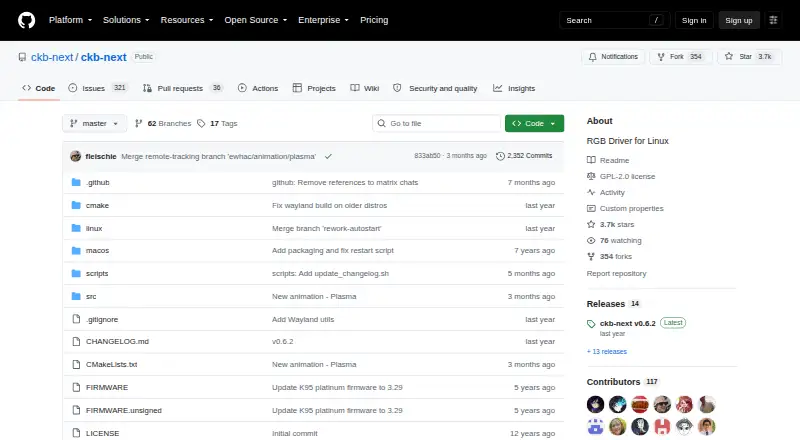
ckb-next: A free, open-source Linux utility for configuring supported Corsair peripherals. Ranked #17 of 33 in RGB Lighting Software by our editors (7.0/10); pricing: Free plan; best for linux users with Corsair peripherals.
At a glance
- Editor score7.0 / 10
- PricingFree plan
- Best forLinux users with Corsair peripherals
- Free planYes
- Paid fromFree
- Device scopePeripherals
- Facts checked23 Sep 2026
Where it wins
- Controls RGB lighting and configurable effects on supported devices
- Saves and manages profiles for supported Corsair peripherals
- Configures supported keyboard and mouse settings on Linux
Where it doesn't
- Linux deployment limits it to one operating-system platform
- Compatibility depends on the specific Corsair device and supported features
- Self-hosted deployment and community support provide a narrow support model
Our verdict on ckb-next
ckb-next is open-source software for Linux users who need to configure supported Corsair keyboards, mice, and related peripherals. It provides device-setting controls, RGB lighting management, lighting effects, profiles, and supported keyboard and mouse options. The project is aimed at people who want to configure Corsair hardware on Linux rather than rely on Corsair's Windows software. Its focus is specific: peripheral configuration and lighting, rather than broader desktop lighting control.
Deployment is self-hosted, with the project distributed through its GitHub repository and support provided by the community. That model suits solo users and small teams that are comfortable managing Linux software and checking device compatibility themselves. The feature set covers the practical configuration workflow: selecting RGB behavior, creating effects, saving profiles, and adjusting supported input-device settings. Profile switching is part of the product's stated scope, giving users a way to keep multiple configurations available.
The main trade-off is breadth. ckb-next serves supported Corsair peripherals on Linux, so its usefulness depends on the exact hardware and on which features the project supports for that device. It does not present a wider multi-platform or cross-brand scope, and there is no separate commercial edition described. Choose ckb-next when Linux support, open-source distribution, and Corsair peripheral control are the priorities. Consider another option if you need broader hardware coverage, a different operating system, or support beyond a community-based, self-hosted project.
Your product? Our editors can test ckb-next in depth and publish a review, labelled as paid · from $149/mo →
ckb-next pricing
ckb-next fact sheet
| Free plan | Yes |
|---|---|
| Paid from | Free |
| Device scope | Peripherals |
| Addressable RGB control | Not verified |
| Cross-device sync | Not verified |
| Lighting profiles | Yes |
| Game lighting effects | Not verified |
| Maximum profiles | Not verified |
| Deployment | Self-hosted |
| Platforms | Linux |
| Support | Community |
| Built for | Solo, Small business (editorial estimate) |
| Pricing | Free plan |
| Website | github.com |
| Facts checked | 23 Sep 2026 |
Alternatives to ckb-next
- Razer Chroma AppFree lighting control for Chroma devices, with effects, game links and per-LED control.8.9
- ASUS Aura Sync UtilityA free Windows utility for synchronized lighting on compatible ASUS hardware.7.9
- MSI Mystic LightFree Windows software for configuring and synchronizing lighting on compatible MSI devices.7.9

See all ckb-next alternatives →
Used ckb-next? Be the first to review it
The editor score above is our own research. What this page doesn't have yet is a reader's view — what you used ckb-next for, what worked and what didn't. No stars are seeded and no review is paid for; an editor reads every one before it appears.
Write a reviewTwo minutes · verified accounts only · read by an editor before it appears
Featured on iTechGuides

ckb-next is listed in our RGB Lighting Software directory. Add the badge to your site — it links back to this page.
<a href="https://www.itechguides.com/products/ckb-next/"><img src="https://www.itechguides.com/best/badge/ckb-next.svg" alt="Featured on iTechGuides" width="230" height="46"></a>
Reviewed by iTechGuides Editors · Editorial team · Updated Oct 2026
Advertiser disclosure: iTechGuides is reader-supported. Vendors can pay for top positions in our rankings and for a place on other products' pages, and we may earn a commission when you click some links. Bought places stand at the number bought; this page and our disclosure say so. Paying vendors may get a fuller, more detailed review from our editors, and that review can change their score. How we rank.
Last updated · How we research and update