
CivicCA
CivicCA: A compliance-aware board workspace with voting, AI minutes, portals, and mobile access. Ranked #11 of 32 in Nonprofit Board Management Software by our editors (8.3/10); pricing: 14-day trial; best for modern nonprofits needing compliance-aware meetings.
At a glance
- Editor score8.3 / 10
- Pricing14-day trial
- Best forModern nonprofits needing compliance-aware meetings
- Free planNo
- Founded2024 · Fresno, California, United States
- Facts checked20 Sep 2026
Where it wins
- Compliance checks cover bylaws, conflicts, and quorum.
- Roll-call voting and exportable voting records support formal decisions.
- Web, iOS, Android, API, and video integrations support flexible access.
Where it doesn't
- No free plan is available.
- The Community plan supports only one body and up to five users.
- The 14-day trial requires a valid credit or debit card.
Our verdict on CivicCA
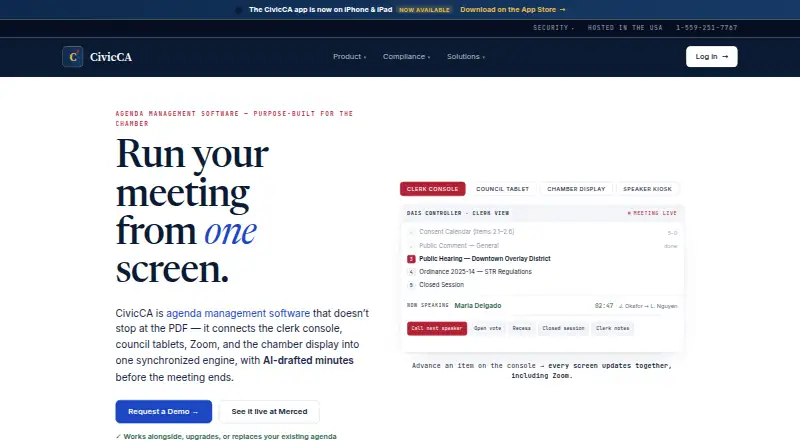
CivicCA is cloud-based board and meeting management software for nonprofits, HOAs, small civic boards, and public-sector boards or councils. It combines agenda building, meeting workflows, attendance tracking, motions, discussion tracking, roll-call voting, AI-drafted minutes, member portals, eComment intake, compliance checks, and searchable records. Boards can work from a laptop or tablet, publish materials to a branded portal, and access the product through web, iOS, Android, and API options.
CivicCA uses paid plans, with a 14-day trial rather than a free plan. Community covers one body, up to five users, and core features including AI. Professional expands coverage to up to five bodies and 25 users, adding video integration, department submissions, and advanced reports. Government supports unlimited bodies and users, with SSO, custom domains, API access, and dedicated support. This structure makes the plan choice depend mainly on board count, user volume, reporting needs, and administrative requirements.
Its strongest distinction is the combination of meeting mechanics and compliance-aware workflows. Nonprofit and HOA agenda templates, quorum checks, conflict checks, voting records, transcript-based minutes, searchable archives, and member notifications address the operational work around formal meetings rather than only calendar scheduling. Zoom, Microsoft Teams, Laserfiche, YouTube, and SentraCheck integrations extend its fit for hybrid meetings, records, and member communication. CivicCA should suit organizations that want structured meetings and governance records across web and mobile channels. Boards seeking a free product, a narrower scheduling tool, or a simpler workspace may prefer an alternative with fewer governance features.
Your product? Our editors can test CivicCA in depth and publish a review, labelled as paid · from $149/mo →
CivicCA pricing
All 3 CivicCA plans and prices →
CivicCA fact sheet
| Free plan | No |
|---|---|
| Paid from | Not verified |
| Board member limit | Not verified |
| Meeting agendas | Yes |
| Minutes management | Yes |
| Board voting | Yes |
| Policy management | Not verified |
| Committee management | Not verified |
| Mobile app | Yes |
| Free trial | 14 days · card required |
| Deployment | Cloud, Mobile |
| Platforms | Web, iOS, Android |
| Compliance & security | SSO/SAML, 2FA |
| Support | Email, Phone · 24/7 |
| Built for | Small business, Mid-market, Enterprise (editorial estimate) |
| Integrations | 5 integrations: Zoom, Microsoft Teams, Laserfiche, YouTube, SentraCheck |
| Pricing | 14-day trial (source) |
| Website | civicca.com |
| Facts checked | 20 Sep 2026 |
CivicCA integrations
CivicCA lists 5 integrations on its own site.
- Zoom
- Microsoft Teams
- Laserfiche
- YouTube
- SentraCheck
Alternatives to CivicCA
- OnBoardA full board-management suite for mature organizations that need structured governance workflows.9.4
- Atlas GovernanceA governance-focused board platform with advanced AI, audit, and multi-board tools.9.3
- BoardableA broad nonprofit board platform covering meetings, governance, documents, and follow-up.9.1



See all CivicCA alternatives →
Used CivicCA? Be the first to review it
The editor score above is our own research. What this page doesn't have yet is a reader's view — what you used CivicCA for, what worked and what didn't. No stars are seeded and no review is paid for; an editor reads every one before it appears.
Write a reviewTwo minutes · verified accounts only · read by an editor before it appears
Featured on iTechGuides

CivicCA is listed in our Nonprofit Board Management Software directory. Add the badge to your site — it links back to this page.
<a href="https://www.itechguides.com/products/civicca/"><img src="https://www.itechguides.com/best/badge/civicca.svg" alt="Featured on iTechGuides" width="230" height="46"></a>
Reviewed by iTechGuides Editors · Editorial team · Updated Oct 2026
Advertiser disclosure: iTechGuides is reader-supported. Vendors can pay for top positions in our rankings and for a place on other products' pages, and we may earn a commission when you click some links. Bought places stand at the number bought; this page and our disclosure say so. Paying vendors may get a fuller, more detailed review from our editors, and that review can change their score. How we rank.
Last updated · How we research and update