
Chronos
Chronos: A focused, free Mac task planner for estimate-based personal work. Ranked #52 of 59 in Task Management Software by our editors (3.6/10); pricing: Free plan; best for mac users planning work from time estimates.
At a glance
- Editor score3.6 / 10
- PricingFree plan
- Best forMac users planning work from time estimates
- Free planYes
- Paid fromFree
- Facts checked21 Sep 2026
Where it wins
- Estimate tasks in hours, days, or weeks and project completion dates.
- Offline planning with notes, search, keyboard navigation, and backups.
- Perpetual free license with JSON import and export.
Where it doesn't
- Available only on macOS.
- Does not provide recurring tasks or task dependencies.
- No collaboration features or guest access.
Our verdict on Chronos
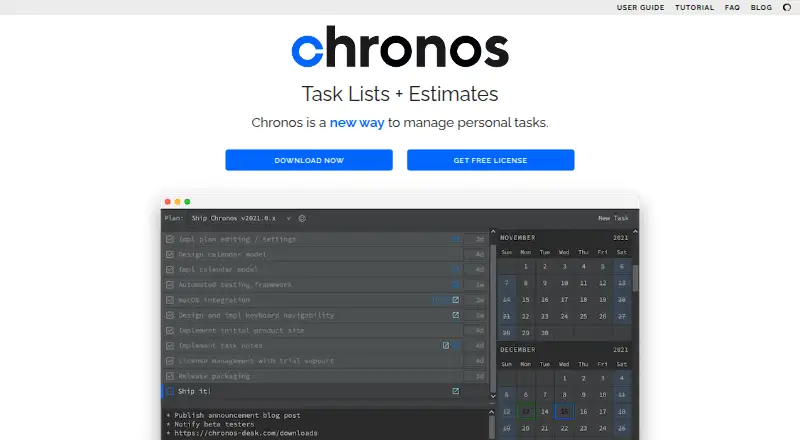
Chronos is a local-first desktop task-management application for personal planning on macOS. It suits software developers, creative professionals, and other individuals who organize work in ordered plans rather than shared team boards. Tasks can be created, edited, deleted, and reordered, with estimates expressed in hours, days, or weeks. Chronos uses those estimates to project completion dates on a calendar and maintains on-task time history through its estimate-based completion model. Notes, detected clickable links, search, and keyboard-driven editing support day-to-day planning without browser access or logins.
The product’s strongest fit is estimate-led scheduling. List and calendar views connect ordered task plans with projected completion dates, giving users a direct way to see how planned work may unfold. Task notes can hold detected clickable links, while JSON import and export make the plan data portable. Automatic backups add another layer of protection for local work. Jira and GitHub are listed as integrations, but Chronos remains centered on individual desktop planning rather than a broad collaboration ecosystem.
According to the published plan, Chronos is free with a perpetual license and no purchase required. That makes it straightforward for individuals who want estimate-based planning without a recurring subscription. The trade-off is scope: there are no recurring tasks, task dependencies, or guest access, and the application is available only on macOS. Choose Chronos if you want a focused personal planner with calendar projections, estimate-based time history, and offline operation. Choose another task-management product if your work depends on shared access, cross-platform availability, recurring workflows, or dependency management.
Your product? Our editors can test Chronos in depth and publish a review, labelled as paid · from $149/mo →
Chronos pricing
All 1 Chronos plans and prices →
Chronos fact sheet
| Free plan | Yes |
|---|---|
| Paid from | Free |
| Task views | Not verified |
| Task dependencies | No |
| Recurring tasks | Not verified |
| Native time tracking | Yes |
| Guest access | No |
| Automation actions | Not verified |
| Deployment | Desktop |
| Platforms | macOS |
| Support | Email, Docs |
| Built for | Solo, Small business (editorial estimate) |
| Integrations | 2 integrations: Jira, GitHub |
| Pricing | Free plan (source) |
| Website | chronos-desk.com |
| Facts checked | 21 Sep 2026 |
Chronos integrations
Chronos lists 2 integrations on its own site.
- Jira
- GitHub
Alternatives to Chronos
- ClickUpA broad task and workflow platform with strong views, automation, and collaboration coverage.9.4
- AsanaA mature task manager with broad project views, automation, and resource planning.9.2
- TrelloA flexible Kanban workspace with automation, integrations, and multiple project views.9.0



See all Chronos alternatives →
Used Chronos? Be the first to review it
The editor score above is our own research. What this page doesn't have yet is a reader's view — what you used Chronos for, what worked and what didn't. No stars are seeded and no review is paid for; an editor reads every one before it appears.
Write a reviewTwo minutes · verified accounts only · read by an editor before it appears
Featured on iTechGuides

Chronos is listed in our Task Management Software directory. Add the badge to your site — it links back to this page.
<a href="https://www.itechguides.com/products/chronos/"><img src="https://www.itechguides.com/best/badge/chronos.svg" alt="Featured on iTechGuides" width="230" height="46"></a>
Reviewed by iTechGuides Editors · Editorial team · Updated Oct 2026
Advertiser disclosure: iTechGuides is reader-supported. Vendors can pay for top positions in our rankings and for a place on other products' pages, and we may earn a commission when you click some links. Bought places stand at the number bought; this page and our disclosure say so. Paying vendors may get a fuller, more detailed review from our editors, and that review can change their score. How we rank.
Last updated · How we research and update