
CamMask
CamMask: A flexible virtual webcam tool for Windows and Mac, with a free plan and broad visual controls. Ranked #26 of 34 in Virtual Camera Software by our editors (6.1/10); pricing: Free plan; best for simple Windows and Mac virtual webcam effects.
At a glance
- Editor score6.1 / 10
- PricingFree plan
- Best forSimple Windows and Mac virtual webcam effects
- Free planYes
- Paid from$34.99 one-time
- Scene compositionYes
- Facts checked20 Sep 2026
Where it wins
- Virtual webcam output for video-chat applications
- Background replacement, effects, overlays, and picture-in-picture
- Photo, video, desktop, and color sources with recording
Where it doesn't
- Free plan includes a CamMask watermark
- Pro costs $34.99 as a one-time purchase
- Limited to Windows and macOS desktop platforms
Our verdict on CamMask
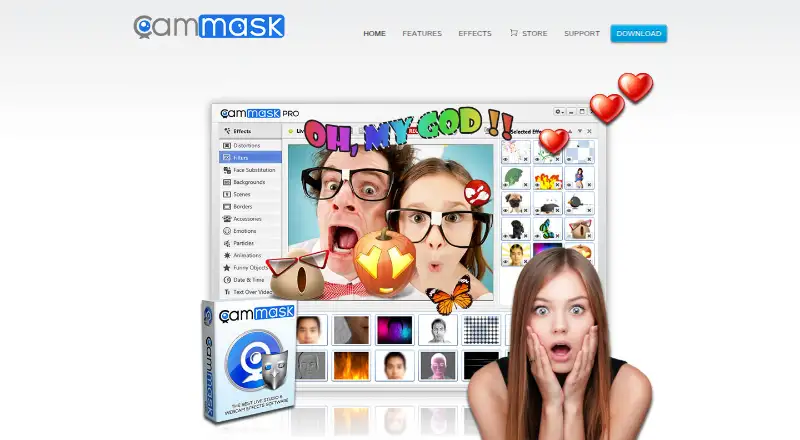
CamMask is desktop virtual webcam software for Windows and Mac that adds visual effects to video-chat applications. It suits individuals who want to change webcam backgrounds, apply face-changing effects, add text or doodles, create picture-in-picture layouts, or combine several video sources without relying on a physical camera alone. Sources can include photos, videos, desktop capture, gradients, and solid colors. The software also supports snapshots, video recording, HD output up to 720p and 1080p, and multiple preset viewports.
Its main strength is breadth within a focused virtual-camera workflow. Users can combine background replacement, special effects, overlays, recording, and multiple viewports in one desktop application. The free plan provides an accessible way to explore the core feature set, while CamMask Pro costs $34.99 as a one-time purchase. Pro removes the CamMask watermark and adds additional special effects, photo and video gallery groups, six preset viewports, and up to 20 transition effects. That pricing structure is straightforward for buyers who prefer a single payment over an ongoing subscription.
CamMask is a practical fit for casual video calls, presentations, streams, and other situations where visual composition matters more than collaboration features. Its platform coverage is limited to Windows and macOS, and the published product materials center on desktop virtual-camera effects rather than a wider application ecosystem. The official site carries copyright notices from 2011–2017, which may matter to buyers evaluating the product’s presentation and maintenance signals. Pick CamMask if you want a broad set of webcam effects and sources at a one-time Pro price; choose another tool if you need mobile support, a subscription-based service, or a larger platform ecosystem.
Your product? Our editors can test CamMask in depth and publish a review, labelled as paid · from $149/mo →
CamMask pricing
All 1 CamMask plans and prices →
CamMask fact sheet
| Free plan | Yes |
|---|---|
| Paid from | $34.99 one-time |
| Supported platforms | Windows, Mac OS X |
| Camera inputs | Not verified |
| Scene composition | Yes |
| Background effects | Yes |
| Virtual camera outputs | 6 |
| Audio routing | Not verified |
| Deployment | Desktop |
| Platforms | Windows, macOS |
| Support | Email, Tickets, Docs |
| Built for | Solo, Small business (editorial estimate) |
| Pricing | Free plan (source) |
| Website | cammask.com |
| Facts checked | 20 Sep 2026 |
Alternatives to CamMask
- NVIDIA BroadcastA free RTX-powered virtual camera suite for cleaner calls, streams, and recordings.9.3
- ManyCamA broad virtual camera toolkit for teams mixing video, audio, scenes, and streaming.8.8
- OBS StudioA flexible free production tool for creators who want extensible desktop scenes.8.7



See all CamMask alternatives →
Used CamMask? Be the first to review it
The editor score above is our own research. What this page doesn't have yet is a reader's view — what you used CamMask for, what worked and what didn't. No stars are seeded and no review is paid for; an editor reads every one before it appears.
Write a reviewTwo minutes · verified accounts only · read by an editor before it appears
Featured on iTechGuides

CamMask is listed in our Virtual Camera Software directory. Add the badge to your site — it links back to this page.
<a href="https://www.itechguides.com/products/cammask/"><img src="https://www.itechguides.com/best/badge/cammask.svg" alt="Featured on iTechGuides" width="230" height="46"></a>
Reviewed by iTechGuides Editors · Editorial team · Updated Oct 2026
Advertiser disclosure: iTechGuides is reader-supported. Vendors can pay for top positions in our rankings and for a place on other products' pages, and we may earn a commission when you click some links. Bought places stand at the number bought; this page and our disclosure say so. Paying vendors may get a fuller, more detailed review from our editors, and that review can change their score. How we rank.
Last updated · How we research and update