Camera Graph
Camera Graph: A free Mac camera studio with scene tools, virtual output, RTMP streaming, and high-frame-rate recording. Ranked #34 of 34 in Virtual Camera Software by our editors (5.3/10); pricing: Free plan; best for mac users wanting an experimental free camera studio.
At a glance
- Editor score5.3 / 10
- PricingFree plan
- Best forMac users wanting an experimental free camera studio
- Free planYes
- Paid fromFree
- Scene compositionYes
- Facts checked24 Sep 2026
Where it wins
- Combines virtual camera output with scenes, transitions, and overlays.
- Includes background effects, RTMP streaming, and MIDI controls.
- Records up to 4K at 120 fps and supports live camera CoreML models.
Where it doesn't
- Available only for macOS.
- Support is limited to community channels and documentation.
- Audio routing into virtual camera output is not verified.
Our verdict on Camera Graph
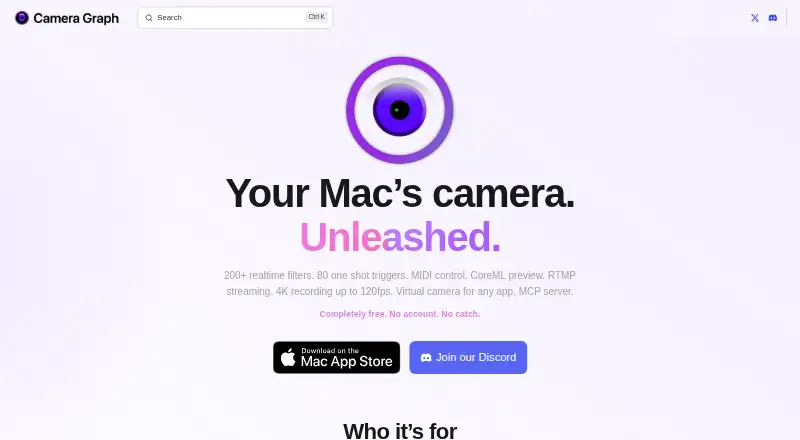
Camera Graph is a free macOS app for composing live camera scenes and sending them through a virtual camera to compatible video-call and streaming apps. It suits Mac users who want more control over their on-camera layout than a basic camera feed provides, including streamers, creators, and people recording presentations or walkthroughs. Its breadth makes it an experimental camera studio as well as a virtual camera utility, so it may be more than needed for someone who only wants a simple background blur.
Scene composition is the product’s central strength: users can combine camera feeds, screen shares, images, text, and overlays, then switch between scenes with transitions. Background removal, replacement, and blur add visual options, while browser overlays support custom CSS injection. MIDI can control effects and scene switching, and live camera feeds can use CoreML models. Camera Graph also sends virtual camera output to apps including Zoom, Google Meet, FaceTime, Microsoft Teams, QuickTime, Slack, and Discord. RTMP streaming to services such as Twitch and YouTube extends it beyond video calls. The vendor describes sources as unlimited, but this does not establish a maximum camera input count or simultaneous virtual camera output count.
The vendor describes Camera Graph as free, with no account or paywalled features, and the published product details identify macOS as its sole platform. Recording up to 4K at 120 fps is a notable capability for a free tool, though buyers should distinguish that from a promise about performance on any particular Mac. Support is through community and documentation. Choose Camera Graph if you use a Mac and want an all-in-one scene, effects, streaming, and recording workspace without a subscription. It is a weaker fit if you need another desktop platform, verified audio routing into virtual camera output, or stronger support assurances.
Your product? Our editors can test Camera Graph in depth and publish a review, labelled as paid · from $149/mo →
Camera Graph pricing
Camera Graph fact sheet
| Free plan | Yes |
|---|---|
| Paid from | Free |
| Supported platforms | macOS |
| Camera inputs | Not verified |
| Scene composition | Yes |
| Background effects | Yes |
| Virtual camera outputs | Not verified |
| Audio routing | Not verified |
| Deployment | Desktop |
| Platforms | macOS |
| Support | Community, Docs |
| Built for | Solo, Small business, Mid-market, Enterprise (editorial estimate) |
| Integrations | 9 integrations: Zoom, Google Meet, FaceTime, Microsoft Teams, QuickTime, Slack … |
| Pricing | Free plan |
| Website | cameragraph.app |
| Facts checked | 24 Sep 2026 |
Camera Graph integrations
Camera Graph lists 9 integrations on its own site.
- Zoom
- Google Meet
- FaceTime
- Microsoft Teams
- QuickTime
- Slack
- Discord
- Twitch
- YouTube
Alternatives to Camera Graph
- NVIDIA BroadcastA free RTX-powered virtual camera suite for cleaner calls, streams, and recordings.9.3
- ManyCamA broad virtual camera toolkit for teams mixing video, audio, scenes, and streaming.8.8
- OBS StudioA flexible free production tool for creators who want extensible desktop scenes.8.7



See all Camera Graph alternatives →
Used Camera Graph? Be the first to review it
The editor score above is our own research. What this page doesn't have yet is a reader's view — what you used Camera Graph for, what worked and what didn't. No stars are seeded and no review is paid for; an editor reads every one before it appears.
Write a reviewTwo minutes · verified accounts only · read by an editor before it appears
Featured on iTechGuides

Camera Graph is listed in our Virtual Camera Software directory. Add the badge to your site — it links back to this page.
<a href="https://www.itechguides.com/products/camera-graph/"><img src="https://www.itechguides.com/best/badge/camera-graph.svg" alt="Featured on iTechGuides" width="230" height="46"></a>
Reviewed by iTechGuides Editors · Editorial team · Updated Oct 2026
Advertiser disclosure: iTechGuides is reader-supported. Vendors can pay for top positions in our rankings and for a place on other products' pages, and we may earn a commission when you click some links. Bought places stand at the number bought; this page and our disclosure say so. Paying vendors may get a fuller, more detailed review from our editors, and that review can change their score. How we rank.
Last updated · How we research and update