bulkhead
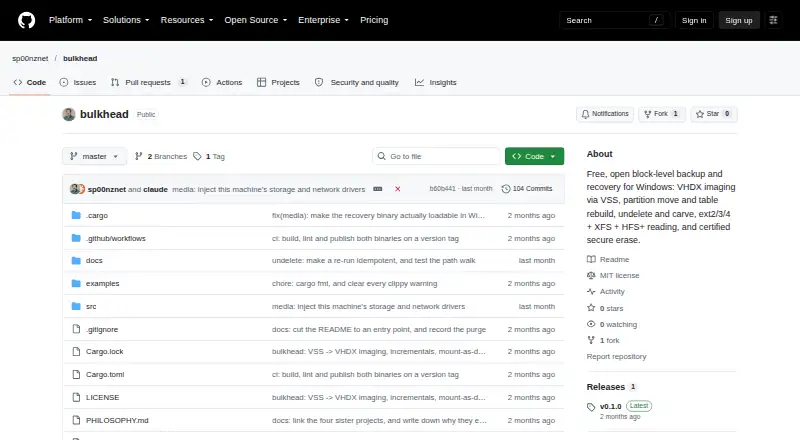
bulkhead: A focused Windows toolkit for VHDX imaging, GPT repair, and NTFS recovery. Ranked #21 of 34 in Partition Recovery Software by our editors (6.5/10); pricing: Free plan; best for windows imaging and GPT repair.
At a glance
- Editor score6.5 / 10
- PricingFree plan
- Best forWindows imaging and GPT repair
- Free planYes
- Paid fromFree
- Facts checked20 Sep 2026
Where it wins
- VHDX block-level imaging with Windows VSS and incremental differencing images
- GPT partition-table scanning, rebuilding, and partition movement
- Bootable WinPE media plus NTFS recovery and raw file carving
Where it doesn't
- Supports Windows only
- Partition-table support is limited to GPT
- The project describes itself as pre-alpha
Our verdict on bulkhead
bulkhead is a free, open-source Windows desktop tool for block-level backup, partition management, and data recovery. It is suited to Windows users who need VHDX imaging, GPT partition repair, deleted NTFS-file recovery, or bootable recovery media. The project is distributed as command-line and native Win32 GUI executables under the MIT license, giving it both scripted and graphical entry points.
Its imaging workflow uses Windows VSS to create VHDX block-level images, including incremental VHDX differencing images. Images can be mounted and restored to bare metal. For partition recovery, bulkhead scans for and rebuilds lost GPT partition tables and supports partition movement. Recovery features extend to deleted-file recovery from NTFS and signature-based carving from raw disk data. It can also create bootable WinPE recovery media, while offering read-only access to ext2/3/4, XFS, and HFS+ volumes. Secure erase operations include certificates.
bulkhead’s main trade-off is its narrow platform and partition-table scope: it supports Windows and GPT rather than a broader mix of operating systems or partition-table types. Its read-only access to several non-NTFS filesystems adds useful inspection coverage, but does not change that Windows-first focus. The project describes itself as pre-alpha, so it is a better fit for technically capable users who want free, open-source tooling and can work within that scope. Choose bulkhead for Windows imaging, GPT rebuilding, and recovery-media creation; choose another option for Linux or macOS workflows or non-GPT partition tables.
Your product? Our editors can test bulkhead in depth and publish a review, labelled as paid · from $149/mo →
bulkhead pricing
bulkhead fact sheet
| Free plan | Yes |
|---|---|
| Paid from | Free |
| Scan modes | Not verified |
| Supported platforms | Windows |
| Partition table types | GPT |
| Filesystem support | NTFS, ext2, ext3, ext4, XFS, HFS+ |
| Bootable recovery media | Yes |
| Disk image recovery | Not verified |
| RAID recovery | Not verified |
| Deployment | Desktop |
| Platforms | Windows |
| Support | Docs |
| Built for | Solo, Small business (editorial estimate) |
| Pricing | Free plan |
| Website | github.com |
| Facts checked | 20 Sep 2026 |
Alternatives to bulkhead
- TestDiskA broad, free recovery toolkit for users comfortable with command-line workflows.9.3
- DMDEA low-cost recovery toolkit with unusually broad filesystem, partition, disk, and RAID support.8.8
- Active@ Partition RecoveryA deep Windows recovery toolkit with free scanning and advanced repair tiers.7.9


See all bulkhead alternatives →
Used bulkhead? Be the first to review it
The editor score above is our own research. What this page doesn't have yet is a reader's view — what you used bulkhead for, what worked and what didn't. No stars are seeded and no review is paid for; an editor reads every one before it appears.
Write a reviewTwo minutes · verified accounts only · read by an editor before it appears
Featured on iTechGuides

bulkhead is listed in our Partition Recovery Software directory. Add the badge to your site — it links back to this page.
<a href="https://www.itechguides.com/products/bulkhead/"><img src="https://www.itechguides.com/best/badge/bulkhead.svg" alt="Featured on iTechGuides" width="230" height="46"></a>
Reviewed by iTechGuides Editors · Editorial team · Updated Oct 2026
Advertiser disclosure: iTechGuides is reader-supported. Vendors can pay for top positions in our rankings and for a place on other products' pages, and we may earn a commission when you click some links. Bought places stand at the number bought; this page and our disclosure say so. Paying vendors may get a fuller, more detailed review from our editors, and that review can change their score. How we rank.
Last updated · How we research and update